- 10 -
IU_ AT51112
Cleaning
l. The rollator should be cleaned regularly by wiping it with a so, damp cloth and then
wiping it dry.
2. Do not allow large amounts of dirt to accumulate around the brake axles or on the wheels.
Do not use strong cleaning agents or abrasive objects.
Maintenance
l. Regularly check rollator parts for wear and make sure all bolted connecons are properly
made.
2. Make sure the brakes are working properly by applying them while walking unl the
rollator stops.
3. Make sure that the parking brake is working properly by moving the levers to the posion
that causes it to block and aempng to move the rollator.
4. If using the brakes does not bring the wheels to a complete stop, the brakes need to be
adjusted.
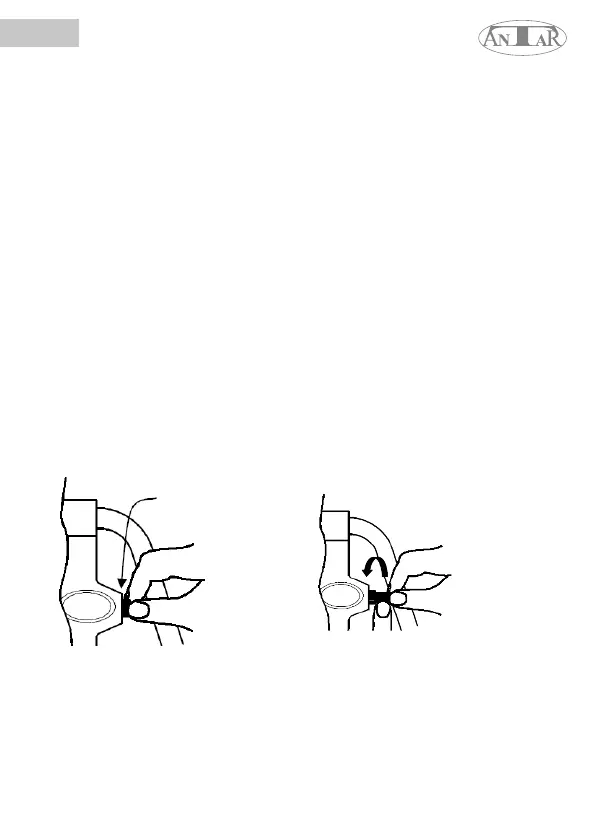
Adjusng the brakes (see Fig. 4)
1. There are two brake adjusters on both sides of the rollator - one in front of the brake lever
and the other on the rear legs of the frame, behind the wheels.
2. To adjust the brake lever, loosen the lock nut (for this purpose, it may be necessary to
use appropriate tools), turn the adjustment element counterclockwise to increase the brake
pressure, and then ghten the lock nut again (see Fig. 4) .
3. To adjust the brake on the rear legs of the frame, loosen the locknut (use of appropriate
tools may be required), turn the adjuster counter-clockwise to increase brake pressure, then
re-ghten the locknut. Proper adjustment of the brake mechanism requires a gap of no more
than 3-4 mm between its lining and the wheel - these elements should also not touch each
other.
4. Note: Aer changing the brake sengs, test them before using the rollator.
5. If the adjustment does not increase brake pressure, do not use the rollator.
Locknut
5
Turn the adjuster
counterclockwise to
ghten the brake
SPECIFICATION
Total width: 63 cm
The distance between the handles: 45 cm
Seat height: 53 - 69 cm
Handle height adjustment range: 85 - 95 cm
Rollator height: 66 cm
Seat width: 32 cm
Net product weight: 6.6 kg
ENG


 To Next Page