24
4.4 Air Filters
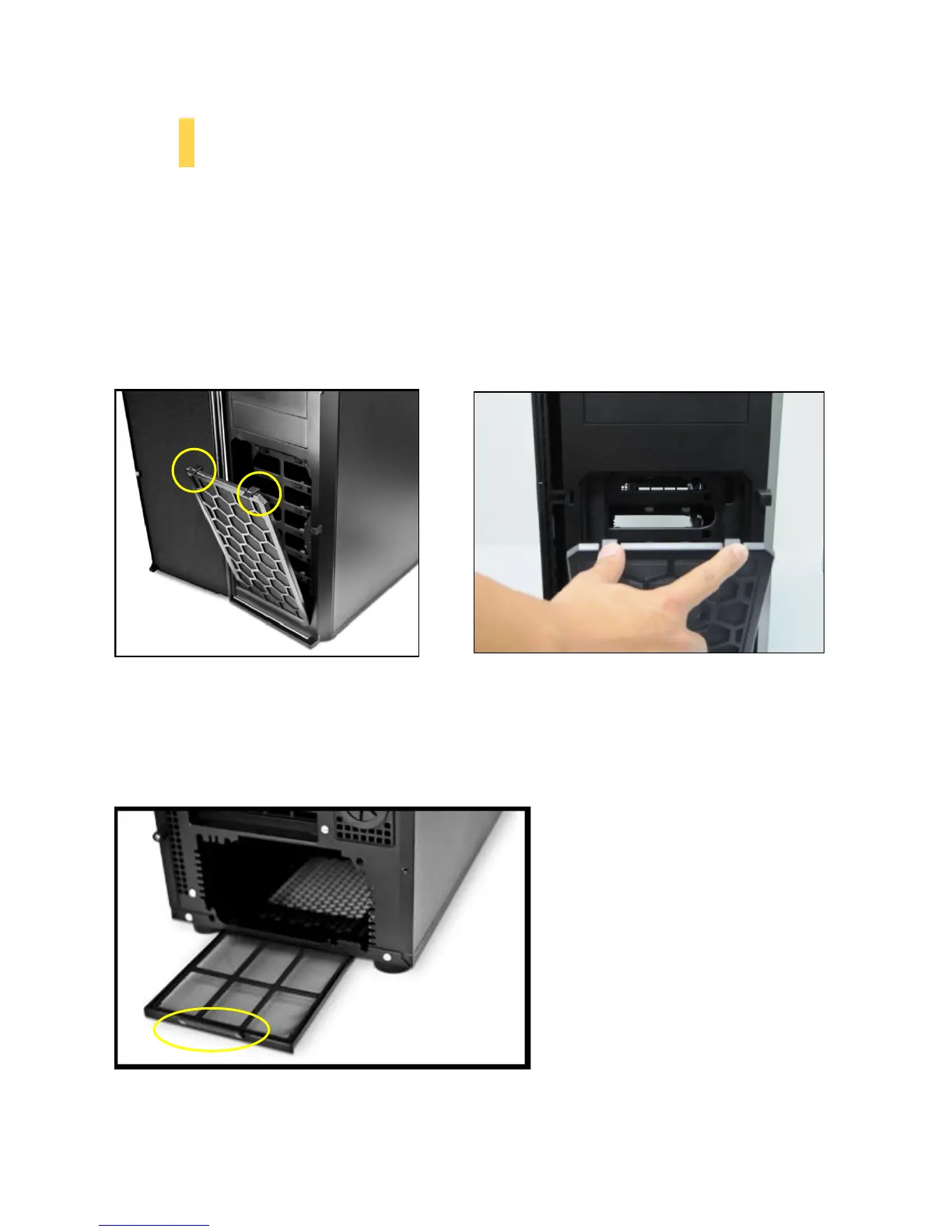
There are two filters in the P100 that can be removed and washed. One filter is the front filter and the
other is the PSU intake filter. You can access the front filter by opening the front door and pushing down
on the tabs at the top of the filter.
Note: From time to time it will be necessary to wash the installed air filter. Not washing the air filter will
result in higher system temperatures and possible stability problems. We recommend checking the air
filter at least once a month initially. The frequency will change depending on system usage (users whose
systems run 24/7 will likely have to check/wash more often than those who don’t use their systems
every day) and on environmental conditions.
The P100 features a removable PSU filter that can be unlocked for maintenance and locked for transport.
To remove the PSU filter, push the ends of the filter down then pull the filter toward you using the tab
outside of the chassis. You can also lock the filter by pushing up on the tab (once the filter is completely
inside the chassis).
Remove the filter by pulling on the tab (circled above ).
Open the front door by pushing down on the
tabs (circled above) at the top of the front filter.



 To Next Page