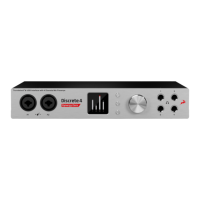
⦁ Real time 3D mic modeling via FPGA engine
⦁ 50+ Premier real time FX, also accessible in DAW
⦁ 4 console-grade Class A mic pres with discrete transistor design
⦁ Precise and recallable stepped gain control
⦁ 4th Generation 64-bit Acoustically Focused Clocking
⦁ FPGA FX models of BAE, Grove Hill and Gyraf Audio classics
⦁ NEW AFX2DAW Plugin for accessing the FPGA FX in your DAW (Coming soon)
⦁ 4 Analog inputs on combo XLR connectors (2 Mic / Line; 2 Hi-Z / Mic / Line)
⦁ 4 Analog Line outs on TRS connectors
⦁ Thunderbolt™ 2 & USB connectivity (TB for Windows coming soon)
⦁ A pair of Monitor outs on TRS connectors
⦁ 4 Stereo Headphone outputs
⦁ 2 Word Clock outputs
⦁ Additional digital connectivity via S/PDIF and 2x ADAT
⦁ Up to 3 individual monitoring mixes with FPGA FX
⦁ Create & share custom presets
⦁ Intuitive EasyPanel software control
⦁ Remote iOS and Android compatible app
⦁ Basic FX pack – use 2 channel strips with 2 instances of all FPGA FX
⦁ Premium FX pack – use 4 channel strips with 4 instances of all FPGA FX
4. Quick Start
Connect the DC power source on the rear panel.
Once the DC power source is plugged in, connect Discrete to your computer via USB 2.0 or Thunderbolt™ (MAC) and
follow the steps below:
1. Navigate to antelopeaudio.com (http://en.antelopeaudio.com/).
2. Click on LOG IN (https://en.antelopeaudio.com/login/) and create your Antelope Audio account. If you have one
please log in using your credentials.
3. Go toDiscrete 4 download page (https://en.antelopeaudio.com/support/download/discrete-4-downloads/) to
download and install the Antelope Audio driver and launcher. If you have ordered Discrete 4 or 8 with Premium
Upgrade Pack, you must receive a code for Premium Upgrade Pack from your dealer & activate it from your
account from CLAIM FEATURES. (https://en.antelopeaudio.com/claim-features/)
4. When the installation is complete, start the Antelope Audio launcher and launch the control panel.
You’re good to go! Need more help? Contact our tech support crew (http://en.antelopeaudio.com/support/).
5. Panels explained
5.1. Front Panel


 To Next Page