Operator Board Maintenance Instructions
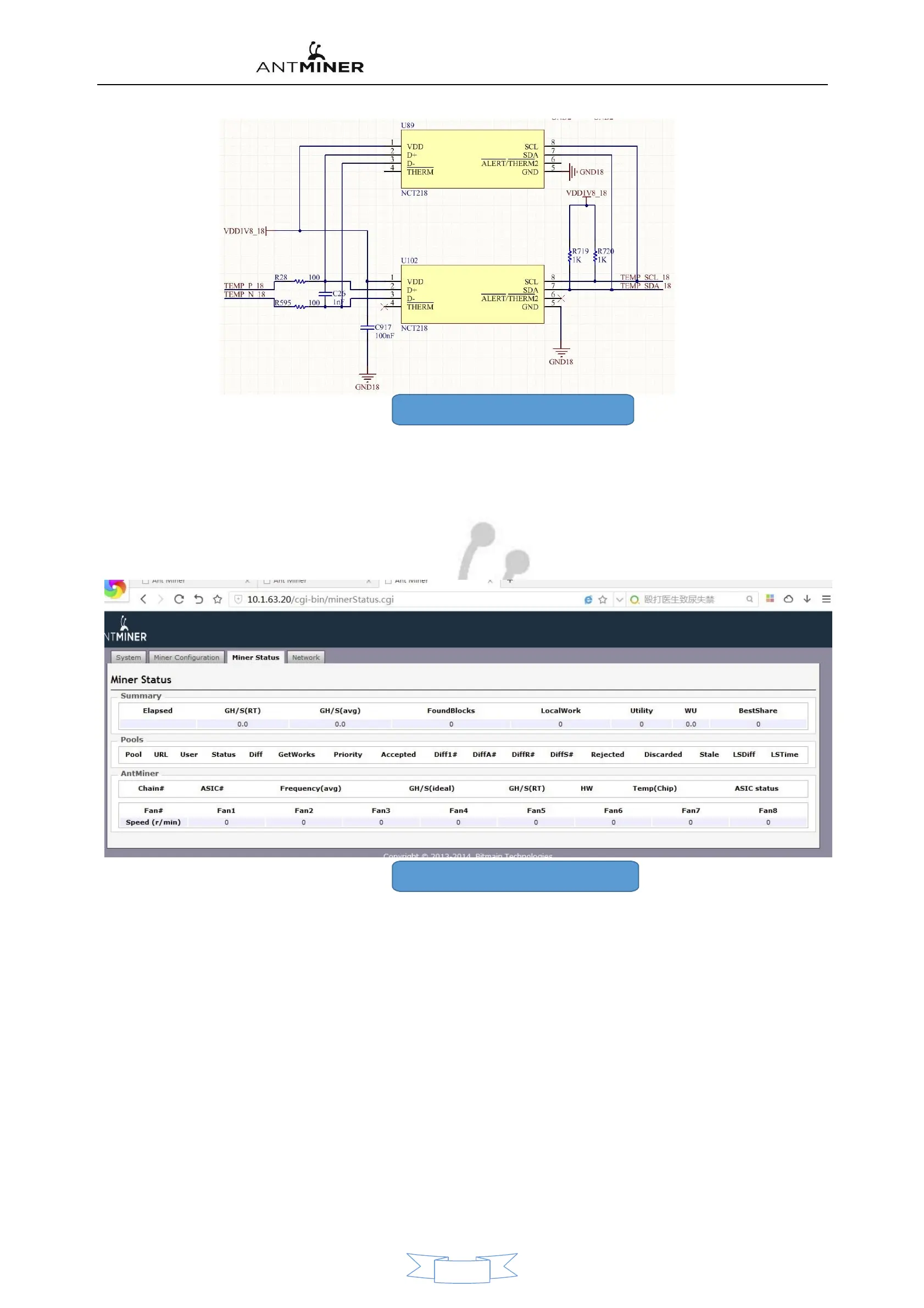
21, temperature sensing schematic diagram
●Quick Troubleshooting method
:
○Troubleshooting the Whole Machine
:
1, Login Monitoring interface(WEB)。 This type of failure is mostly caused by an operational board failure.,A few are due to the operating
environment, fans, external network, firmware and so on.
Here are some of the common phenomena that are handled:
1), the calculation interface has no configuration information. Figure 22 is shown below:
22, no configuration information screenshot
Treatment methods
:
◂
Check the miner Light first
,
If the miner's status is red, a flashing flash.
,
Indicates that the mining machine is not in normal
condition
,
The mining machine network can be viewed first
,
Use the computer to plug in the net of the mine machine.
internet line – check Mine Pool of mining machine
,
See is can and pass.
◂If the status of the indicator is normal. The biggest possibility is the mining machine 3 There's a problem with the block
board.,Compared to the mining machine PIC The voltage is rewritten. ◂Mine Machine firmware Damage,The firmware can be
upgraded to the latest firmware via the upgrade interface.
2)No GH/S(RT)and a red flash. Figure below 23 is shown:
12


 To Next Page