The ANVIZ CX3 is a fingerprint and card time clock designed to simplify workforce management in a secure workplace environment. This device serves as a comprehensive solution for time attendance tracking, employee data management, and work schedule configuration, catering to various business needs.
Function Description
The primary function of the ANVIZ CX3 is to accurately record employee time attendance using fingerprint and RFID card verification. It allows for the enrollment of employees, management of their personal data, and the generation of detailed time attendance reports. The device operates as a standalone unit, with data import and export capabilities facilitated via a USB drive.
Key functionalities include:
- Time Attendance Recording: Employees can punch in and out using their registered fingerprints or RFID cards. The device supports multiple work times within a day, allowing for flexible scheduling and accurate tracking of working hours, including lunch breaks and shifts that span across midnight.
- Employee Enrollment and Management: Users can be added, modified, or deleted directly on the device. Enrollment involves assigning a unique User ID, name, password, and registering fingerprints or RFID cards. The device supports different verification modes (e.g., fingerprint only, card only, ID+password, etc.) to suit various security requirements.
- Work Schedule Configuration: The CX3 offers robust scheduling options, including normal work schedules and overnight schedules. Users can define specific start and end times for "IN" and "OUT" punches, creating valid punch time ranges for accurate attendance calculation. This flexibility accommodates businesses with varying work patterns, such as those with employees working through midnight.
- Data Import and Export: All time attendance records and employee information can be imported from or exported to a USB drive in FAT32 format. This feature is crucial for transferring data between devices, backing up information, and generating reports for payroll or analysis. The device supports batch import of user information via Excel files, streamlining the setup process for larger workforces.
- Report Generation: The device can generate time attendance reports based on configured pay periods (weekly, bi-weekly, semi-monthly, or monthly). These reports can be exported to a USB drive, providing businesses with essential data for payroll processing and attendance monitoring.
- Device Settings and Configuration: A comprehensive settings menu allows administrators to configure various aspects of the device, including language, time and date, display settings (power saving, brightness, keyboard lock, standby time), and device-specific parameters like Device ID and Admin PIN Code.
Usage Features
The ANVIZ CX3 is designed for ease of use with a straightforward interface and intuitive navigation.
- User-Friendly Interface: The device features a 3.5" TFT screen and a keypad for direct interaction. The menu structure is organized into logical categories (Main, User, Data, Settings, Advanced) for easy access to different functions.
- Quick Enrollment: Employees can be quickly enrolled by pressing the 'M' button, entering the Admin ID and Password, selecting "Enroll," and then registering their fingerprint by pressing the same finger on the sensor three times.
- Flexible Work Schedule Setup: The ability to define multiple work times and specify valid punch ranges allows businesses to accurately track attendance for diverse work patterns. The "Overnight" option specifically addresses shifts that cross midnight, ensuring correct attendance calculation.
- Pay Period Customization: Users can set up their company's pay period (monthly, weekly, bi-weekly, semi-monthly) and the start date of payment, ensuring that generated reports align with their payroll cycles.
- Data Transfer via USB: The use of a FAT32 formatted USB drive for data import and export simplifies data management, eliminating the need for complex network configurations for basic operations.
- Advanced Time Attendance Rules: Features like "Duplicate Punch Range" prevent redundant records, while "Log Alarm Threshold" alerts administrators when the device's memory is nearing capacity. "Identify Precision" allows for adjustment of fingerprint comparison accuracy, and "Check Finger" enables or disables the active touch function of the fingerprint sensor.
- Multiple Verification Modes: The device supports various verification methods (fingerprint, card, ID+password), offering flexibility and enhanced security options for employee authentication.
- Language Support: The device supports multiple languages, making it adaptable to diverse user bases.
Maintenance Features
The ANVIZ CX3 incorporates several features to ensure its longevity, data integrity, and ease of troubleshooting.
- Hardware Safety Instructions: The manual emphasizes the importance of using the product safely, advising against oily water or sharp objects on the screen, avoiding physical shocks, and operating within optimal temperature ranges to prevent damage.
- Screen and Panel Cleaning: Users are instructed to gently wipe the screen and panel with soft materials, avoiding water or detergent, to maintain the device's appearance and functionality.
- Firmware Updates: The device supports firmware updates via a USB drive, allowing for improvements in functionality, security, and bug fixes. Anviz provides new firmware releases through its community website.
- Device Reset Options: The "Factory Reset" option allows administrators to restore the device to its default settings, deleting all user data and records. A "Restart" option is also available to reboot the device while retaining existing information.
- Device Information Access: The "Basic Info" section provides critical device information such as Serial Number, Employee NO., Card Count, Fingerprint NO., Log count, Firmware Version, Kernel Version, and File System Version. This information is valuable for troubleshooting and support inquiries.
- Device Self-Test: The "Test" function allows users to verify the health of the device's components, including the keypad, LCD display, and speaker (alarms and voices), aiding in quick diagnosis of potential hardware issues.
- Data Backup: The export function serves as a crucial data backup mechanism, allowing administrators to save user information and attendance records to a USB drive, protecting against data loss in case of device malfunction or replacement.
- Support and Community Resources: Anviz provides a community platform and direct support channels (phone, email) for users to seek assistance, share experiences, and access help resources. This ensures that users have avenues for resolving issues and getting the most out of their device.
- Warranty and RMA Process: The device comes with a warranty, and a clear Return Merchandise Authorization (RMA) process is outlined for handling repairs or replacements, ensuring a structured approach to hardware service.

 Need help?
 General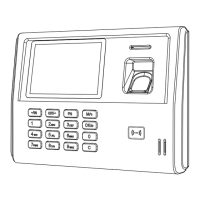

 To Next Page
