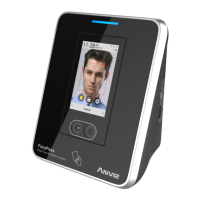
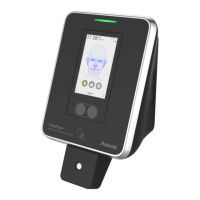
This document describes the Anviz FacePass Standalone Facial Recognition System, a sophisticated device designed for time and attendance management, as well as access control. The FacePass system leverages advanced biometric technology to provide a reliable, convenient, and efficient solution for enterprises.
Function Description
The Anviz FacePass system is primarily a standalone facial recognition terminal used for time and attendance tracking and access control. It integrates cutting-edge technologies including fingerprint/card recognition, computer communication, and microelectronics. The device is equipped with multi-point infrared light sources and dual infrared cameras, enabling rapid and accurate recognition across various environments.
The system features a user-friendly GUI interface on a TFT touch screen, providing intuitive local operation. It offers voice prompts for guidance during use, enhancing the user experience. For management, it includes built-in powerful attendance management software and supports a convenient WEB server management software, allowing for comprehensive control and reporting.
Key functions include:
- User Management: The system allows for enrolling new users, modifying existing user information (including re-registering face templates), deleting users, and searching for specific users based on their ID.
- Communication Settings: It supports network settings (IP address, mask, gateway, port) and USB management for data import/export.
- System Settings: Users can configure various terminal options such as language, relay delay, body induction sensitivity, tamper alarm, disorder keypad, and enable ID+Password verification.
- Time and Attendance Management: The device captures attendance records, which can be downloaded and processed to generate detailed time attendance reports.
- Access Control: Upon successful verification, the system sends a command to an access controller to open a door, providing a secure access solution.
The accompanying software provides a comprehensive suite of tools for managing the attendance system. This includes:
- System Parameters: Setting up company name, time attendance rules, statistic rules (for early/late/overtime), and leave classes.
- Department Management: Adding, deleting, and modifying departments within the organization.
- Employee Maintenance: Managing employee information, including importing employee lists, adding, deleting, modifying, and transferring employees between departments.
- Shift Management: Defining timetables (on-duty/off-duty times) and setting up shifts.
- Employee Schedule: Allocating shifts or temporary shifts to employees.
- Record Collection: Downloading attendance records from the terminal or importing backup record files.
- Exception Management: Handling exceptions such as business leave, personal leave requests, forgotten clock-ins/outs, or collective late arrivals.
- Statistic Report Generation: Tracking, checking, and calculating records to generate various time attendance reports.
Usage Features
The FacePass system is designed for ease of use and high performance.
- Rapid and Accurate Recognition: The device utilizes a highly improved algorithm and powerful hardware platform to ensure quick and precise facial recognition. The multi-point infrared light source and dual infrared cameras contribute to its ability to perform fast identification in diverse lighting conditions.
- User-Friendly Interface: The TFT touch screen and intuitive GUI make local operation straightforward. Voice prompts guide users through the process, such as during face template capturing.
- Flexible Data Management: Data can be imported and exported via USB flash drive, allowing for easy transfer of user information (including face features data) and attendance records. Data encryption is available for downloaded records, enhancing security.
- Web Server Management: The built-in web server management software provides a convenient way to manage the system remotely, offering flexibility for administrators.
- Body Induction Function: The terminal can be automatically activated into face recognition mode when a person approaches, streamlining the verification process.
- ID+Password Verification: In cases where face verification fails, users can input their ID and password to gain access, providing a backup verification method.
- Continuous Operation: Designed for 7*24 continuous working, the system uses human-harmless non-visible auxiliary light technologies, ensuring good performance regardless of day or night environment.
- Robust Against Light Changes: Active auxiliary illumination technologies make the system highly resilient to varying light conditions, ensuring consistent performance.
- Standalone Operation: The device can operate independently, storing up to 300 users and 200,000 records, making it suitable for various enterprise sizes.
Maintenance Features
The FacePass system incorporates features that simplify maintenance and ensure long-term reliability.
- Stable Performance and Energy Conservation: High-performance, low-power ARM processors ensure stable operation over extended periods. The auto-standby mode supports energy saving and contributes to an environment-friendly design.
- Terminal Intelligence Updates: The system automatically synchronizes time and captures face images. A built-in template self-studying feature ensures that the face template database continuously updates with dynamic changes in hair style, complexion, age, and other factors, always storing the most updated version of user information for correct recognition.
- Firmware Upgrade: System firmware can be upgraded via a USB storage device, allowing for easy updates and improvements to the device's functionality.
- Data Backup and Recovery: The system supports backing up data and saved information to a USB storage device. In case of data loss, a recovery operation can be performed to retrieve all related data, ensuring data integrity. A storage password is required for these operations, adding a layer of security.
- Database Management: The software includes features for clearing obsolete data and compressing the database, helping to maintain optimal system performance.
- Administrator Management: The system allows for setting administrator passwords and managing administrator privileges, ensuring secure access to system configurations.
- Modified Record Log and Managing Log: These features provide a history of changes and operations, aiding in auditing and troubleshooting.
- Database Linking: The ability to set database links facilitates integration with other systems or centralized data management.
The FacePass system is designed for both desktop and wall mounting, offering flexibility in installation. The recommended installation height and environmental considerations (avoiding direct sunlight) are crucial for optimal performance, ensuring the device operates effectively and accurately.

 Need help?
 General

 To Next Page