20
2.4 System setting
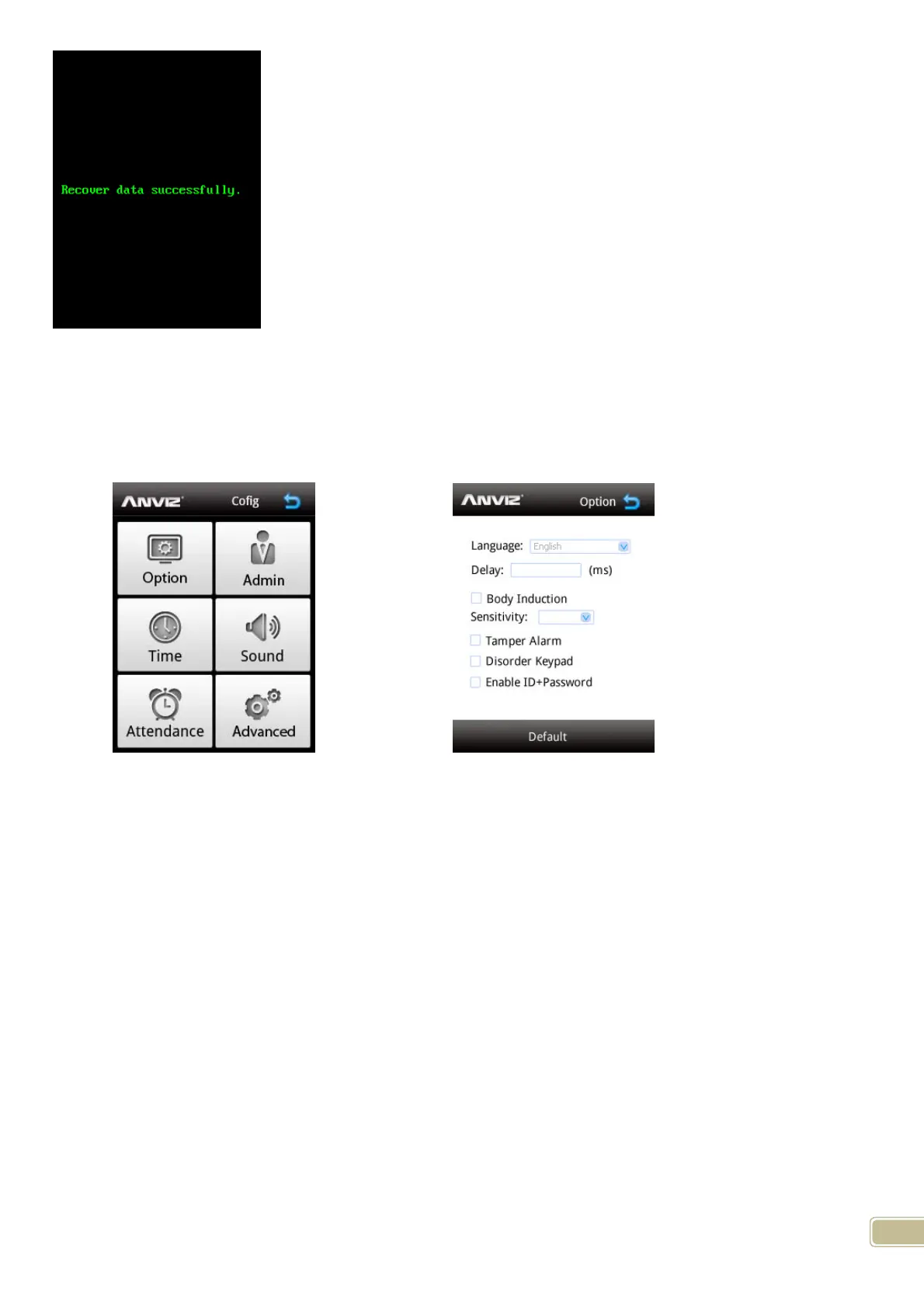
In the FacePass main menu please press “Config” enter Configuration Page.
Configuration Page
Option Page
2.4.1 Option
Click “Option” can setting terminal language, relay delay and body induction functions for the terminal
Language: Click combo box to choice system language. The default language include English, Chinese
Delay: It is relay response time.
Body Induction: This function use to automatically activated terminal into face recognition mode when some body
comes close the FacePass terminal.
Sensitivity: It is the sensitivity adjuster for Body Induction. Value: 0-5; Slow---Fast
Tamper Alarm: This function use to triggered alarm when the FacePass terminal is dismantled without proper
right.
Disorder keypad: Select this option to make keyboard figures positions switchable
Enable ID password: Enable this function that when verify face failed in the terminal you can input ID and
Password to verify pass the terminal. And the FacePass will capture current user
facial image.
Default: Click “Default” the terminal will prompt the terminal will back to default mode. Press “Yes” to continue.
“No” to cancel.



 To Previous Page