7
User controls
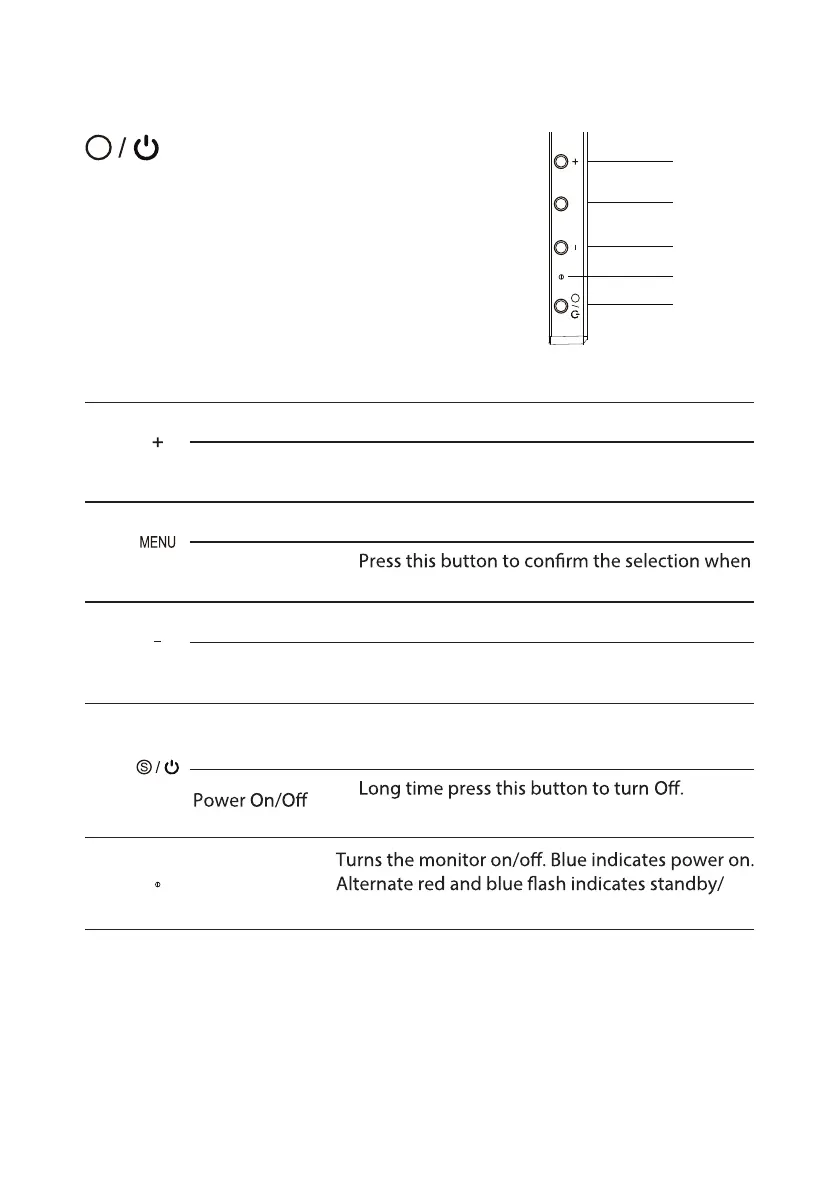
SOURCE (EXIT) / Power Switch:
To turn the monitor ON or OFF.
Lights up to indicate the power is turned ON.
Using the Shortcut Menu
External controls
1
Brightness a. Press this button to adjust the brightness diretly.
Up
b.
4
5
2
1
3
MENU
S
S
Press this button to select the desired item when
in OSD menu.
Volume a. Press this button to adjust the volume diretly.
Down
b.
3
Press this button to select the desired item when
in OSD menu.
2
Menu a.
OK
b.
in OSD menu.
Press this button to display the menu.
4
SOURCE /
EXIT
a. Press this to select signal channel.
b. In OSD menu, short time press to exit menu.
c.
d. Short time press this button to power On.
5
LED Indicator
power saving mode.



 To Next Page