EasyManua.ls Logo

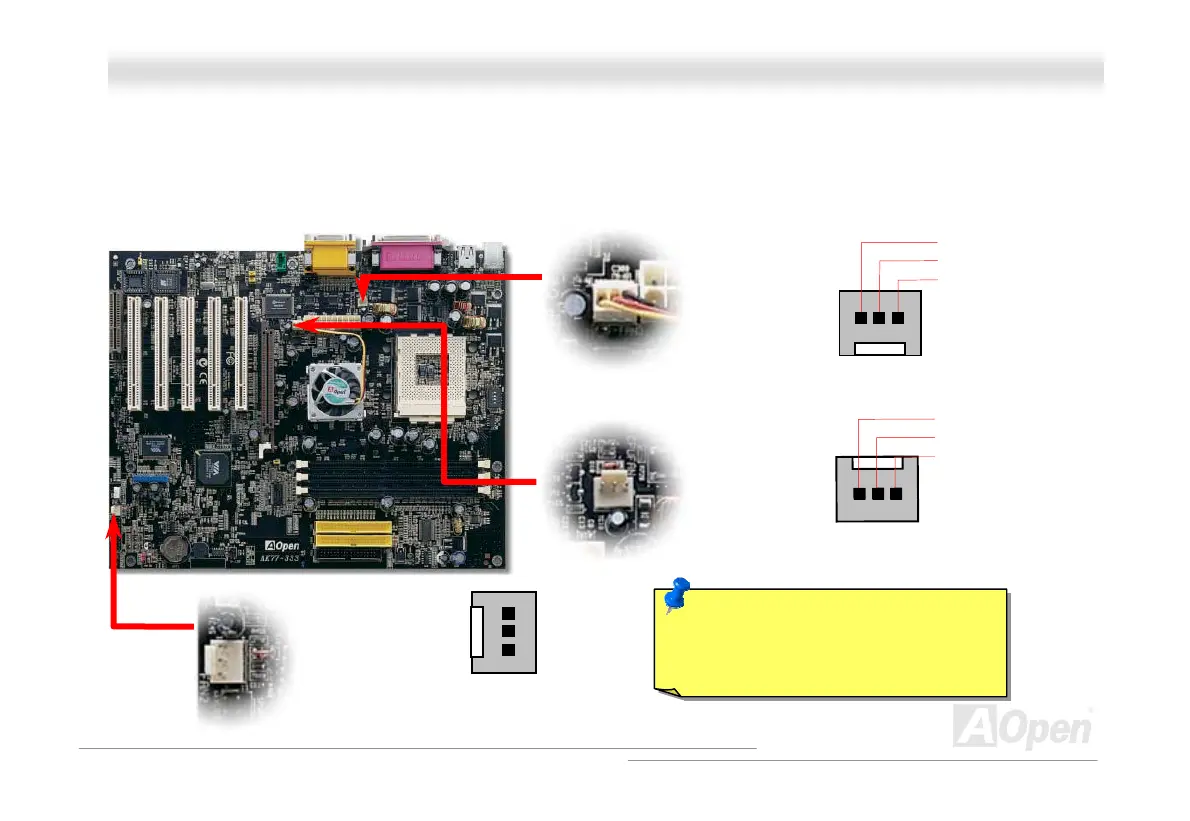
AOpen AK77-333 - CPU and Housing Fan Connector (with H;W Monitoring)

AOpen AK77-333
113 pages
Print Icon
To Next Page IconTo Next Page
To Previous Page IconTo Previous Page
Loading...
28
A
A
K
K
7
7
7
7
-
-
3
3
3
3
3
3
O
O
n
n
l
l
i
i
n
n
e
e
M
M
a
a
n
n
u
u
a
a
l
l
C
C
P
P
U
U
a
a
n
n
d
d
H
H
o
o
u
u
s
s
i
i
n
n
g
g
F
F
a
a
n
n
C
C
o
o
n
n
n
n
e
e
c
c
t
t
o
o
r
r
(
(
w
w
i
i
t
t
h
h
H
H
/
/
W
W
M
M
o
o
n
n
i
i
t
t
o
o
r
r
i
i
n
n
g
g
)
)
Plug in the CPU fan cable to the 3-pin CPU FAN connector. If you have chassis fan, you can also plug it on System Fan (FAN2)
or AUX Fan (FAN3) (without H/W monitoring) connector.
Note: Some CPU fans do not have
sensor pin, so that cannot support fan
monitoring.
CPU Fan Connector
FAN2 Connector
SENSOR
+12V
GND
FAN3 Connector
GND
+12V
SENSOR
SENSOR
+12V
GND

Table of Contents

Related product manuals