47
A
A
K
K
7
7
7
7
-
-
3
3
3
3
3
3
O
O
n
n
l
l
i
i
n
n
e
e
M
M
a
a
n
n
u
u
a
a
l
l
P
P
C
C
9
9
9
9
C
C
o
o
l
l
o
o
r
r
C
C
o
o
d
d
e
e
d
d
B
B
a
a
c
c
k
k
P
P
a
a
n
n
e
e
l
l
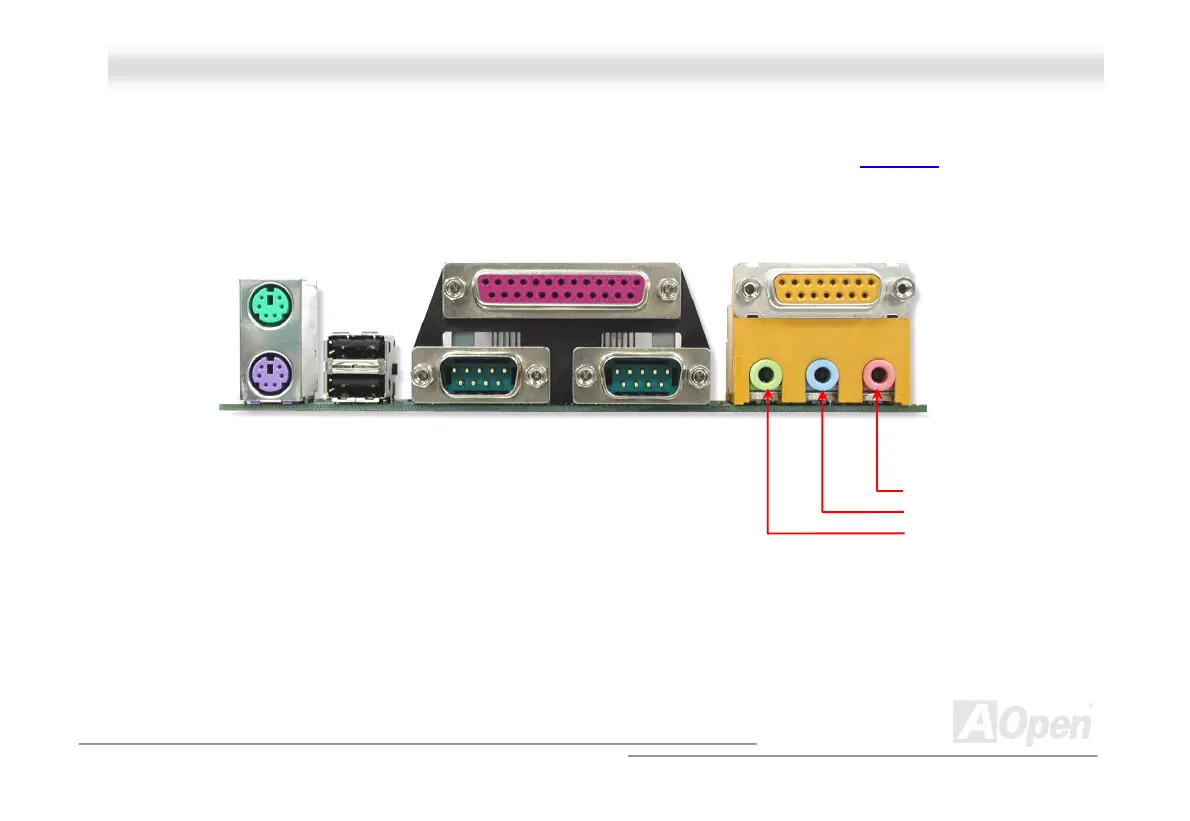
The onboard I/O devices are PS/2 Keyboard, PS/2 Mouse, serial ports COM1 and COM2, Printer, Eight USB, AC97 sound and
game port. The view angle of drawing shown here is the back panel of the housing.
PS/2 Keyboard: For standard keyboard, which is using a PS/2 plug.
PS/2 Mouse: For PC-Mouse, which is using a PS/2 plug.
USB Port: Available for connecting USB devices.
Parallel Port: To connect with SPP/ECP/EPP printer.
COM1 Port: To connect with pointing devices, modem or others serial devices.
Speaker Out: To External Speaker, Earphone or Amplifier.
Line-In: Comes from the signal sources, such as CD/Tape player.
MIC-In: From Microphone.
MIDI/Game Port: For 15-pin PC joystick, game pad or MIDI devices.
PS/2 Mouse
Connector
PS/2 Keyboard
Connector
USB Port
(V1.1)
SPP/EPP/ECP
Parallel Port
COM 1 Port COM 2 Port
Game Port
MIC-In
Line-In
Speaker Out



 To Next Page