1 2
5
6
7
3
8
9
10 11
12
13
4
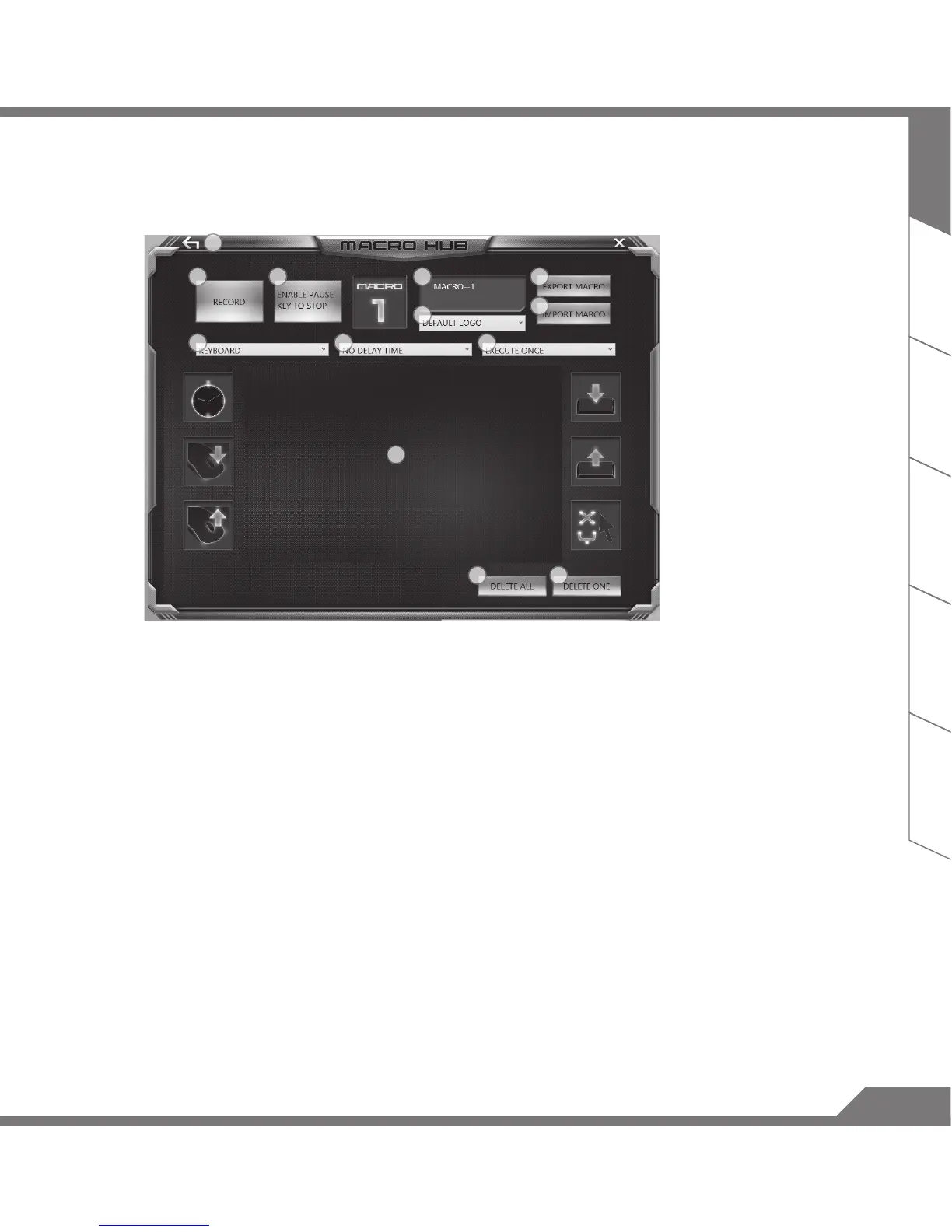
d. The overview of macro record panel (you can record your own macro here)
1. Start recording: Click when you’re about to record the macro
2. Stop recording: Click to stop the record of macro
3. Macro Name: Set the name of this macro
4. Import icon: Set icon for this macro. You can use default icon or upload your own icon
5. Record type: You can choose to record only mouse(or keyboard) movement, or record
both. You can also decide to or not to record mouse position.
6. Record interval: You can decide to or not to record the interval of each movement(or You
can set xed interval time between every movement)
7. Execution way: You can set the macro execution way (execution once, repeat execution or
repeat execution with deep press)
8. Export macro: Export your macro
9. Import macro: Import the macro
10. Delete all: Delete all movement in this macro
11. Delete selected: Delete selected movement
12. Movement list: it shows all movement you record
13. Exit: The system will inquire you if to save the recorded macro


 To Next Page