Setup Your System for RAID 0/1
WARNING
●
Please backup your data before you build and run RAID 0/1 on your system.
●
RAID 1 needs two storage drives of the same specication and capacity in your laptop.
●
RAID 0 needs two storage drives of the same specication in your laptop. Different capacity is acceptable.
1
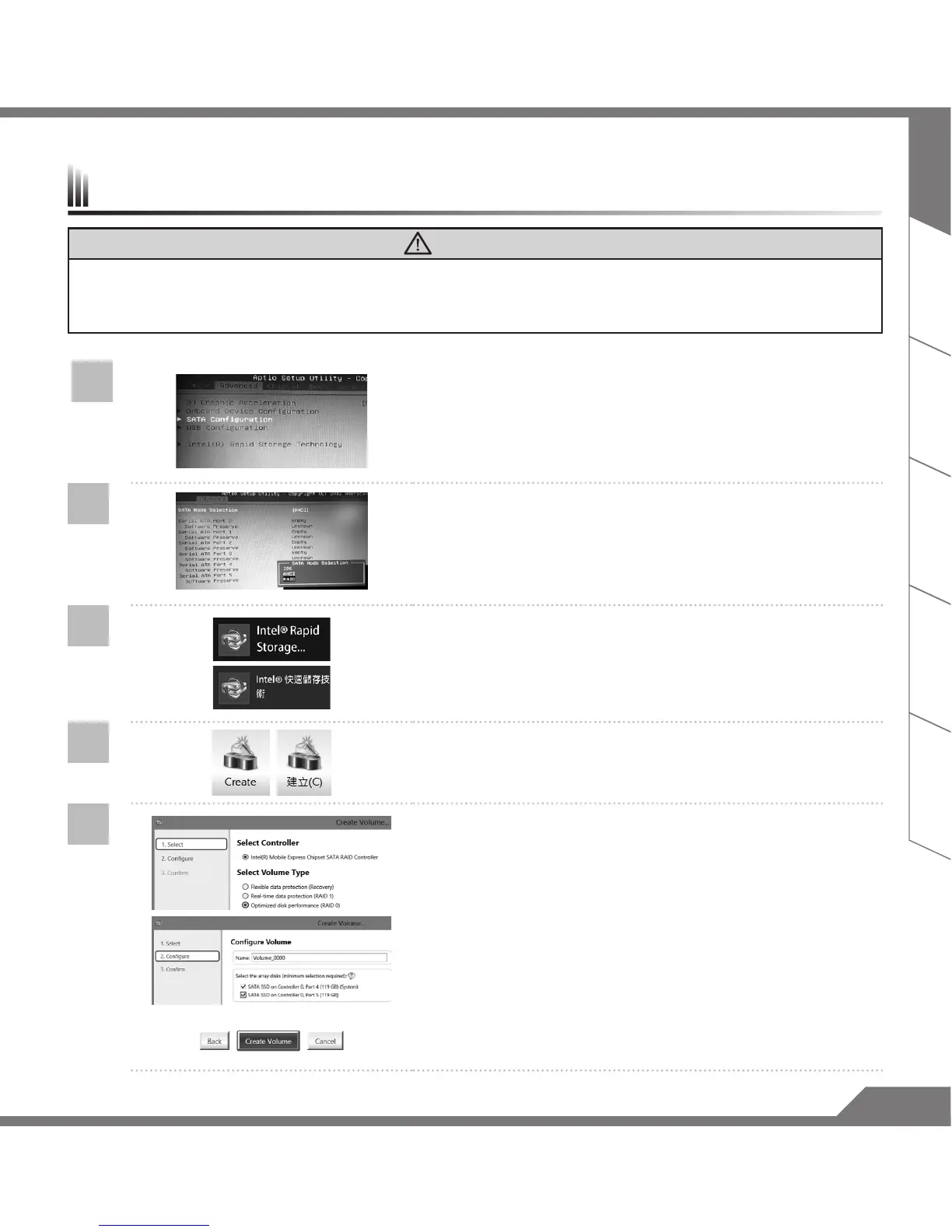
• Press F2 when computer starts to Enter BIOS setup utility.
• Go to Advanced > SATA configuration.
2
• Change "SATA Mode selection" from "AHCI" to "RAID".
• Press F10 to save and exit. The system will restar t
automatically.
3
• Once the system restarts. Go to "All Apps" found at the
bottom of the screen on Windows 8 and execute Intel
Rapid Storage program.
4
• You will see the Intel Rapid Storage Technology Screen,
Click> Create.
5
• Un der Selec t Volume Type cho ose Optimized disc
performance (RAID 0/1), Click > NEXT.
• Under Configure Volume you may set Name to your
preferred name and select both controllers.
• Click > Next. You will see Confirm Volume Creation. Click >
Create volume.
• Wait until the system migration is complete and restart the
laptop.



 To Next Page