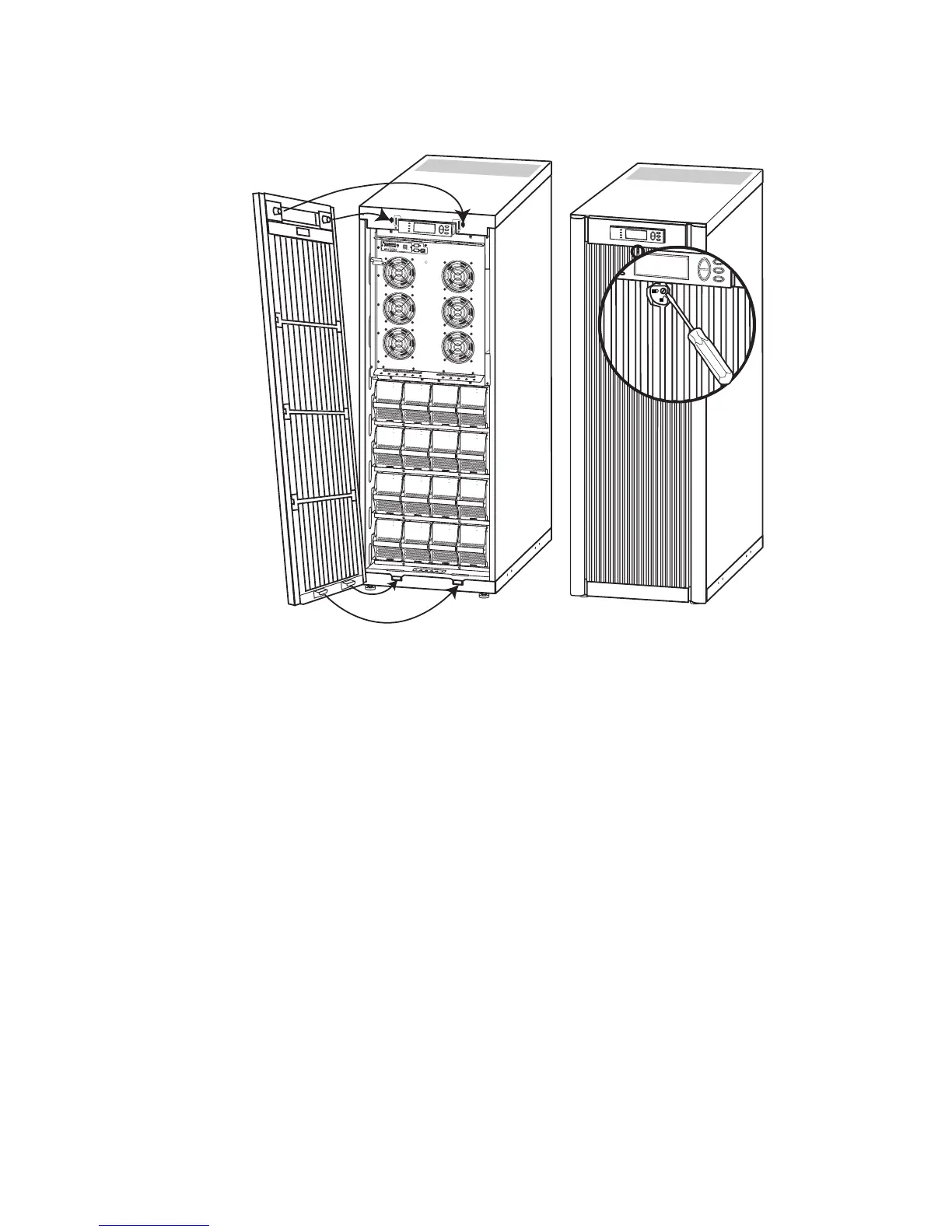
Operation – Front Panel Removal/Installation
990-1599B Smart-UPS® VT 10-30 kVA, 208/220 V and XR Battery Enclosure Operation Manual 21
Installation
Insert the two protrusions at the bottom of the Front Panel into the two slots at the bottom of the
Enclosure.
Push the Front Panel into place.
To secure the Front Panel, turn the screw counterclockwise to locked position.
10/1
0
0B
ase
-T
Pro
be
A
P
9
6
1
9
N
e
t
w
o
r
k
M
a
n
a
g
e
m
e
n
t
C
a
r
d
E
M
!
R
e
s
e
t
Ou
tput
Pw
r
Z
o
ne
10
/1
00
M
o
d
e
l
:
S
e
r
i
a
l
:
B
A
T
T
E
R
Y
U
N
I
T
M
o
d
e
l
:
S
e
r
i
a
l
:
B
A
T
T
E
R
Y
U
N
I
T
M
o
d
e
l
:
S
e
r
i
a
l
:
B
A
T
T
E
R
Y
U
N
I
T
M
o
d
e
l
:
S
e
r
ia
l
:
B
A
T
T
E
R
Y
U
N
I
T
M
o
d
e
l
:
S
e
r
i
a
l
:
B
A
T
T
E
R
Y
U
N
I
T
M
o
d
e
l
:
S
e
r
ia
l:
B
A
T
T
E
R
Y
U
N
I
T
M
o
d
e
l
:
S
e
r
i
a
l
:
B
A
T
T
E
R
Y
U
N
I
T
M
o
d
e
l
:
S
e
r
i
a
l
:
B
A
T
T
E
R
Y
U
N
I
T
M
o
d
e
l
:
S
e
r
i
a
l
:
B
A
T
T
E
R
Y
U
N
I
T
M
o
d
e
l
:
S
e
r
i
a
l:
B
A
T
T
E
R
Y
U
N
IT
M
o
d
e
l
:
S
e
r
i
a
l:
B
A
T
T
E
R
Y
U
N
I
T
M
o
d
e
l
:
S
e
r
i
a
l:
B
A
T
T
E
R
Y
U
N
I
T
M
o
d
e
l
:
S
e
r
ia
l:
B
A
T
T
E
R
Y
U
N
I
T
M
o
d
e
l
:
S
e
r
i
a
l
:
B
A
T
T
E
R
Y
U
N
I
T
M
o
d
e
l
:
S
e
r
i
a
l:
B
A
T
T
E
R
Y
U
N
I
T
M
o
d
e
l
:
S
e
r
ia
l:
B
A
T
T
E
R
Y
U
N
I
T



 To Next Page