.0
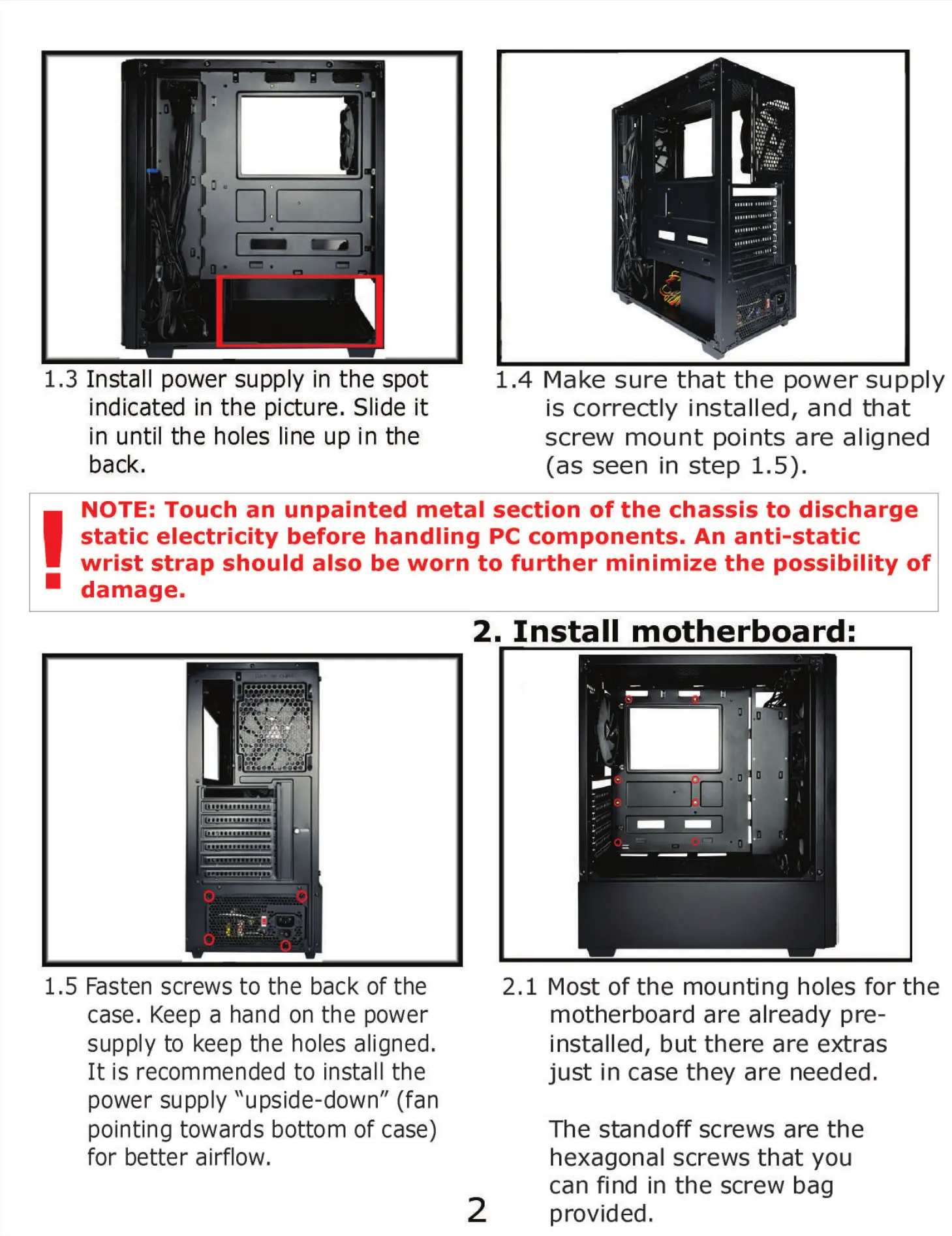
1.3 Install power supply in the spot
indicated in the picture. Slide it
in until the holes line up in the
back.
1.
4 Make sure that the power supply
is correctly installed, and that
screw mount points are aligned
(as seen in step 1.5).
NOTE: Touch an unpainted metal section of the chassis to discharge
static electricity before handling PC components. An anti-static
wrist strap should also be worn to further minimize the possibility of
damage.
2. Install motherboard:
1.5 Fasten screws to the back of the
case. Keep a hand on the power
supply to keep the holes aligned.
It is recommended to install the
power supply "upside-down" (fan
pointing towards bottom of case)
for better airflow.
2
2.1 Most of the mounting holes for the
motherboard are already pre-
installed, but there are extras
just in case they are needed.
The standoff screws are the
hexagonal screws that you
can find in the screw bag
provided.


 To Next Page