1
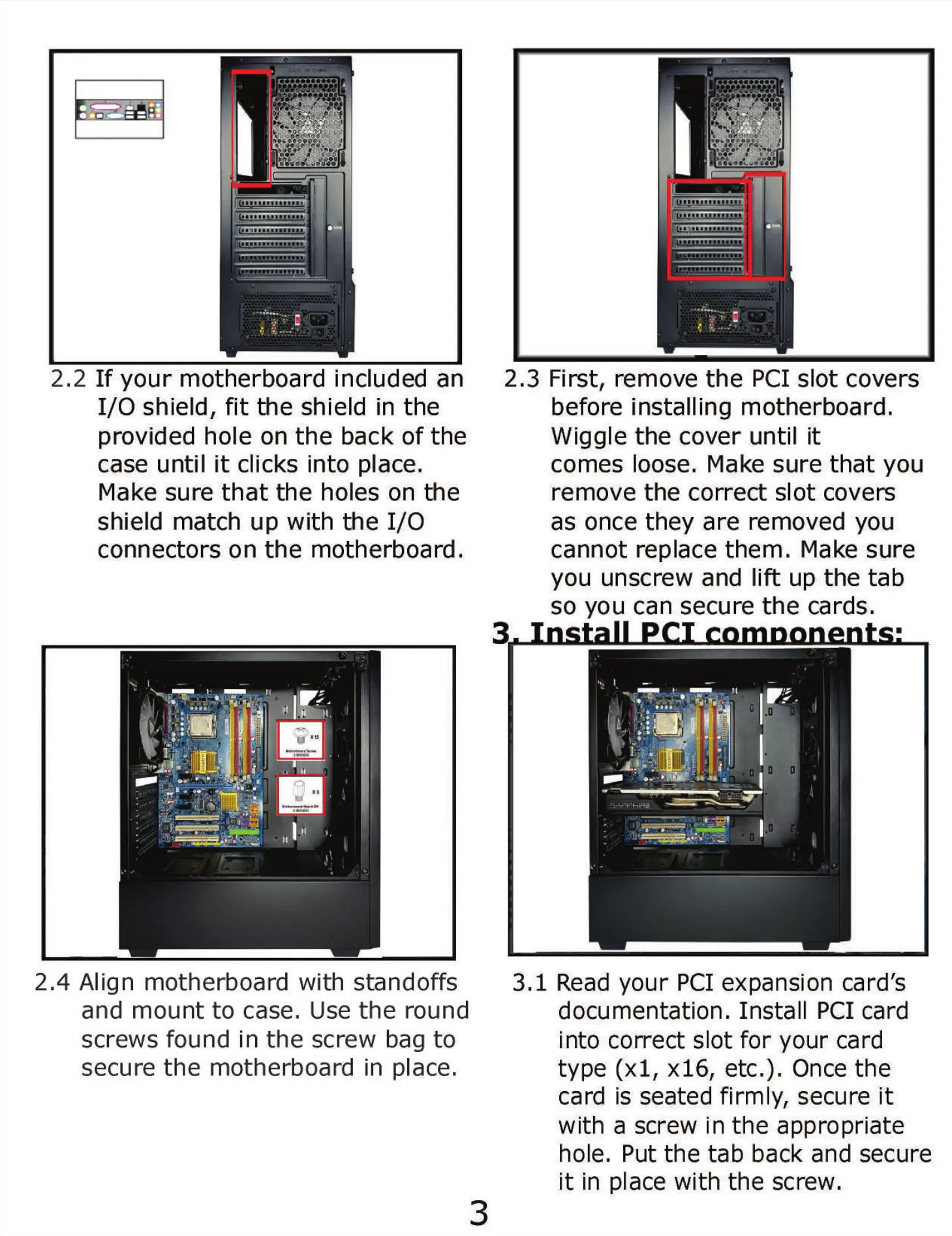
2.2 If your motherboard included an
1/0 shield, fit the shield in the
provided hole on the back of the
case until it clicks into place.
Make sure that the holes on the
shield match up with the 1/0
connectors on the motherboard.
2.4 Align motherboard with standoffs
and mount to case. Use the round
screws found in the screw bag to
secure the motherboard in place.
2.
3
3 First, remove the PCI slot covers
before installing motherboard.
Wiggle the cover until it
comes loose, Make sure that you
remove the correct slot covers
as once they are removed you
cannot replace them. Make sure
you unscrew and lift up the tab
so you can secure the cards.
3.1 Read your PCI expansion card's
documentation. Install PCI card
into correct slot for your card
type (xl, x16, etc.). Once the
card is seated firmly, secure it
with a screw in the appropriate
hole. Put the tab back and secure
it in place with the screw.
3


 To Next Page