VortexMEditionDeskAssemblyGuide 11|Page
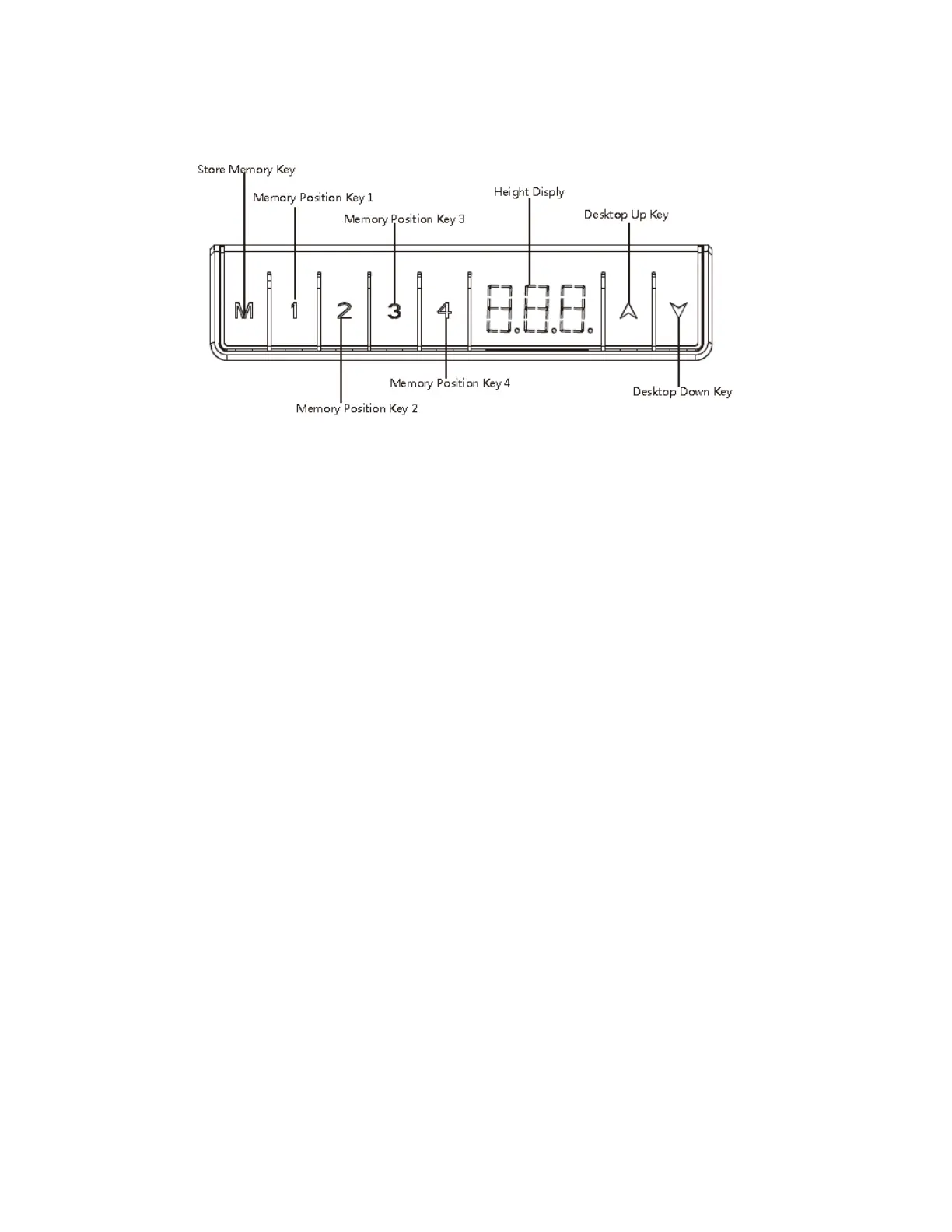
HOW TO USE MEMORY CONTROLLER
RESETmaybeneededfromtimetotimeineventslikeprolongednon‐operation,suddenpoweroutage,
overload,overheatandetc.Mostissuesgetresolvedwithareset.Pleasenotethatresettingdeskinvolvesmore
thanaconventionalpower‐offandapower‐onlikethatofmostelectronicdevices.
PressonholdbothUPandDOWNbuttonsfor5seconds,RSTwillappearonthecontrollerdisplayanddeskwill
startgoingdowntothelowestpositionifitisnotatthatposition.Keepholdingbothbuttonsuntilthedesk
reachesthelowestpoint.Theresetiscompletewhenyouhearabeep.
PRESETS:FactorydefaultsettingforPreset1,2,3and4is28.3”,33.6”,35.5”and47.2”respectivelyandcan
bechangedbyfollowinginstructionbelow.
1. PressUPorDOWNbuttontogotoadesiredheight
2. PressMbuttonfor3secondsanddisplayedheightwillstartflashing
3. PressandholdPresetbutton1,2,3or4.If1buttonispressed,P1willflashbriefly.Presetiscomplete
whenflashingdisplayedheightbecomessolid.
Togotoyourpresetheight,simplypresspresetbuttononce.


 To Next Page