Chapter 1 iMac at a glance 5
Take a tour
Your iMac is packed with advanced technologies and a beautiful reection-reducing display in
a remarkably thin design.
•
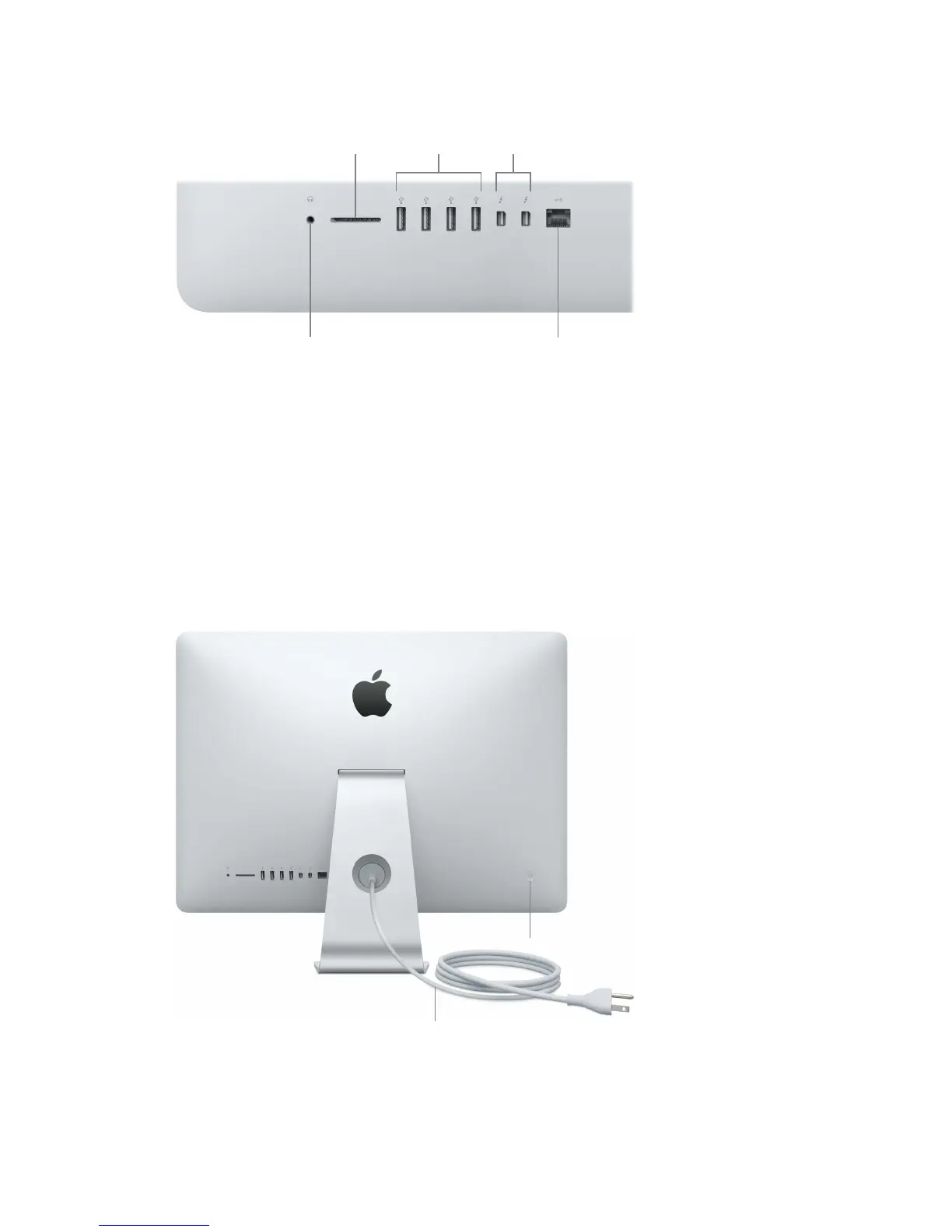
3.5 mm Headphone Jack: Plug in stereo headphones or a digital 5.1 surround-sound speaker
system and experience high-quality sound while watching movies or listening to your
favorite music.
•
SDXC card slot: Easily transfer photos, videos, and data to and from your iMac, with the latest
high-capacity SD cards.
•
USB 3 ports: Connect an iPad, iPhone, iPod, digital camera, camcorder, external storage, or
printer quickly and easily. The iMac USB 3 ports support USB 3 and USB 2 devices.
•
Thunderbolt 2 ports: This ultrafast and ultraexible technology lets you connect high-speed
peripherals such as RAID arrays, external displays, and docking stations. Thunderbolt 2 supports
adapters (sold separately) for technologies like FireWire or HDMI, for increased connectivity.
•
Gigabit Ethernet port: Connect a router or modem to get on the Internet, or connect to another
computer to transfer les without using Wi-Fi.
Power button
AC power cord
•
AC power cord: Pass the power cord through the hole in the stand, plug it into the power port
on the back of your iMac, then plug the cord into a power outlet.
•
Power button: Press and hold for three seconds to turn your iMac on or o, or press to put it to sleep.
74% resize factor





 To Next Page