12. Use only with the cart, stand, tripod, bracket, or table specified by the manufacturer, or sold with the apparatus.
When a cart is used, use caution when moving the cart/apparatus combination to avoid injury from tip-over.
13. Unplug this apparatus during lightning storms or when unused for long periods of time.
14. Refer all servicing to qualified service personnel. Servicing is required when the apparatus has been damaged in
any way, such as power-supply cord or plug is damaged, liquid has been spilled or objects have fallen into the
apparatus, the apparatus has been exposed to rain or moisture, does not operate normally, or has been dropped.
Warinng!
⇒ To reduce the risk of fire or electrical shock, do not expose this equipment to dripping or splashing and
ensure that no objects filled with liquids, such as vases, are placed on the equipment.
⇒ This apparatus must be earthed.
⇒ Use a three wire grounding type line cord like the one supplied with the product.
⇒ Be advised that different operating voltages require the use of different types of line cord and attachment
plugs.
⇒ Always observe the local safety regulations. Ensure that the factory-set power requirements for the device
(refer to the label on the back of the monitor) corresponds to the mains supply in your region.
⇒ This equipment should be installed near the socket outlet and disconnection of the device should be easily
accessible.
⇒ To completely disconnect from AC mains, disconnect the power supply cord from the AC receptacle.
⇒ The mains plug of the power supply shall remain readily operable.
⇒ Do not install in a confined space.
⇒ Do not open the unit-risk of electric shock inside.
Care
Components of the highest quality are used in your AEON monitor. This assures years of trouble free operation.
Following precautions should still be made though. Avoid running the system into severe clipping. Even there is an
advanced protection system, you may be able to destroy your speakers by severe overpowering. The limiter works
over a certain range, but exceeding this level may send a severely clipped signal to your drivers.
When a noticeable distortion occurs, please turn down the level to your speakers. Avoid hot plugging the equipment
connected to the monitors. Always turn off the speaker and other equipment when plugging or unplugging signals, or
switching equipment on or off.
Do not touch the drive units by hand.
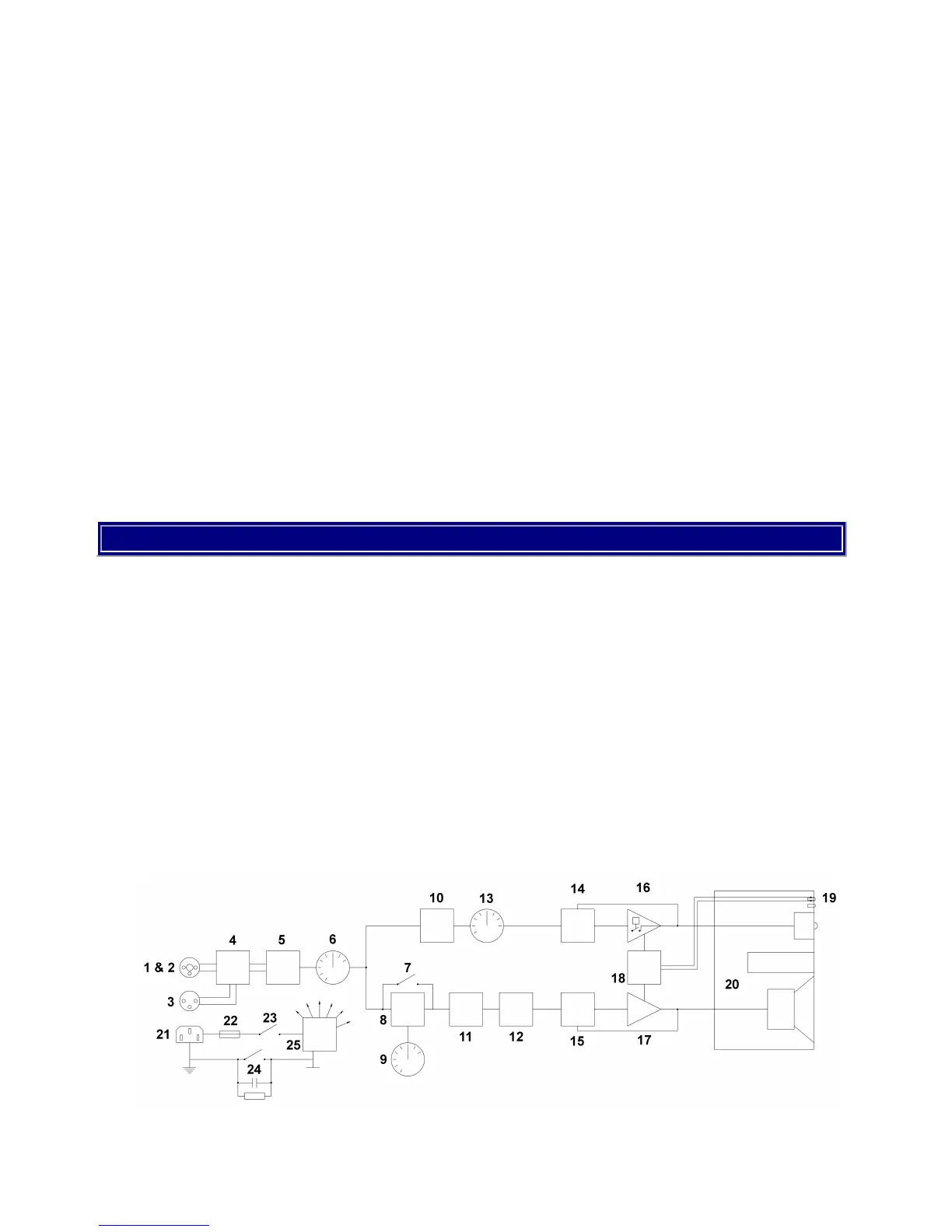
Block Diagram of AEON active studio monitor


 To Next Page