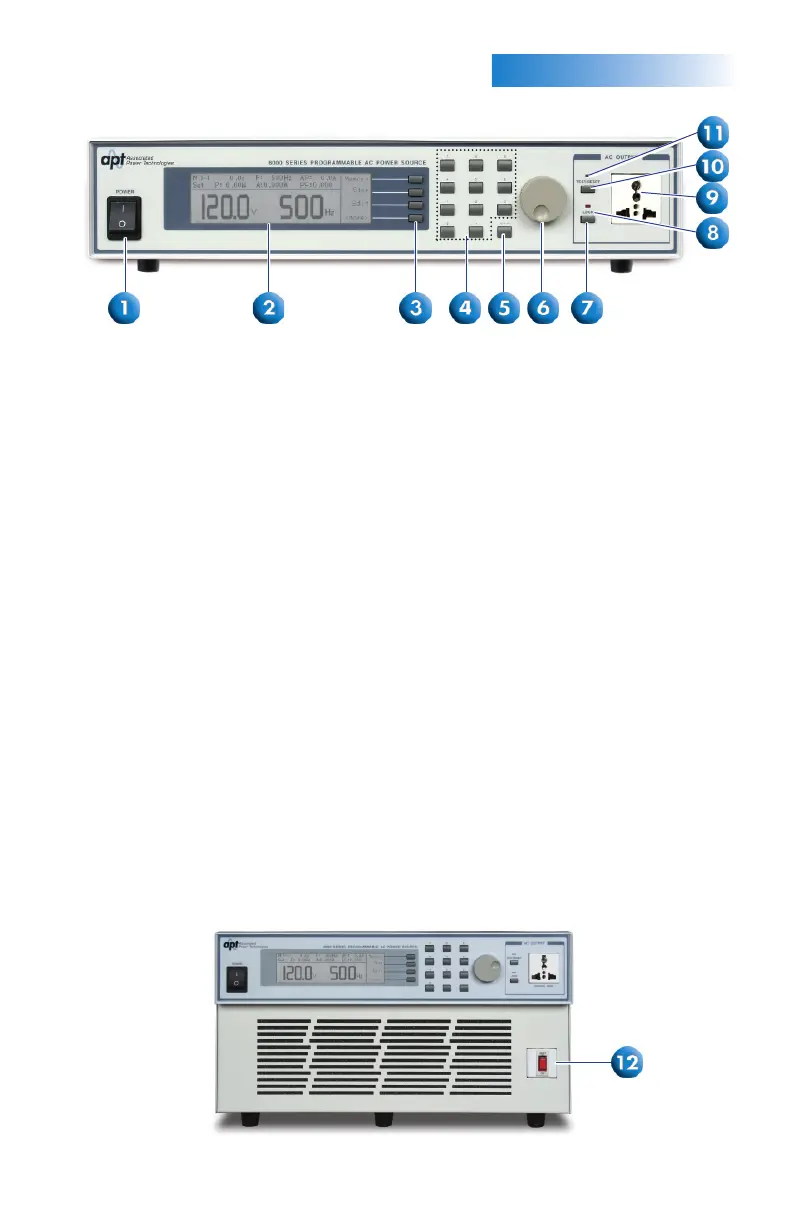
FRONTPANELCONTROLS
1.
1. POWER SWITCH: Rocker style power switch with international ON ( | )
and OFF (0) markings.
2. GRAPHIC LCD: 240 x 64 Monographic LCD.
3. SOFT KEYS: Multifunctional keys used to select parameters, select screens,
and edit parameters.
4. NUMERIC KEYPAD: Keys used to enter numeric data.
5. DELETE KEY: Used to delete text characters and numeric data.
6. ROTARY KNOB: Used to adjust the voltage/frequency output in
MANUAL Mode or DC+/DC- Mode.
7. LOCK KEY: Used to lock out the front panel.
8. LOCK LED: When lit, this LED indicates that the instrument’s front
panel is locked.
9. UNIVERSAL AC OUTPUT SOCKET: 300 VAC max voltage and 20 A
max current.
10. TEST/RESET KEY: Used to turn ON/OFF output voltage, or used to reset the
instrument in the event of a failure condition.
11. TEST/RESET LED: When lit, this LED indicates output is active, or when
blinking indicates the instrument is in a failure condition.
12. RESET KEY: Used to reset the unit if 20 A max current is reached for
duration of one hour on the universal AC output socket. Runs 15 A
maximum continuous current on universal AC output socket.
Only available on the 6040 model shown below.
(6040 Front Panel)



 To Next Page