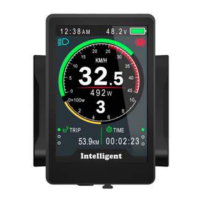
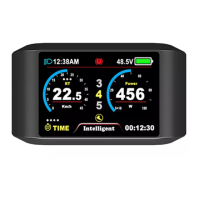
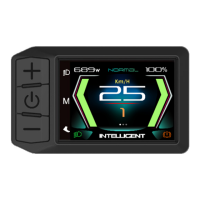
The VENTURE SCOOTERS 850c Display (DPC-14), also known as 850C-BF, is a TFT LCD display designed for e-bikes. Manufactured by Tianjin APT Science and Technology Co., Ltd., this display serves as the primary interface for users to monitor and control their electric scooter.
Function Description:
The 850c Display provides a comprehensive overview of the e-bike's status and allows for various functional adjustments. It features a high-contrast 3.2-inch IPS colorful matrix screen, ensuring clear visibility of information. The ergonomic external button design facilitates easy operation.
Key functions include:
- Speed Display: Shows AVG SPEED (average speed), MAX SPEED (maximum speed), and SPEED (real-time speed).
- Mileage Indicator: Displays Odometer (total distance), Trip distance, Clock, and Riding time.
- Assist Level Control: Offers 3-level, 5-level, or 9-level assist options, which can be customized.
- Power/Current Indicator: Provides real-time power indication, either digitally, analogically, or as current.
- Battery Indicator: Offers a smart and reliable battery indicator, with options to display voltage, percentage, or turn off the indicator. Accurate percentage display requires communication with the battery.
- Error Code Indicator: Displays error codes if a fault occurs, helping in troubleshooting.
- Headlight/Backlight Control: Allows users to turn the headlight and screen backlight on or off.
- Walking Mode (6km): Enables a low-speed walking mode, useful for maneuvering the e-bike on foot. This feature requires controller support.
- Data Cleanup: Provides an option to reset temporary data such as AVG Speed, MAX Speed, Trip, and Time. These temporary data cannot be erased by powering off the device.
- USB Charging Port: Includes a 5V 500mA USB port for charging external devices.
- Software Upgradability: The software can be upgraded through UART.
Important Technical Specifications:
- Screen: 3.2-inch IPS screen.
- Battery Supply: Compatible with 24V/36V/48V battery systems.
- Rated Operating Current: 40mA.
- Max Operating Current: 100mA (when using a 36V battery with USB equipment charging).
- USB Charging Port Output: 5V 500mA.
- Off Leakage Current: Less than 1uA.
- Max Output Current to Controller: 100mA.
- Operating Temperature: -20℃ to 70℃.
- Storage Temperature: -30℃ to 80℃.
- Dimensions: Host/L92mmW60mmH14mm.
- Material: Product shell is ABS, and the transparent window is made with high-strength Acrylic.
- Certification: CE / IP65 (waterproof) / ROHS.
Usage Features:
The 850c Display is designed for intuitive use with several operational features:
- Power On/Off: Pressing and holding the "Power" button for 1 second turns the display on or off. The display can automatically shut down after a set period (0-9 minutes) of inactivity. If a password power-on is set, the correct password must be entered before starting.
- Assist Level Adjustment: Short pressing the "UP/DOWN" buttons changes the assist level. Level 0 is neutral, and the top level is 9. The number of assist levels can be customized.
- Speed & Mileage Mode Switch: Short pressing the "POWER" button cycles through different display modes: AVG SPEED -> MAX SPEED -> RT SPEED (Real-time Speed) -> ODO (Odometer) -> RANGE -> TIME -> TRIP. The display automatically reverts to Real-time Speed after 5 seconds of no operation.
- Headlight/Backlight On/Off: Pressing and holding the "UP" button for 1 second turns the headlight on or off and switches the screen to the corresponding mode. The display can maintain the headlight function for a while even if the motor is not working due to low battery voltage.
- Walking Mode Activation: Pressing and holding the "DOWN" button for 2 seconds activates walking mode. Releasing the button exits this mode.
- Data Reset: Pressing and holding "UP" and "DOWN" buttons together for 1 second resets temporary data like AVG Speed, MAX Speed, Trip, and Time.
- Parameter Setting Menu: Double-pressing the "POWER" button (interval less than 0.3 seconds) enters the setting menus. "UP/DOWN" buttons change parameter settings, and "POWER" switches to the next item. Double-pressing "POWER" exits the menu. The display automatically exits the menu after 30 seconds of inactivity or if riding starts (for safety reasons).
Parameter Settings:
The display offers a range of customizable parameters:
- System (Metric/Imperial): Switches between metric and imperial units.
- Brightness: Adjusts backlight brightness from I (darkest) to IIIII (brightest), with a default value of I.
- Auto Off: Sets the auto power-off time from 1 to 9 minutes, or OFF. Default is 5 minutes.
- Scenes: Changes display scenes between Digital and Analog. Currently, only Digital scenes are supported, with Analog support planned for the future.
- Battery Ind (Indicator): Selects battery indicator display mode: Voltage, Percentage, or OFF.
- Pow Ind (Power Indicator): Changes the power output indicator to Analog, Digital, or Current. This data represents the battery's power output, not the motor's.
- Clock: Allows setting the Year/Month/Day/Hour/Min/Sec.
- Start Password: Enables a password for power-on. If activated, the correct password must be entered within 30 seconds, otherwise, the display powers off.
- Basic Setting:
- Wheel: Sets the wheel diameter (16/18/20/22/24/26/27/27.5/28/29/30/31 inch) or wheel circumference (51cm-255cm). Circumference setting requires controller support.
- Battery: Configures battery voltage (24V/36V/48V/UBE, where UBE is user-defined).
- Advance setting: Accesses advanced settings with a default password of '1919'.
- Speed limit: Adjusts the speed limit from 10km/h to 45km/h (default 25km/h). Speed and current limits are restricted by the controller and motor.
- Assist levels: Customizes assist levels (3/5/9/UBE, where UBE is factory default).
- Error code: Displays the last 10 error codes.
- Factory settings: Restores all parameters to factory defaults.
- Informations: Shows E-bike information, including speed, mileage, and product details (hardware/software version, date, serial number).
- Battery info: Provides detailed battery information such as Voltage, Current, Avg Current, Cycle times, Capacity, Remaining Capacity, Full Charge Capacity, Temperature (Max/Min Tempt), Relate ChgSta, Absolute ChgSta, Max/Last Uncharge Times, and CorVolt-1. This information requires battery communication.
Maintenance Features:
- Error Code Display: The 850c Display shows warning messages and error codes (04-30) at the bottom of the screen, indicating specific faults. This helps in diagnosing issues. For example, "Error 30 No Signal" indicates a communication error, and "Error 09 Three-Phase Power" indicates a phase line error of the motor.
- Assembly Instructions: Provides detailed instructions for assembly, including screw torque values (M416, M48, M3*10 with STD and MAX N.M values) to prevent damage from excessive torque, which is not covered under warranty.
- Clamp Installation: Notes two directions for clamp installation (forward or backward) and specifies handlebar sizes (31.8mm, 25.4mm, 22.2mm) with transfer rings for smaller diameters.
- Connector Descriptions: Clearly labels the wiring: Red (Anode 24v/36v/48V), Blue (Power cord to controller), Black (GND), Green (RxD: controller -> display), and Yellow (TxD: display -> controller).

 Need help?

 To Next Page

 General