EasyManua.ls Logo

Aputure Amaran - Page 2

Aputure Amaran
4 pages
Print Icon
To Next Page IconTo Next Page
To Previous Page IconTo Previous Page
Loading...
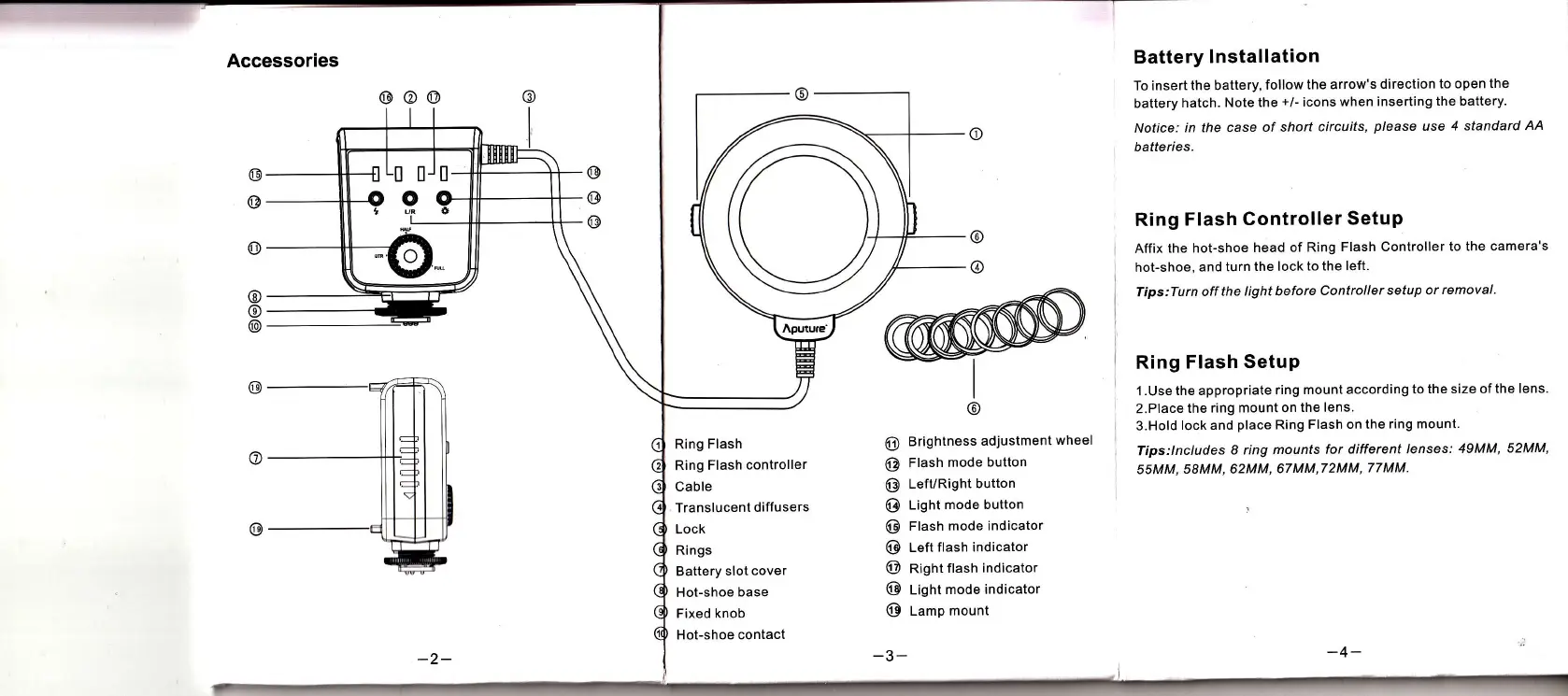
Accessories
Battery
lnstallation
To insert
the battery,
follow
the arrow's
direction
to open the
battery
hatch. Note
the
+/-
icons
when inserting the
battery.
Notice:
in the case
of short
circuits,
p/ease
use 4 standard
AA
batteries.
Ring
Flash
Controller
SetuP
Affix
the hot-shoe
head of
Ring
Flash Controller
to the camera's
hot-shoe,
and turn
the lock
to the left.
Tips:Turn
off the
light before
Controller
setup or
removal.
Ring
Flash Setup
1
.
Use
the appropriate
ring
mount according
to
the size of
the lens.
2.Place
the
ring mount on
the lens.
3.Hold
lock and
place
Ring
Flash on the
ring mount.
Tips:lncludes
8 ring mounts
for different
lenses:
49MM,
52MM'
55MM,
58MM, 62MM,
67 MM,7
2MM,
77 MM,
@@@
@
I
@
@
@
I
@
Ring Flash
Ring
Flash
controller
Cable
Translucent
diffusers
Lock
Rings
Battery
slot cover
Hot-shoe
base
Fixed knob
Hot-shoe
contact
@
Brightness
adjustment
wheel
@
Flash
mode
button
@
Left/Right
button
@
Lignt
mode button
@
rtash mode
indicator
@
Left
ftash indicator
@
nigntftash
indicator
@
t-igl't
mode indicator
@
Lamp mount
-3-
-2-

Related product manuals