-14-
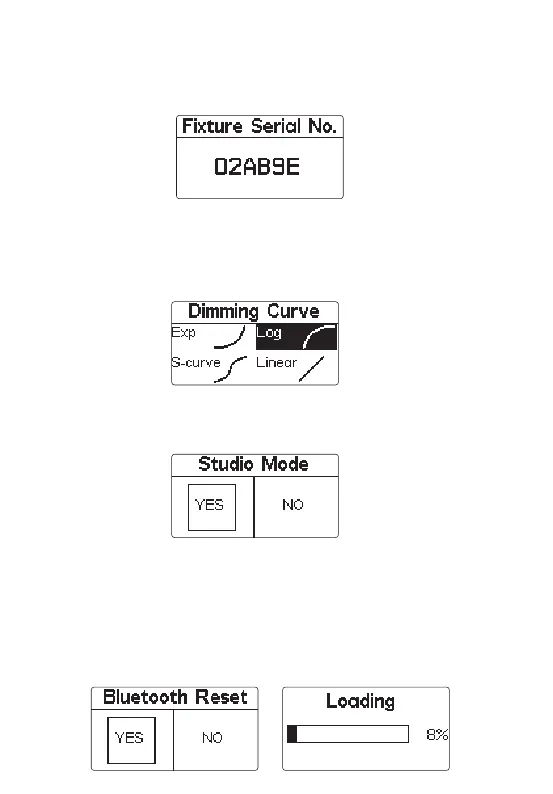
* Through the menu interface, select "Device serial number" to view the serial number of the device.
* When Studio Mode is active, the light will turn on as soon as it receives power, without having
to press the power button.
* Studio Mode is active as the factory default.
Users can connect devices with the name LS 60x ****** through the bluetooth of
their mobile phones or tablets (six digits + letters are the serial number of the
machine). At this time, they can control the devices wirelessly through their mobile
phones or tablets.
6) Dimming curve mode
5) Wireless mode
Press “MENU” key to enter MENU mode, rotate “MENU” key to select "Dimming curve"
item, click “MENU” key to enter "Dimming curve" mode, rotate "OK" key to select
exponential, logarithmic, linear and "S" dimming curve, and then click "OK" key to
confirm the selection.
7) Studio mode
Press “MENU” key to enter the MENU mode, rotate “MENU” key to select studio
mode, click “MENU” key to enter studio mode, then rotate "OK" key to select "Yes"
or "No", and click "OK" key to open or close studio mode.
8) Bluetooth reset
(1) Press “MENU” key to enter MENU mode, rotate “MENU” key to select Bluetooth
reset, click “MENU” key to enter Bluetooth Reset mode, then rotate “OK” key to select
"Yes" and press “OK” key short to reset Bluetooth (the current reset progress will be
displayed on the pop-up interface, and the progress will be displayed within 5
seconds); Select "NO" to return to the previous menu.








 To Next Page