Need help?
Do you have a question about the Aqua Computer D5 NEXT and is the answer not in the manual?
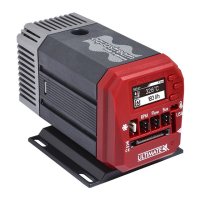
Introduces the D5 NEXT pump, its design features, and technical capabilities.
Lists essential safety guidelines for handling and operating the pump to prevent damage or injury.
Details all components included in the retail package of the D5 NEXT pump.
Guides on physically assembling and mounting the pump unit within a PC case.
Specifies the allowed orientations for pump installation to ensure proper operation and prevent damage.
Details how to connect the SATA power plug to the pump, including pin assignments.
Explains USB connection for PC communication and data exchange with the aquasuite software.
Describes the fan connector's use for PWM fans or flow sensors and its pin assignment.
Details the bus connector for connecting other Aqua Computer devices or RGBpx products.
Explains how to operate the D5 NEXT using its physical keys and OLED display for configuration.
Describes configuring the device via a USB connection using the aquasuite software.
Guides on downloading and installing the aquasuite software from the official website.
Explains how to display overview pages directly on the desktop for convenient monitoring.
Guides on creating new overview pages and entering edit mode to customize layouts.
Details how to add new data elements and configure their display styles and properties.
Details how to export and import overview page configurations between PCs.
Guides on configuring data logging settings, intervals, and selecting data sources.
Explains how to analyze logged data using interactive charts and visualization tools.
Describes exporting logged data manually to XML files or setting up automatic exports.
Explains how to manually set the pump's rotation speed in power preset mode.
Guides on automatically adjusting pump speed based on selected temperature sensor readings.
Details automatic pump speed adjustment using custom temperature curves for precise control.
Explains automatic pump speed adjustment based on a desired target flow rate.
Covers additional pump settings like power limits, scaling, and fan output configuration.
Explains how to manually set the fan's output power level.
Guides on automatically adjusting fan speed based on temperature sensor readings.
Details automatic fan speed adjustment using custom temperature curves for optimal cooling.
Covers general fan settings like start boost, power limits, and minimum/maximum power values.
Explains how aquabus connection to an aquaero affects fan control, overriding D5 NEXT settings.
Describes using the fan output connector alternatively as a flow sensor input.
Guides on configuring maximum brightness and disabling all lighting functions.
Explains how to map LEDs, select effects, and customize parameters for RGBpx components.
Details using sound-controlled effects to visualize current audio output with RGBpx lighting.
Describes the AMBIENTpx effect for replicating screen content on LEDs for ambient lighting.
Explains the integrated water temperature sensor and its calibration options.
Discusses virtual flow sensor calculations versus mechanical flow sensor connections.
Details the virtual flow sensor, its prerequisites, calibration process, and limitations.
Guides on connecting and calibrating mechanical flow sensors to the D5 NEXT controller.
Explains using software temperature readings from third-party applications via USB.
Configures acoustic alarms and flashing LEDs during alarm conditions for alerts.
Details setting up alarm limits for sensors and enabling evaluation for alert generation.
Lists system-critical alarms, their impact, and mandatory shutdown procedures.
Covers display brightness, page interval, and OLED wear compensation for display longevity.
Explains how to configure four chart pages for display on the pump's screen.
Guides on activating or deactivating predefined display pages for the pump's interface.
Explains how to manually select and activate saved device configurations (profiles).
Guides on automatically activating profiles based on predefined rules or conditions.
Details how to save current device settings into profiles for later recall.
Covers displaying device details, serial numbers, and adding custom descriptions for easier identification.
Explains how to reset the pump controller to its original factory default settings.
Details configuration for aquabus communication and RGBpx lighting connections.
Guides on updating the device firmware and changing the pump menu language via aquasuite.
Explains creating virtual sensors using mathematical and logical functions for advanced monitoring.
Covers managing and activating profiles across multiple devices simultaneously.
Details setting up system-wide hotkeys to trigger profiles or desktop pages.
Guides on exporting data to the Aqua Computer server for publishing and sharing.
Explains how to access published data via browsers, JSON, or other formats.
Details importing data sets from the Aqua Computer server using an access key.
Explains how to change the aquasuite software language setting.
Guides on customizing the order of menu items and devices in the aquasuite interface.
Covers selecting preferred units for temperature and flow measurements.
Details customizing the software's start-up behavior and taskbar icon visibility.
Explains background service configuration for USB settings and hardware data.
Details the background service's ability to analyze audio and video data for connected devices.
Guides on software activation, update service, and registering license keys.
Lists technical specifications like voltage, power consumption, pump pressure, and dimensions.
Explains how to reset the pump controller to its original factory default settings.
Provides guidance on cleaning the device using a dry, soft cloth and avoiding liquids.
Advises on proper disposal of the device as electronic waste according to local regulations.
Provides contact information for support via email, postal address, and phone for inquiries.
The D5 NEXT is a sophisticated pump designed for PC water cooling systems, combining robust mechanics with advanced monitoring and control capabilities. Its core function is to circulate coolant within a PC's water cooling loop, ensuring efficient heat dissipation. Beyond simple circulation, the D5 NEXT integrates a range of features that allow for precise control, extensive monitoring, and customizable aesthetics, making it a central component for enthusiasts and users seeking detailed management of their cooling setup.
At its heart, the D5 NEXT is a D5 vario pump, known for its longevity and quiet operation. It utilizes a shaftless spherical motor where a hemispherical rotor/impeller unit spins on an ultra-hard, wear-resistant ceramic ball. This design ensures consistent performance and a low noise level, as bearing play remains unchanged even after prolonged use. The pump's primary function is to maintain a continuous flow of coolant, which is essential for transferring heat away from critical PC components.
Beyond its mechanical pumping action, the D5 NEXT incorporates an integrated fan controller for PWM fans, allowing it to manage not only its own operation but also the cooling fans connected to the system. An integrated USB interface facilitates communication with a PC, enabling comprehensive configuration and monitoring through the aquasuite software. Depending on its configuration, the device also features either an aquabus interface for communication with other Aqua Computer devices or an RGBpx effect controller, capable of managing up to 64 individually addressable LEDs. An OLED display on the unit provides real-time sensor readings and allows for direct configuration of the pump without needing a PC.
The D5 NEXT can automatically adjust its pump speed based on various parameters, including water temperature or flow rate. This intelligent control ensures optimal cooling performance while minimizing noise and power consumption. It can operate in different modes, such as a power preset mode for manual speed control, a temperature set point mode to maintain a desired coolant temperature, or a curve controller mode that adjusts speed based on a customizable temperature curve. A flow controller mode allows the pump to maintain a desired flow rate, further enhancing cooling efficiency and system stability.
The D5 NEXT offers multiple ways to interact with and configure its features. Users can operate the device directly via its OLED display and three integrated keys. The left and right keys are used to navigate information pages and select/alter menu entries, while the middle key opens the device menu and confirms selections. This on-device control allows for basic setup and monitoring without the need for a connected computer. However, it's important to close the aquasuite software on a connected PC when configuring via the display and keys, as the software can overwrite direct device settings.
For more advanced configuration, comprehensive visualization, and logging options, the D5 NEXT connects to a PC via its USB interface and utilizes the aquasuite software. This software suite provides an extensive interface to manage all pump parameters, fan settings, RGBpx lighting effects, and sensor configurations. The aquasuite allows users to:
The D5 NEXT is designed for durability, but certain maintenance aspects are important for its longevity and optimal performance:
 General
| Pump Type | D5 |
|---|---|
| Control Type | PWM |
| Max Flow Rate | 1500 L/h |
| Voltage | 12 V |
| Interface | USB 2.0 |
| RPM Monitoring | Yes |
| Fluid Temperature Sensor | Yes |
| Connector | G1/4" |
| RGB Lighting | Yes |

 To Next Page