5.2 Chiller rinse
To ensure your Aurora appliance always dispenses the
highest quality water it is important to rinse it regularly.
The appliance will display the Chiller mode/Rinse warning
symbol when the appliance requires the chiller rinsing
process.
1. When the Chiller mode/Rinse light is flashing ensure
the machine is topped up with a minimum of 1 liter of
clean water and an empty jug is positioned under the
dispensing outlet.
2. Select the chilled temperature and 1000ml dispense
volume.
3. Press the dispense button to start dispensing.
4. Once the chiller rinsing cycles has finished the Chiller
mode/Rinse light will be constantly illuminated red/white
depend on chiller temperature.
5.Discard the water dispensed.
6.Your machine is now ready to use.
6. Descaling
For safe & ecient operation of your Aurora appliance it is
important to descale regularly.
Untreated scale deposits prevent the element conducting
heat eciently and may aect its performance.
The appliance will display the descale warning symbol when
the appliance requires the descale process.
Ensure the water tank is empty and the filter is removed
before starting the descale process.
Descale Procedure:
1. When the descale light is flashing ensure the water tank
is empty and the filter is removed before starting the
descale process.
2. Fill water tank with no less than 3 litres of 1:20 citric acid
solution (1g citric acid powder per 20 ml water).
3. Place jug under dispense nozzle.
4. Press and hold the descale warning symbol for 3 seconds.
5. The descale warning symbol will flash and the appliance
will run a descale process. Caution: Dispense solution
will be hot; around 90°C.
6. When the water tank is empty, refill with 2L of cold water
and press the descale warning symbol again.
7. The appliance will run a cleaning cycle. Caution:
Dispense solution will be hot; around 90°C.
8. The descale warning symbol will turn o once complete.
9. Re-insert the Aqua Optima filter after descale process is
complete.
10. The appliance is now ready to use.
Note:
• To pause the descale process (for example to empty and
replace the jug), press the dispense button. To restart the
descale process, press the dispense button for a second
time. Unless the process is run completely the de-scale
indicator will not be reset and the appliance will continue
displaying descale icon.
If the appliance water flow decreases, or scale can be
observed in the dispensed water, a manual descale should
be performed (the descale icon is not illuminated).
Manual Descale Procedure:
1. Ensure the water tank is empty and the filter is removed
before starting the manual descale process.
2. Fill water tank with no less than 3 litres of 1:20 citric acid
solution (1g citric acid powder per 20 ml water).
3. Place jug under dispense nozzle.
4. Select temperature setting of 90C and volume 1000ml
then press the dispense button. Repeat this process 3
times.
5. When the water tank is empty, refill with 2L of cold water.
Select temperature setting of 90C and volume 1000ml
then press the dispense button.
6. Re-insert the Aqua Optima filter after descale process is
complete.
7. The appliance is now ready to use.
7. Installation
The appliance comes with two plug types, one for UK and
one for EU, the correct plug should be used and inserted
into the plug socket.
WARNING: PLEASE DO NOT DISASSEMBLE THIS
APPLIANCE YOURSELF. ELECTRIC ELEMENTS WILL BE
EXPOSED AND THERE IS A RISK OF ELECTROCUTION.
POSITIONING OF APPLIANCE
• Do not install this appliance in a very damp or hot place or
near heat source.
• Place the appliance on a flat and even surface.
• Install the appliance in a dry place to avoid damage,
moisture or rust.
• Do not use this appliance outdoors. This appliance is only
suitable for use indoors.
• Do not overhang the power cord and/or water tray o a
table, counter or other surface and avoid contact with
hot surfaces.
• WARNING: DO NOT INSTALL THIS APPLIANCE IN
DIRECT SUNLIGHT.
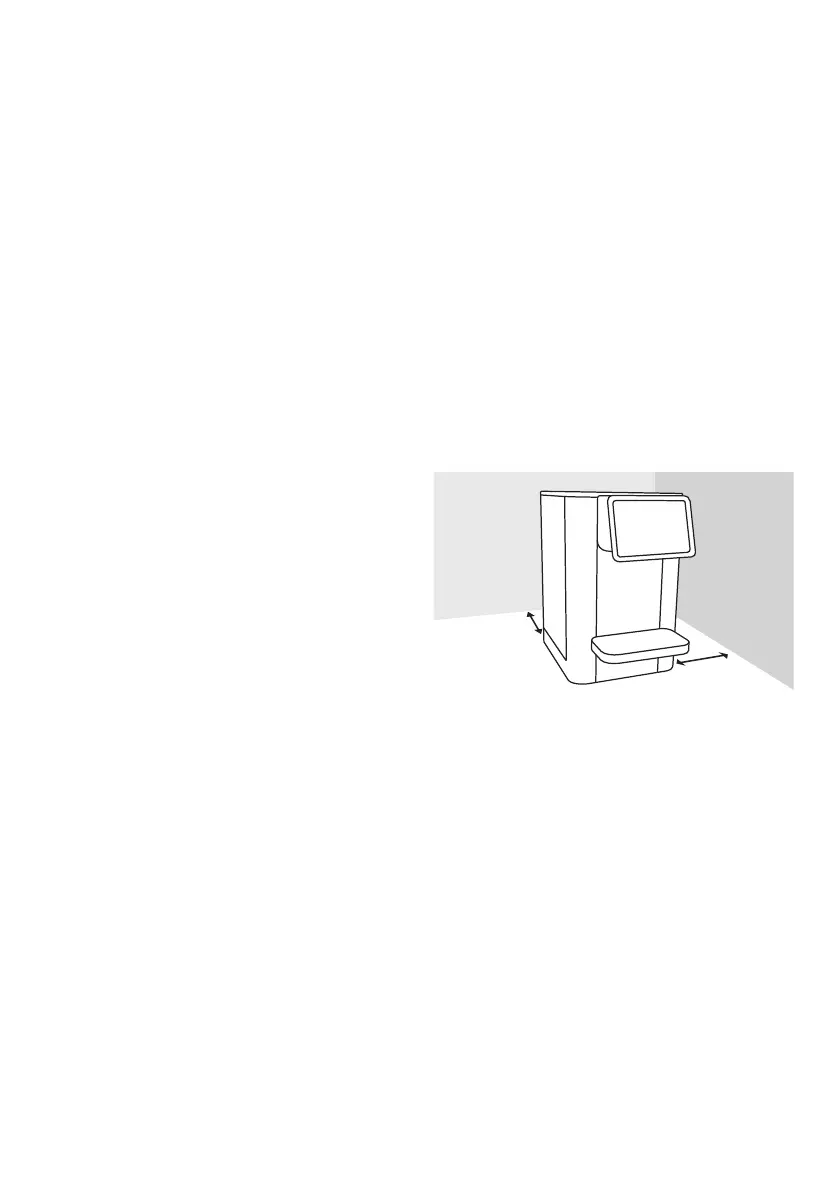
• Ensure that the ventilation on both sides is never blocked
or covered and ensure a minimum distance >4 inches
(100mm) from the rear wall and right side as shown in the
image.
• WARNING: When positioning the appliance, ensure the
supply cord is not trapped or damaged.
• WARNING: Do not locate multiple portable socket-outlets
or portable power supplies at the rear of the appliance.
>4 inches
)
>4 inches
(
100mm
)
5


 To Next Page