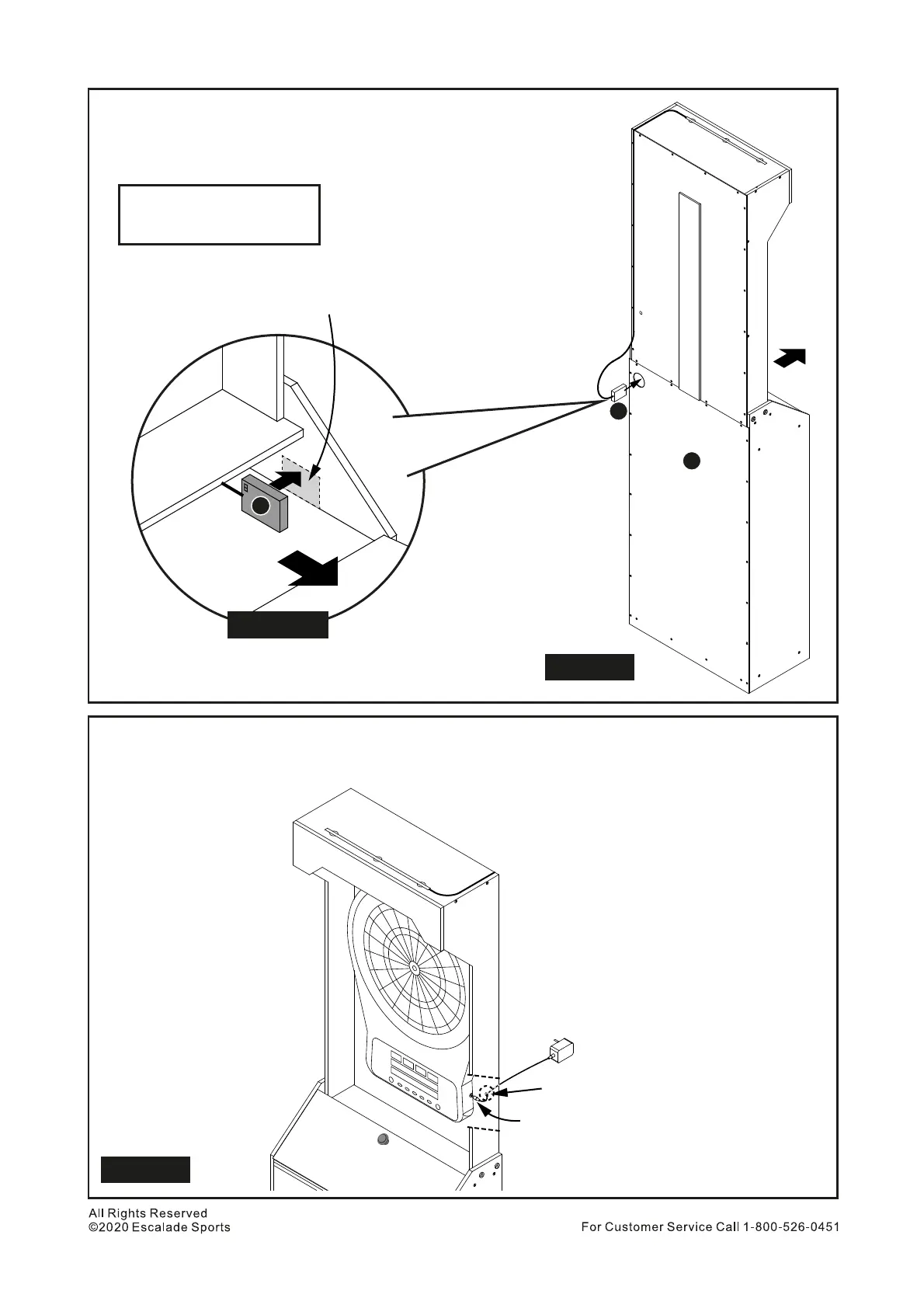
Place Part P Battery Box into lower cabinet upper shelf by going
through the hole on Part F. See Figure 16.
Peel off 3M tape cover on battery box and stick on the inside the bottom
cabinet upper row. See Figure 16A.
32.
33.
P Battery Box - 1 pc
PARTS REQUIRED
Connect the AC Adaptor jack to Electronic Dartboard by going through the small hole on the right
bottom (view from front) of the upper cabinet. See Figure 17.
Connect the AC Adapter plug to a power outlet.
34.
35.
P
F
Place battery box into
lower cabinet upper
shelf by going through
the hole on Part F
Peel off 3M tape cover on battery box and
stick on the side of bottom cabinet.
Figure 16
P
Front
Front
Figure 16A
Plug into a power outlet
Plug into Electronic Dartboard
power jack
Small hole in back of cabinet
for AC adaptor plug & cord
Figure 17
15


 To Next Page