EasyManua.ls Logo

ARAG IBX100 4679004 - User Manual

ARAG IBX100 4679004
60 pages
Print Icon
To Next Page IconTo Next Page
Loading...
INSTALLATION, USE AND MAINTENANCE
4679004
4679005
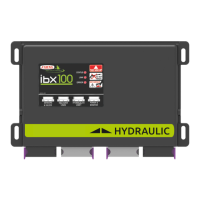
IBX100 ECU CONTROL UNIT
Object Pool rel. 1.2.6

Table of Contents

Questions and Answers

  • M
    Michael FloresSep 4, 2025
    Why does the sprayed surface displayed not match actual sprayed surface on my ARAG Control Unit?
    • M
      maxwellturnerSep 4, 2025
      If the sprayed surface displayed on your ARAG Control Unit does not match the actual sprayed surface, check the boom width setting, the setup of the wheel constant, and the connections to the speed sensor.
  • J
    Joshua PhillipsSep 18, 2025
    What to do if there are three-way section valves in use, but no backfolw calibration on ARAG IBX100 4679004 Control Unit?
    • K
      Kathryn ZimmermanSep 18, 2025
      To solve this problem, perform calibration.
  • R
    Rachel AdamsSep 16, 2025
    What to do if distance travelled count is not reset on ARAG IBX100 4679004?
    • M
      Melissa MillsSep 16, 2025
      To solve this problem, reset the counter.
  • R
    Rhonda SantanaSep 14, 2025
    What to do if covered area count is not reset on ARAG IBX100 4679004?
    • M
      Mark DavidSep 14, 2025
      To solve this problem, reset the counter.
  • S
    Spencer OneillSep 12, 2025
    Why do the valve controls take no effect on my ARAG IBX100 4679004?
    • R
      Roberta JonesSep 12, 2025
      If the valve controls on your ARAG Control Unit have no effect, it might be because the valves are not connected. Connect the IN-CAB cable and the connection cable to the valves.
  • D
    Darren MillerSep 12, 2025
    What to do if one valve does not open on ARAG Control Unit?
    • E
      erinmatthewsSep 12, 2025
      If one valve does not open on your ARAG Control Unit, it could be due to no power supply to the valve. Check the valve electric connection and operation.
  • A
    Austin RussellSep 9, 2025
    Why does the time count displayed not match actual time worked on ARAG IBX100 4679004?
    • J
      Jacob StricklandSep 9, 2025
      If the time count displayed on your ARAG Control Unit does not match the actual time worked, it is because the work time count has not been reset. Reset the counter.
  • A
    alexandermilesSep 7, 2025
    Why does the sprayed fluid count displayed not match litres/gpm actually sprayed on ARAG Control Unit?
    • J
      Jeffrey HensleySep 7, 2025
      If the sprayed fluid count displayed on your ARAG Control Unit does not match the litres/gpm actually sprayed, check the setup of the folwmeter constant and the setup of the section valve type.
  • J
    Jennifer RomeroSep 5, 2025
    Why does the distance traveled count displayed not match actual distance covered on ARAG IBX100 4679004 Control Unit?
    • A
      Angela HughesSep 6, 2025
      If the distance traveled count displayed on your ARAG Control Unit does not match the actual distance covered, it could be due to a wrong setup. Check the setup of the wheel constant. Also, check connections to the speed sensor.
  • A
    anthonyhayesAug 21, 2025
    Why does the ARAG IBX100 4679004 Control Unit display no longer show the speed?
    • S
      saramyersAug 21, 2025
      If the ARAG Control Unit display doesn't show the speed, it could be due to a wrong wheel constant setup. In this case, check the setup of the wheel constant. Another cause might be no signal coming from the speed sensor, so check the connections to the speed sensor.

Summary

System Installation Guide

System Recommended Composition

Details system components and cable selection for correct connection.

Control Unit Fixing

Instructions for securely mounting the control unit on the machine.

Wiring Connections Overview

Introduces wiring connections for the system.

Control Unit Fixing and Dimensions

Control Unit Mounting

Securely fasten the ECU using specified bolts and orientation.

Overall Dimensions

Provides the physical dimensions of the control unit.

Wiring Connections for IBX100

IBX100 Sprayer Wiring

Illustrates connection points for the sprayer unit.

IBX100 Hydraulic Wiring

Shows wiring for hydraulic systems with Seletron.

General Wiring Precautions

Wiring Cable Handling

Use ARAG cables, avoid damage, and ensure correct connections.

Cable Harness Positioning

Route cables to protect from water and damage.

Control Unit (ECU) Connection

Connect wiring harnesses to the control unit sockets.

Securing Seletron Cables

Seletron Cable Routing

Route and secure Seletron cables to prevent damage and ensure proper operation.

Extension Cable Usage

Guidelines for using extension cables for Seletron units.

Component Placement and Routing

Position components and route cables considering machine movement.

Control Unit Valve Connection

System with Section Valves

Connect valves for systems with section valves, ensuring proper seals.

Hydraulic Valve Connection

Connecting Hydraulic Valves

Connect hydraulic valves according to initials and ensure proper seating.

Sensor Connection

ISOBUS System Cable Connection

Advanced Implement Settings

Boom Settings

Flowmeter Configuration

Pressure Sensor Configuration

Valve Settings Configuration

Nozzle Data Configuration

Speed Settings

Rev Counter Configuration

Tank Settings

Device Calibration

Pressure Sensor Zero Value Calibration

Calibrate the pressure sensor to zero if an offset is detected.

Tank Level Zero Value Calibration

Calibrating Tank Level Sensor

Set the tank level sensor to zero when the tank is empty.

Tank Profile Calibration

Performing Tank Profile Calibration

Calibrate the tank profile, ensuring the tank is full of clean water.

Implement Geometry Settings

System Configuration Options

Fence Nozzle Settings

Flowmeter Presets

Working Parameters Configuration

Information and Alarm Settings

Application Rate, Tank, and Flowmeter Alarms

Configure alarms for rate, tank levels, and flowmeter status.

Nozzle, Regulation, and RPM Alarms

Set alarms for nozzle pressure, regulation, and RPM limits.

Seletron and Hardware Fault Alarms

Enable alarms for Seletron status and ECU hardware faults.

System Status Overview

Seletron Connection Status

Monitor the connection status of individual Seletron units.

ISOBUS Protocol Information

Auxiliary Input Status Check

Seletron Status Diagnostics

Installation Progress

Display progress during Seletron pairing procedure.

Checking Seletron Connections

Diagnose connection status of individual Seletron units.

Seletron Connection Procedure

Seletron Connection Diagnostics

Color legend for Seletron status and troubleshooting diagnostics.

Connecting Buffer Zone Nozzles

Sequence for connecting "Buffer zone" Seletrons.

Connecting Fence Nozzles

Sequence for connecting "Fence" Seletrons.

ID Reset for Seletron Devices

Resetting Seletron Identification Numbers

Procedure to reset Seletron IDs before re-pairing.

Seletron Replacement Procedure

Preliminary Operations for Replacement

Safety and setting preparation before replacing Seletrons.

Replacing Seletron Devices

Steps for disconnecting and connecting Seletron devices during replacement.

Automatic Functions Control

Automatic and Manual Nozzle Selection

Main Control and Section Management

Touch-Screen Panel Operations

End Nozzle Functions (Buffer Zone)

Fence Nozzle Functionality

Cleaning and Maintenance Rules

LED Status Key and Indicators

Error Messages and Troubleshooting

Common Error Messages

Lists error messages, their causes, remedies, and job modes.

Troubleshooting Common Faults

Diagnosing and Resolving Valve and Display Issues

Troubleshooting steps for valve control, speed display, and output accuracy.

Diagnosing Sensor and RPM Issues

Troubleshooting steps for sensor signals, RPM display, and connections.

ARAG IBX100 4679004 Specifications

General IconGeneral
ManufacturerARAG
Part Number4679004
ModelIBX100
Product TypeControl Unit
Voltage12 VDC
Protection ClassIP65

Related product manuals