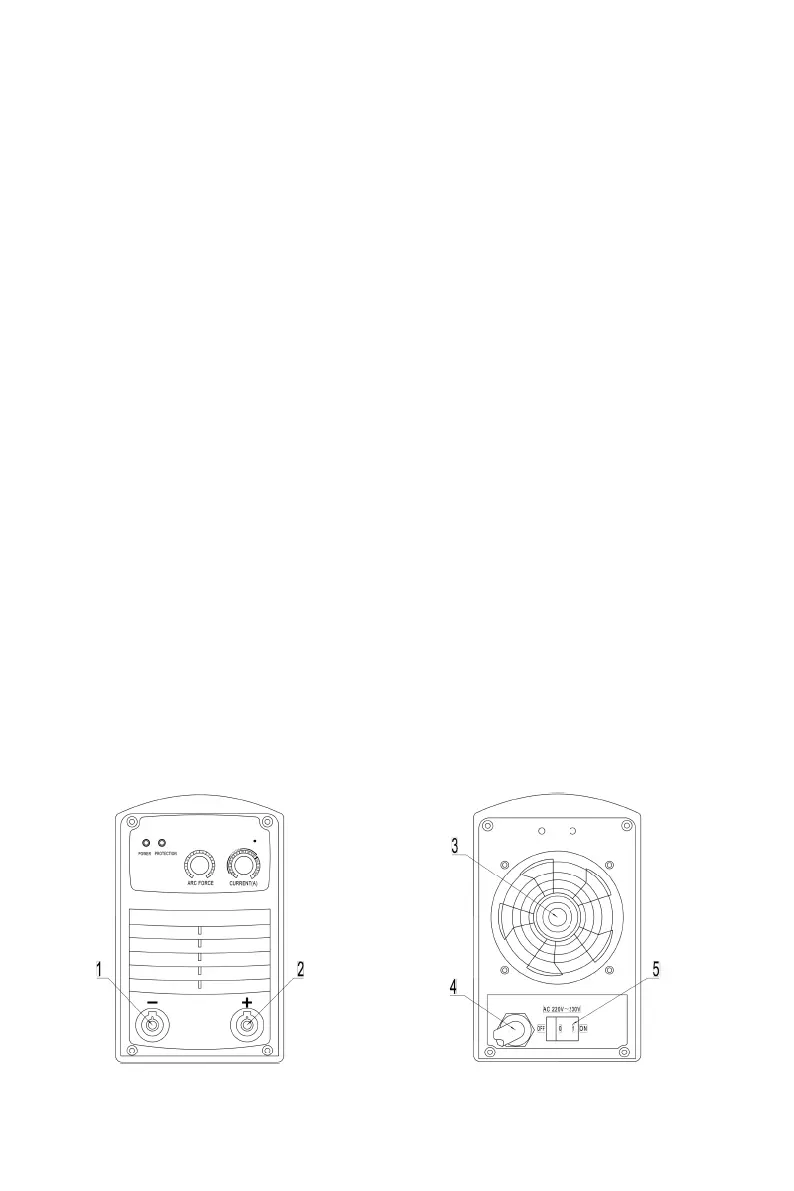
1. Power on indicator
Green color, will light up if the machine is switched on AC230V power supply; light off if there’
s some problems with power supply.
2.Protection on indicator
Yellow color, will light off if the machine operates properly; lights up if the power source
overheats or has some other fault, and machine will stop working automatically. Keep the
machine power on and fan running until the indicator lights off, then wait 20 minutes before
start welding.
3.Welding current adjustment knob
Used for adjusting current value. Adjust welding current according to work piece thickness,
groove shapes, welding position, electrode diameter, etc. Welding current decides welding
seam penetration and wire melt speed.
4.Arc force current adjustment knob
Used for adjusting the arc force current. During welding, improper operation or droplet
transfer may cause short circuit between the electrode and work piece. To reduce this
problem, when the arc voltage is low, increase the arc force can let the droplet transfer into
molten pool as soon as possible, which will reduce the short circuit rate and improve anti-stick
function.
5.MMA/TIG switch(optional)
Used for switching between MMA and TIG;
Switch is on “MMA” position, welding machine is on DC STICK working mode;
Switch is on “TIG ” position, welding machine is on TIG working mode.
4-4 Interface
Fig. 4-4-1: interface


 To Next Page