35
35
9
Connecting the Archos™ 104 to a Stereo system
Connecting the Archos™ 104 to a Stereo system
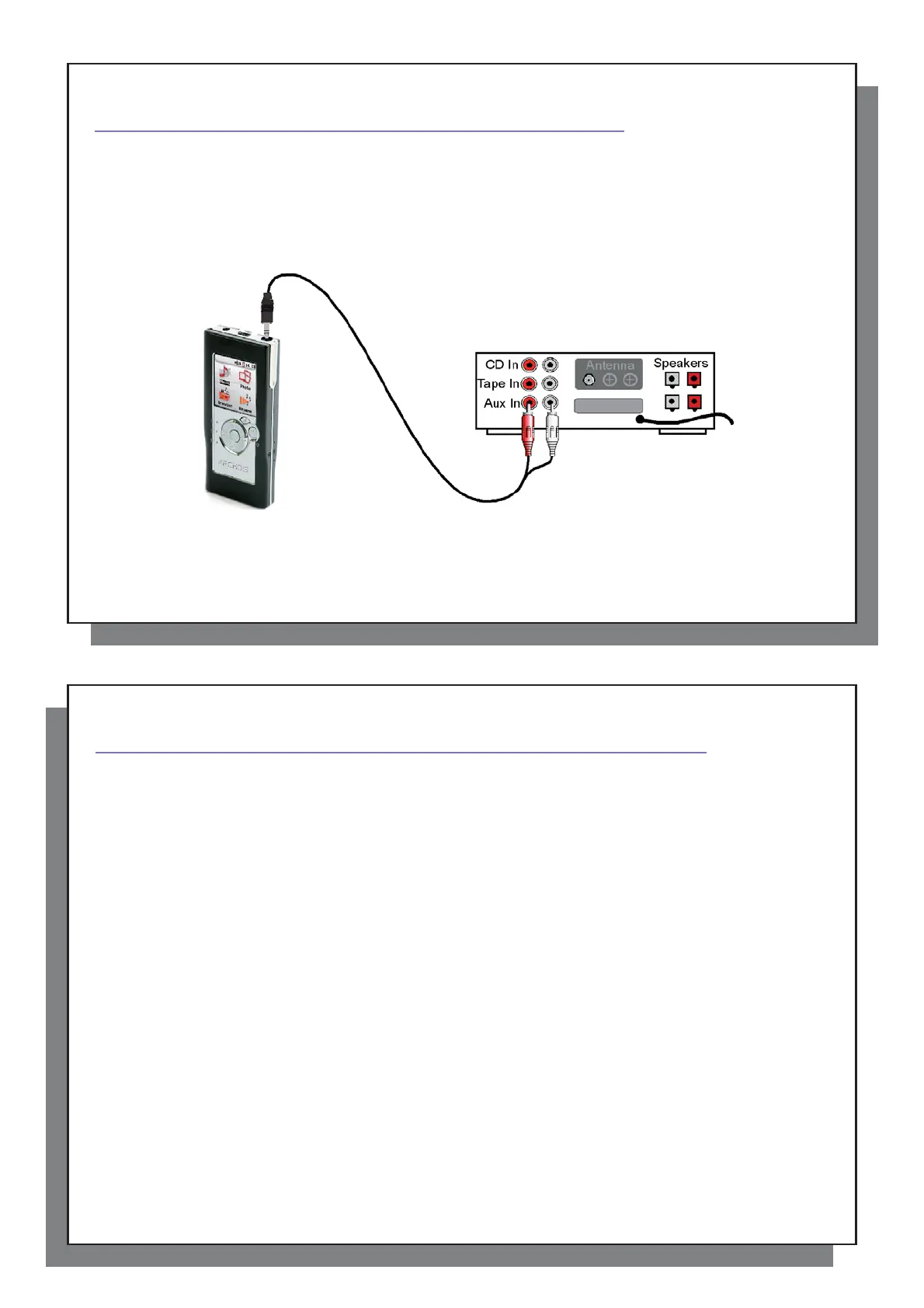
Connecting your Archos™ 104 to a stereo system allows you to listen to your Archos™ 104’s music on it without
a headset. You will need a standard (mini headphone to RCA) audio cable for this which is not supplied with the
Archos™ 104. The diagram below illustrates the setup. Plug the audio cable into the headphone jack and into the
auxiliary jacks on your stereo. Note that this is only a schematic representation of a stereo. If in doubt, the manual
of your stereo will enable you to identify the auxiliary inputs.
36
36
1
0
Connecting the Archos™ 104 to/from your Computer
Connecting the Archos™ 104 to/from your Computer
10.1 USB Connection Type (‘Hard Drive’ or ‘Windows Device’)
10.1 USB Connection Type (‘Hard Drive’ or ‘Windows Device’)
Your device comes confi gured as a Windows® Device and will be immediately recognized by your computer
if you are running Windows
®
XP (with Service Pack 1 minimum) and Windows Media
®
Player 10. If you have
another version of Windows
®
, not sure what version of Windows
®
XP you have, or if you are using a Macintosh
®
,
then you will need to change the USB (Universal Serial Bus) Port setting on the Archos™ 104. You will do this
by going to System and USB Port and change it to ‘Hard Disk’.
10.2 Connecting the Archos™ 104
10.2 Connecting the Archos™ 104
Connection order: See the sections below for your particular computer’s operating system.
1) Turn on the Archos™ 104.
2) With your computer running, plug the USB cable into your computer.
3) Plug in the other end of the USB cable to the Archos™ 104 USB Device port (if your computer asks to install a
new driver for the new hardware, then you must unplug it and change the USB Port to Hard Drive.)
Windows
®
XP
Please verify* that you have Windows® XP and it is updated it to at least, Service Pack 1. You must also
have Windows Media® Player 10 (WMP10) installed on your computer. This way, you can take advantage of
connecting it as a ‘Windows Device’. Connect it to your PC as enumerated above and you can then see the
Archos™ 104 in Windows® Explorer and WMP10. Without Windows® XP Service Pack 1 (a free update) or
Windows Media® 10, you cannot use it as a Windows® recognized ‘Device’ and will have to follow the instructions
for Windows® ME & 2000 below.
* Right-click on ‘My Computer’ select ‘Properties’, and then look in the tab labeled ‘General’. It should say “Service
Pack 1” or higher.
Windows
™
ME and 2000
Attention: Before connecting the Archos™ 104 to your computer with the USB cable, go to Setup>System>USB
Port and change it to ‘Hard Disk’.



 To Next Page