9
9
3.2 Play Screen and Button Control
3.2 Play Screen and Button Control
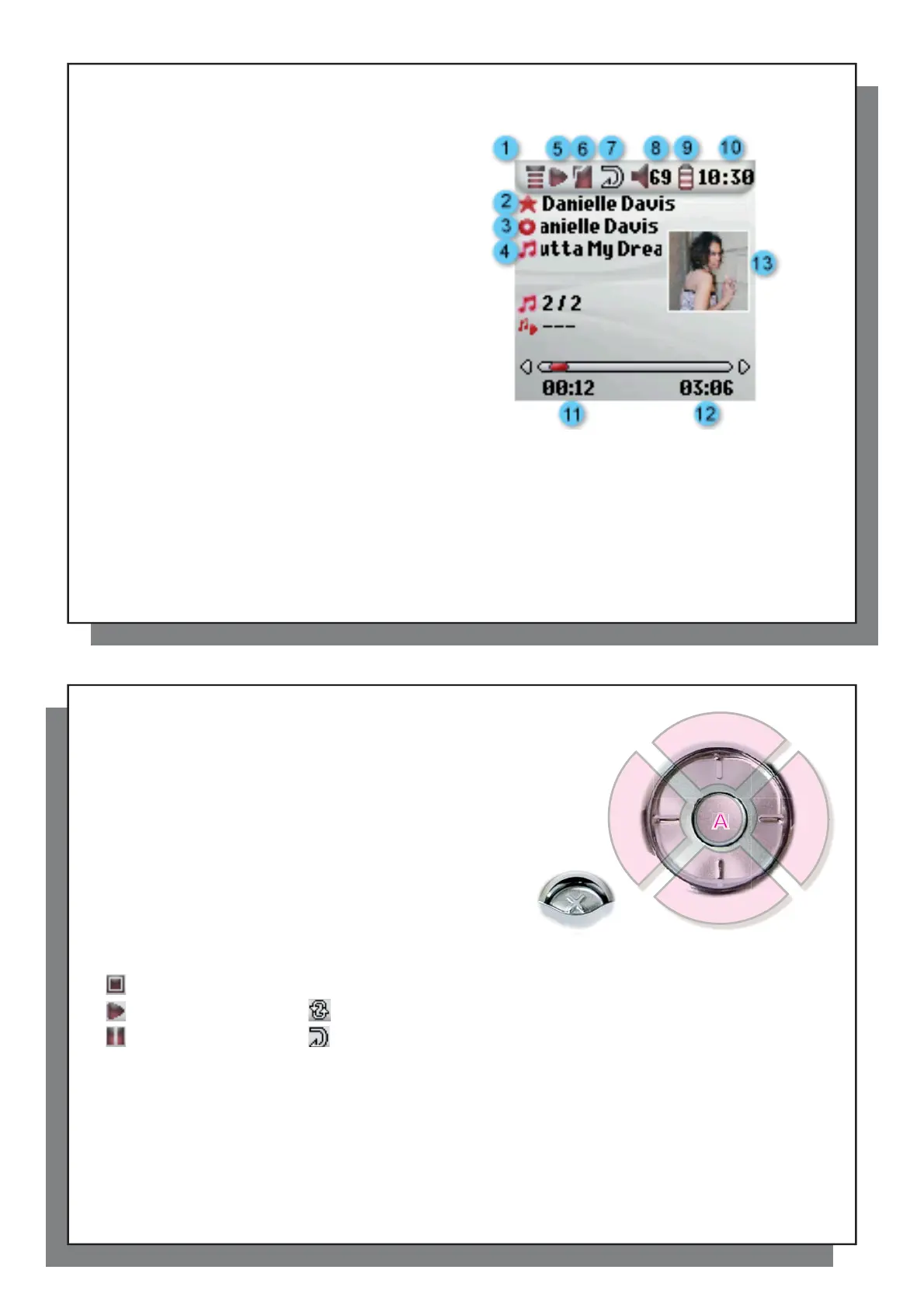
(1) Menu available
(2) Artist* or parent folder
(3) Album* or current folder
(4) Song title* or fi le name
(5) Status: playing
(6) Play Mode: Folder
(7) Play Order: Repeat
(8) Volume (0-99)
(9) Battery level
(10) Real time clock
(11) Song elapsed time
(12) Song remaining time
(13) Album cover (if it is available)
*If the fi le contains these tag data
10
10
A Play/pause/resume song
B Increase the volume
C Click once: Play the next song in the folder or playlist.
Hold: Fast forward through the song.
D Decrease the Volume
E Click once: Play the previous song in the folder or playlist
(during fi rst 10 seconds of song) otherwise go to the
beginning of the song.
Hold: Fast reverse through the song.
F Stop Song
Play Status Play Order
Stopped (no icon) Play once
Playing a track Shuffl e (Random) track selection
Current track is paused Repeat playing
The top status bar indicates the status and play settings that you have given. See the Settings chapter for a
description of the Playmode options.
A
B
C
D
E
F



 To Next Page