26
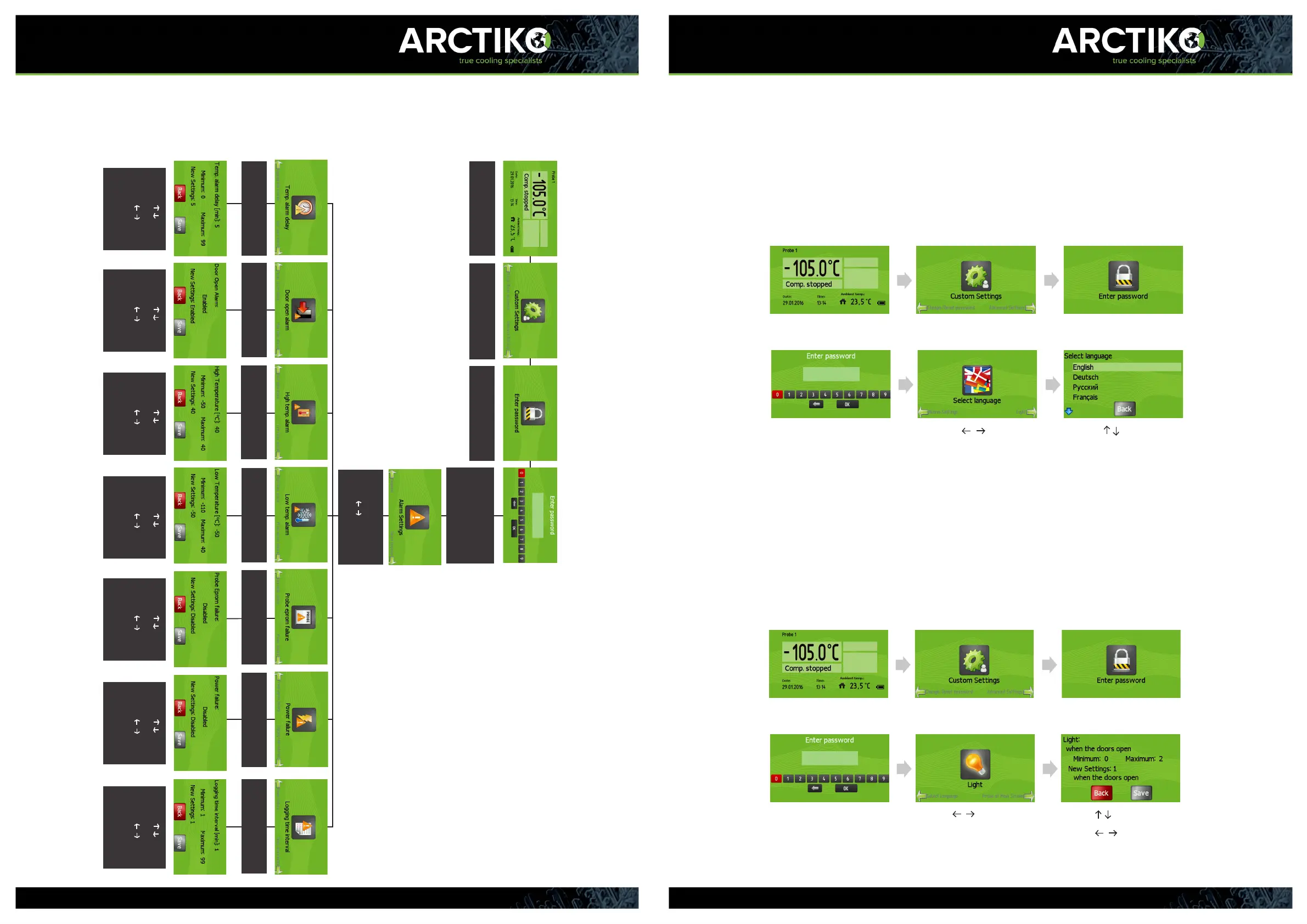
Alarm setting instructions
The password is “0000” -
Press “ENTER” to enter the
highlighted number and
press “ENTER” to continue
Press “ENTER” to access
menu
Press “ENTER” to access
custom settings
Press “ENTER” to type
password
- Press “ENTER” to
access alarm setttings
- Press to select the
desired setting menu
Press “ENTER” to access
Temp. alarm delay
Press “ENTER” to access
Door open alarm
Press “ENTER” to access
High temp. alarm
Press “ENTER” to access
Low temp. alarm
Press “ENTER” to access
Probe eprom failure
Press “ENTER” to access
Power failure
Press “ENTER” to access
Logging time interval
- Use to
change the value
- Use to
highlight “save”
- Press “ENTER” to
save
- Use to
change the value
- Use to
highlight “save”
- Press “ENTER” to
save
- Use to
change the value
- Use to
highlight “save”
- Press “ENTER” to
save
- Use to
change the value
- Use to
highlight “save”
- Press “ENTER” to
save
- Use to
change the value
- Use to
highlight “save”
- Press “ENTER” to
save
- Use to
change the value
- Use to
highlight “save”
- Press “ENTER” to
save
- Use to
change the value
- Use to
highlight “save”
- Press “ENTER” to
save
27
Select language
The default language of the controller is English. The language can be
changed in the “Select language” menu. The available languages are
English, German, Russian, French, Spanish, Swedish, Turkish and Polish.
Changing the language will change the text throughout the controller and can
be done at any time without interrupting the operation of the appliance.
- Press until the
“Select language” appears in
the display
- Press “ENTER” to access
Use to select the
desired language
Press “ENTER” to save
Press “ENTER” to access menu Press “ENTER” to access
custom settings
Press “ENTER” to type password
The password is “0000” -
Press “ENTER” to enter the
highlighted number and press
“ENTER” to continue
Light
It is possible to change the settings of the light in the appliance to suit your
needs. You can choose from three dierent settings:
0. Light always on.
1. Light on, when the door is open.
2. Light on, when the door is closed.
- Press until the “Light”
appears in the display
- Press “ENTER” to access
- Use to change the value
- Use to highlight “save”
Press “ENTER” to save
Press “ENTER” to access menu
Press “ENTER” to access
custom settings
Press “ENTER” to type password
The password is “0000” -
Press “ENTER” to enter the
highlighted number and press
“ENTER” to continue



 To Next Page