35
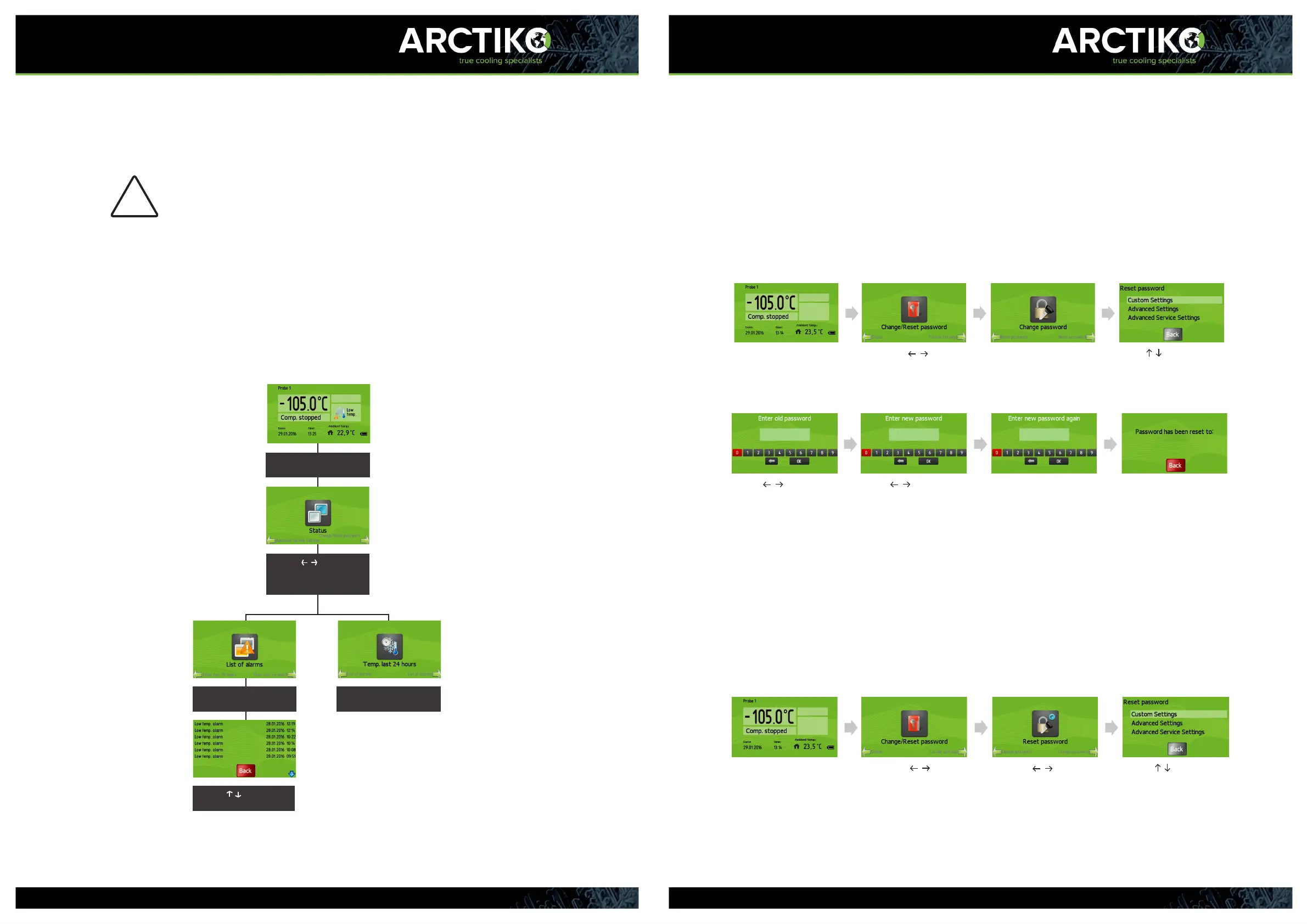
Change/Reset password
You can change the password of the appliance to a personal code to increase
security and prevent unauthorized access to the appliance.
- The factory setting of the password is “0000”.
Change password
Press “ENTER” to access menu - Press until
“Change/ Reset password” appears
in the display
- Press “ENTER”
Press “ENTER” to
“Change password”
- Use to highlight the item
to change
- Press “ENTER” to access
- Use to hightlight
the numbers
- Press “ENTER” to type the
numbers of the OLD password
- Press “ENTER” to submit
- Use to highlight the
numbers
- Press “ENTER” to type the
numbers of the new password
- Press “ENTER” to submit
- Enter NEW password again
- Press “ENTER” to submit
The password has been changed
Reset password
If you forgot the password for the appliance, it is possible to reset to the
factory setting “0000”. In order to reset the password, you need to require a
“reset password” from your Arctiko distributor. - Contact your distributor for
the code needed.
Press “ENTER” to access menu
- Press
until
“Change/ Reset password” appears
in the display
- Press “ENTER”
- Press until the
“Reset password” appears in the
display
- Press “ENTER” to
“Reset password”
- Use to highlight the
item to reset
- Press “ENTER” to access
Advanced service settings
The Advanced service settings are only for qualified Arctiko
technicians use only!
Status
Enter status
The status menu oers a range of monitoring options of the appliance. You
can see a list of current alarms and the temperatures for the last 24 hours.
!
Press “ENTER” to access
menu
- Press until “Status”
appears in the display
- Press “ENTER”
- Use to navigate
through the list of alarms
Press “ENTER” to access
“List of alarms”
Press “ENTER” to access
“Temp. last 24 hours”
- Press “Esc” to exit menu/go back.
- The display will return to the main screen after 1 minute of inactivity.
34



 To Next Page