F-3 MAINTANANCE AND TROUBLESHOOTING F-3
Troubleshooting Guide
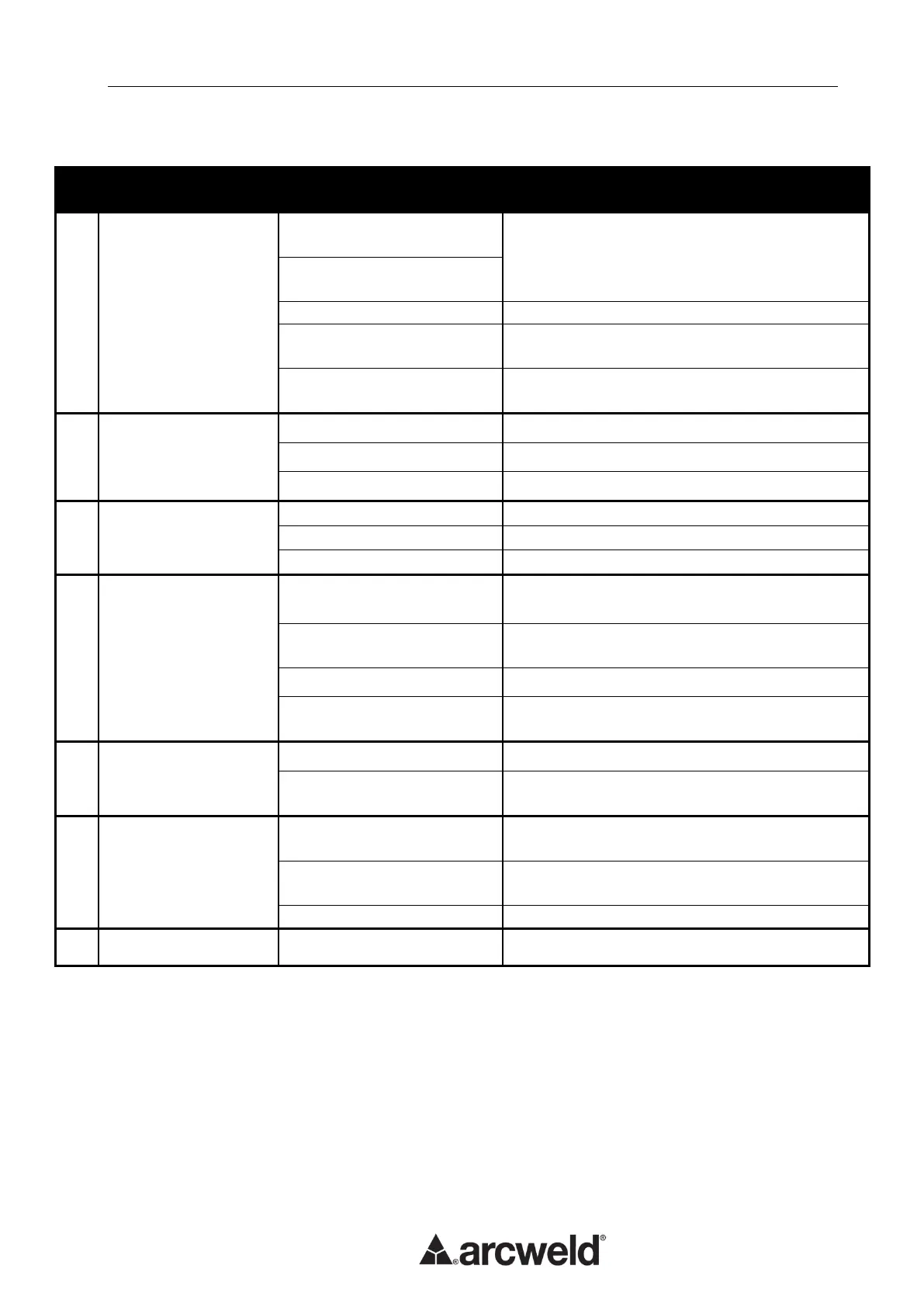
Yellow Thermal
Indicator is on
Input voltage is too high
(≥15%)
Switch off power source; Check the main supply.
Restart welder when power recovers to normal
state.
Input voltage is too low
(≤15%)
Insufficient ventilation.
Ambient temperature is too
high.
It will automatically recover when the
temperature reduces.
Exceeding the rated
duty-cycle.
It will automatically recover when the
temperature reduces.
Wire feeding motor
not working
Increase tension on drive roll
Cooling Fan not
working or turning
very slowly
Replace or repair the fan
Wire broken or disconnected
Arc is not stable and
spatter is large
Too large contact tip makes
the current unsteady
Change to proper contact tip and / or drive roll.
Too thin power cable makes
the power unstable.
Correct the input voltage.
Wire feeding resistance is
too large
Clean or replace the liner and keep the gun
cable straight.
Connect / repair work cable
Work piece has greasy, dirty,
rusty or painted
Clean work piece, ensure good electrical contact
between work clamp and job.
Torch is not connected
properly.
Gas pipe is crimped or
blocked.
Please contact our Field Service Shop.


 To Next Page