5
Add Users under Normal Mode
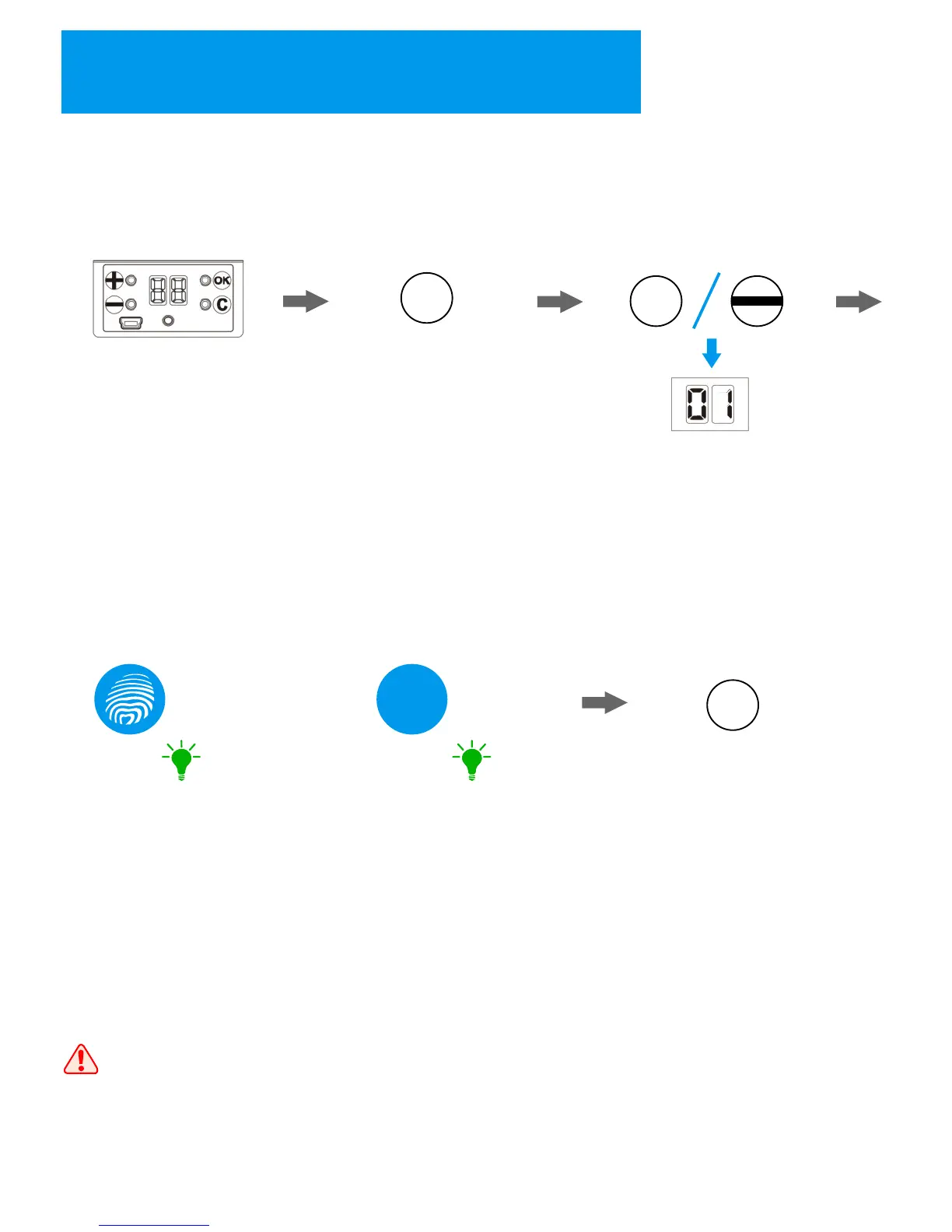
1. Activate the lock
by pressing any key
on the lock;
+
2. Press “+” key to enter
registration state;
3. Press “+” and “-“ key to select
the ID, then press “OK” to confirm;
4. Fingerprint User: Place the
finger on the sensor in 2 times;
(Register Success: the keypad
shows “Green” light with sound;
Register Fail: the keypad shows
“Red” light with sound);
x2
5. Password User: input the
password in 2 times;
(Register Success: the keypad
shows “Green” light with sound;
Register Fail: the keypad shows
“Red” light with sound);
***
x2
6. The lock will show the next ID
for registering another user, repeat
the steps above if there are other
users need to be registered. If not,
you can press “C” to exit.
Once finishing the user's registration, please try to unlock the lock to
make sure the user registration is successful.
“Green” “Green”
C
OR
+
10


 To Next Page