28. How to disable auto-lock function
▲ Function Code: 68#
{#Master code#}+{68#}
29. How to enable / disable Lock-out mode (lock out all
the users if enabled)
▲ Function Code: 99#
{#Master#}+{99#}
30. How to program scheduling by week & time
▲ Function Code: (45#)
1
st
enable daylight saving
2
nd
set up date & time (use 88# function code)
3
rd
adding user code or user card in advance (see No.5 or
No.9 how to add user code & user card)
4
th
program schedule (as below example)
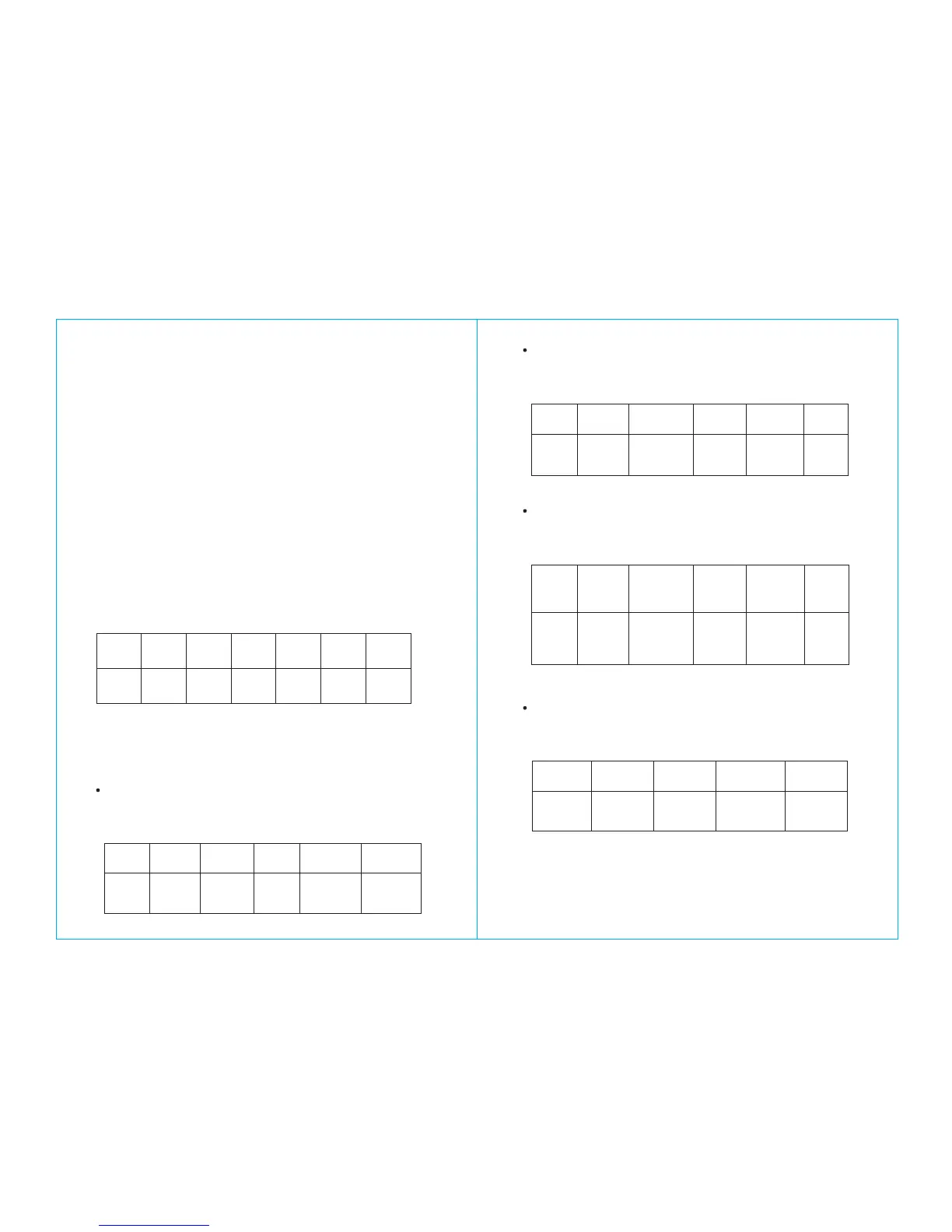
Weekly Schedule Format
Sun Mon Tue Wed Thu Fri Sat
7 1 2 3 4 5 6
Formula: {#master code#}+{function code#}+{user code#
or card}+{weekly schedule day#}+{begin time & ending
time#}
How to schedule with a “User code”
Example: schedule for user code “2222” which will grant
access Mon., Wed. and Fri., from 8:30AM to 5:30PM
#1357# 45# 2222# 135# 0830 1730#
Master
code
Function
code
User code
Beginning
time
Ending time
How to schedule with an “User card”
Example: schedule for user card which will grant access
Mon., Wed. and Fri., from 8:30AM to 5:30PM
#1357# 45# Card# 135# 0830 1730#
Master
code
Function
code
Card
Schedule
Beginning
time
Ending
time
How to schedule with “User-code + user card”
Example: schedule for code “1357” + card which will grant
access Mon., Wed. and Fri., from 8:30AM to 5:30PM
#1357#
135#
0830
1730#
Master
code
Function
code
User code +
user card
Schedule
Beginning
time
Ending
time
How to schedule passage mode (also see number 16.)
Example: schedule passage mode Monday to Friday,
8:30AM to 5:30PM
#1357# 15# 12345# 0830 1730#
Master
code
Function
code
Schedule
Beginning
time



 To Previous Page