

EasyManua.ls Logo

Arenti IN1 - User Manual

Arenti IN1
10 pages
Print Icon
To Next Page IconTo Next Page
Loading...
Wi-Fi FHD
Indoor Camera
IN1 (IN1T)
Quick
Guide
Question and Answer IconNeed help?

Do you have a question about the Arenti IN1 and is the answer not in the manual?

Summary

Camera Identification and Components

Camera Components Overview

Identifies key physical components like status light, lens, and card slot with their functions.

Infrared LEDs for Night Vision

Explains the function of infrared LEDs for capturing images in both day and night conditions.

Camera Lens Specifications

Details the camera lens resolution (FHD) and its field of view (115 degrees).

Micro SD Card Slot Usage

Describes the use of the micro SD card slot for recording video footage.

Downloading and Registering the Arenti App

Download Arenti Mobile App

Instructions for downloading the Arenti app from the App Store or Google Play.

Account Setup and Permissions

Steps to create an account and grant necessary permissions for notifications.

Device Pairing via QR Configuration

Initiating Device Pairing

Steps to add a new device and select the camera type for the pairing process.

Device Power On and Reset

Instructions for powering on the camera and performing a reset for pairing readiness.

Wi-Fi Network Configuration

Setting up the camera with a 2.4GHz Wi-Fi network and entering the password.

QR Code Generation and Scanning

Generating a QR code on the phone for the camera to scan to establish connection.

Network Connection Process

App connects to the camera, indicated by status light changes, after successful scanning.

Confirmation and Device Naming

Confirms successful pairing and allows editing the device name or assigning it to a room.

Using the Arenti Camera Features

Live Viewing Interface

Details on the live viewing screen, including controls for viewing and settings.

History and Playback

Guidance on accessing recorded footage via history, calendar, or search functions.

Installation and Troubleshooting

Wall Mount Installation

Instructions for mounting the camera onto a wall using the provided stand and screws.

Status Light Indicators

Explanation of different status light patterns and their meanings during operation.

Pairing Failure Troubleshooting

Steps to resolve issues if the device fails to pair with the Arenti app.

5 GHz Wireless Compatibility

Clarifies that the Arenti device does not support 5GHz wireless connections.

Network Change and SD Card Issues

Guidance on changing network routers and troubleshooting SD card identification problems.

FCC Statement and Compliance

FCC Compliance Rules

States compliance with FCC rules regarding interference and operation.

RF Exposure Guidelines

Advises on installation and operation to maintain compliance with RF exposure guidelines.

Overview

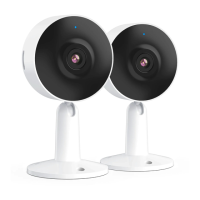
This document describes the Arenti Wi-Fi FHD Indoor Camera, model IN1 (IN1T), a smart home product designed for indoor surveillance. The camera offers full high-definition (FHD) video with a 115° field of view, allowing for comprehensive monitoring of indoor spaces.

Function Description:

The Arenti Wi-Fi FHD Indoor Camera is a smart indoor camera that allows users to monitor their home remotely via a smartphone or tablet. It connects to your home Wi-Fi network and provides live video streaming, recording capabilities, and various smart features. The camera is designed to capture both day and night images thanks to its infrared LEDs. It supports local video recording via a micro SD card slot and offers cloud storage options. The device also includes motion detection, two-way audio communication (intercom), and notification history.
Important Technical Specifications:

  • Video Resolution: Full HD (FHD)
  • Field of View: 115°
  • Connectivity: Wi-Fi (supports 2.4GHz networks only; does not support 5GHz wireless connection)
  • Storage: Micro SD card slot (supports FAT32 format), Cloud storage
  • Power: AC adaptor via USB cable
  • Mounting: Wall mountable with included screws and wall plugs
  • Rotation: 360° horizontal rotation, 0-120° vertical tilt
  • Status Indicator Light:
    • Blinking (red): Currently connecting or awaiting Wi-Fi connection (faster blinking)
    • Solid on (red): Camera or network is abnormal
    • Solid on (blue): Successfully connected and ready for use
    • Blinking (red slowly, 1 time per second): In pairing mode
  • FCC Compliance: Part 15 of FCC Rules, Class B digital device. Requires a minimum distance of 20 cm between the radiator and your body for RF exposure compliance.

Usage Features:

  • Easy Setup: The camera is set up using the Arenti app, available on the App Store and Google Play. Users download the app, register an account, and follow on-screen prompts to pair the device.
  • QR Code Configuration: Device pairing involves scanning a QR code generated by the app with the camera lens. The phone should be held 15-25cm (5-8 inches) from the camera lens during this process.
  • Live Viewing: The Arenti app provides a live view interface with several controls:
    • Screenshot/Record: Capture photos or videos during live view, saved to the smartphone's internal memory.
    • Intercom: Enable two-way talk function.
    • Motion Detection: Enable motion detection alerts.
    • Timestamp: Display time on video.
    • Volume On/Off: Control audio output.
    • HD/SD Switch: Adjust video quality.
    • Full Screen Display: View video in full screen.
    • Stream Bit Rate: Monitor data transfer rate.
    • WiFi Signal Status: Check Wi-Fi signal strength.
    • Notification History: Access past alerts.
    • Cloud Storage Service: Manage cloud recordings.
  • History Playback: Users can review recorded video clips from the SD card or cloud storage by selecting a specific date.
  • Device Management: The app allows users to edit the device name, assign it to a specific room, and manage multiple Arenti devices.
  • Notifications: The app sends notifications for events like motion detection, which can be configured in settings.

Maintenance Features:

  • Reset Function: If pairing fails or the camera needs to be reconfigured, a reset button is available. Holding the RESET button for 4-5 seconds will reset the device.
  • Wi-Fi Network Change: To connect the camera to a different Wi-Fi network or router, the device must be reset or removed from the Arenti app and then reconfigured.
  • SD Card Management:
    • It is recommended to plug in the SD card after power cut.
    • Ensure the SD card is normally available and formatted to FAT32.
    • If the device doesn't identify the SD card, check the card's format and ensure a stable internet environment.
  • Troubleshooting: The manual provides troubleshooting steps for common issues, such as pairing failures (checking Wi-Fi network type, password, pairing mode, and network activity) and SD card identification problems.
  • Installation: The camera comes with a mounting stand, screws, and wall plugs for easy installation. Users should mark screw positions using the stand as a template, drill holes, insert wall plugs, and then secure the stand. Before final installation, it's crucial to check Wi-Fi strength in the chosen location to ensure full functionality.
  • Online Support: For further assistance, users can visit the official Arenti website.

Arenti IN1 Specifications

General IconGeneral
BrandArenti
ModelIN1
CategoryIP Camera
LanguageEnglish