EasyManua.ls Logo

Argo Holly - Mode Button

Argo Holly
12 pages
Print Icon
To Next Page IconTo Next Page
To Previous Page IconTo Previous Page
Loading...
22
V 12/17
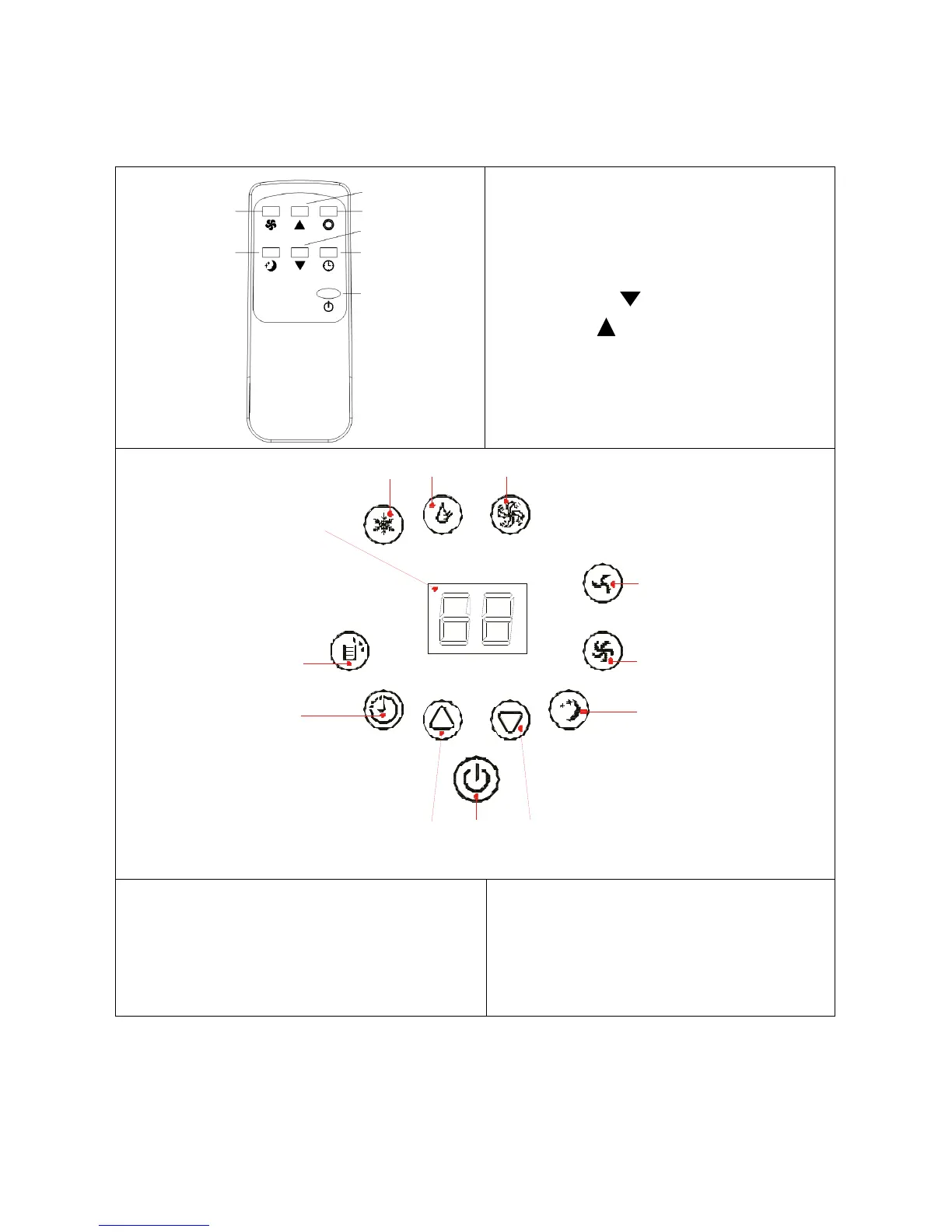
FOR OPTIMAL REMOTE CONTROL OPERATION, POINT THE TRANSMITTER HEAD TOWARDS THE
RECEIVER ON THE AIR CONDITIONER.
1. ON/OFF BUTTON
2. BUTTON MODE
3. SLEEP BUTTON
4. DOWN BUTTON
5. UP BUTTON
6. SPEED BUTTON
7. TIMER BUTTON
1
4
5
3
6b
6
a
2c2b2a
9
8
7
1) ON/OFF BUTTON
2) MODE BUTTON
2a COOLING
2b DEHUMIDIFYING
2c FAN
3) SLEEP BUTTON
4/5) UP / DOWN BUTTON
6) SPEED BUTTON
6a LOW VENTILATION
6b HIGH VENTILATION
7) TIMER BUTTON
8) FULL TANK
9) DISPLAY
(1) POWER BUTTON (on the remote control and on the control panel)
Press this button to switch the unit on or off.
(2) MODE BUTTON
When the unit is on, press this button to choose the desired mode among: COOLING, FAN and DEHUMIDIFYING.
1
2
3
4
5
6
7

Related product manuals