V 05/15
6
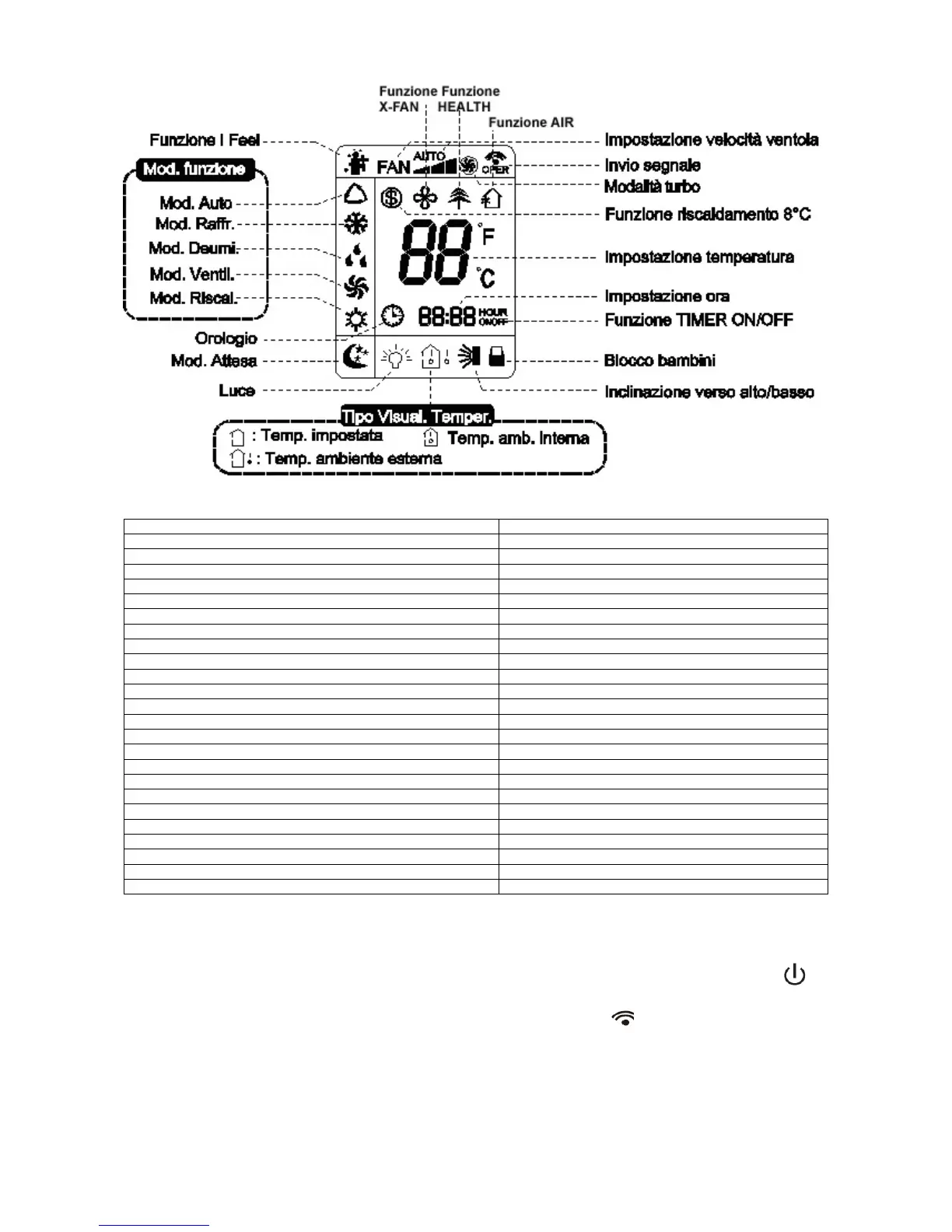
Getting to know the display icons
Funzione I Feel I Feel function
Mod. funzione Operating mode
Mod. Raffr. Cool mode
Mod. Deumi. Dry mode
Mod. Ventil. Fan mode
Mod. Riscal. Heat mode
Orologio Clock
Mod.Attesa Sleep mode
Luce Light
Funzione X-Fan X-Fan function
Funzione HEALTH HEALTH function
Funzione AIR AIR function
Impostazionevelocitàventola Fan speed setting
Inviosegnale Signal transmission
Modalità turbo Turbo mode
Funzioneriscaldamento 8°C 8°C heating function
Impostazionetemperatura Temperature setting
Impostazioneora Time setting
Funzione TIMER ON/OFF TIMER ON/OFF function
Blocco bambini Parental lock
Inclinazione verso alto/basso Up/down swing
Tipo Visual. Temper. Temp. display
Temp. Impostata Set temp.
Temp. Ambienteesterna Outdoor ambient temp.
Temp. Amb. Interna Indoor ambient temp.
Getting to know the remote control buttons
N.B.:
• When you connect the power, the air conditioner will emit a beep. The power indicator will
illuminate (red). You will now be able to control the air conditioner with the remote control.
• When you press the ON/OFF button on the remote control, the
icon on the remote control
display will flash once and the air conditioner will emit a beep. This means that the signal has
been sent to the unit.
When the unit is on, the icons for the set functions will appear on the display.
• Pressing the ON/OFF button again will turn off the unit. The set temperature and the clock icon
will appear on the remote control display. (If the Timer ON, Timer OFF and light functions have
been set, the corresponding icons will also appear on the remote control display).




 To Next Page