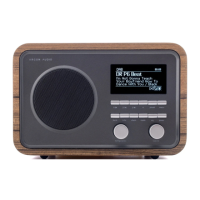
The Argon Audio Radio 2i MK2 is a sophisticated yet user-friendly Wi-Fi connected audio system designed to deliver high-quality sound at a value-for-money price. Engineered in Denmark, it combines a Scandinavian design aesthetic with a comprehensive set of features for an enjoyable listening experience.
Function Description:
The Radio 2i MK2 serves as a versatile audio hub, offering multiple modes for accessing a wide range of audio content. It supports DAB+/FM broadcast radio, providing access to local digital and analogue stations. For a global listening experience, it features Internet Radio, with access to over 20,000 stations and "Listen again" broadcasts, as well as Podcasts, offering a vast selection of global podcasts. The device is also equipped with Spotify Connect, allowing users to stream and control music directly from the Spotify app on their phone, tablet, or computer. Bluetooth connectivity enables streaming and control from any Bluetooth Smart device. For external audio sources, an Aux-in port is provided, making it compatible with devices like MP3 players. The unit also includes a Line out for connection to an external amplifier and a headphone out for private listening.
Usage Features:
The Radio 2i MK2 is designed for intuitive operation, featuring a large 2.7-inch display that provides clear information with up to six lines of text. Navigation is primarily done through a rotary control for tuning/selection and volume adjustment. Dedicated buttons for Power, EQ, Mode, Alarm, Info, Back, Menu, and Presets (1-4) offer quick access to various functions.
- Setup Wizard: Upon first startup, a setup wizard guides the user through essential configurations, including date/time format (12/24 hour display), auto-update settings for time (from DAB, FM, or Network), and network connection. This ensures the device is ready for use quickly.
- Time and Alarms: The device features a clock with auto-update capability, ensuring accurate time display. It includes dual independent alarms, which can be set to wake users with a buzzer, Internet radio, DAB, or FM. Alarms can be configured for daily, once, weekends, or weekdays, with adjustable volume. A snooze function is also available when an alarm is sounding.
- Sleep Timer: A sleep function allows users to set a timer (15, 30, 45, or 60 minutes) after which the system will automatically turn off, perfect for falling asleep to music or radio.
- Equaliser: Users can customize their audio experience with several preset EQ modes (Classic, Pop, News, My EQ) or create a user-defined setting with custom bass, treble, and loudness adjustments.
- Streaming Audio Quality: For streaming services, users can select their preferred audio quality level (Low, Normal, High), with the actual bit rate depending on the service in use.
- Network Management: The Radio 2i MK2 remembers the last four wireless networks it has connected to and automatically attempts to reconnect. Users can view and delete registered networks, as well as manually alter network settings for troubleshooting.
- Language Support: The default language is English, but users can easily change it to their preferred language from the system settings.
- Presets: The device allows users to store up to 10 presets for Internet Radio, DAB, and FM stations. These presets are separate for each mode, offering quick access to favorite stations.
- Now Playing Information: While playing, the screen displays relevant information such as station name, description, artist, and track information. Pressing the Info button cycles through additional details like slogan, language/location, codec and sampling rate, playback buffer, and today's date.
- DAB Radio Specifics: In DAB mode, the device automatically performs a full scan for available stations. Users can manually initiate scans and prune invalid stations. Dynamic Range Compression (DRC) is available to adjust the dynamic range of the output audio, useful in noisy environments. Station order can be set to Alphanumeric, Ensemble, or Valid.
- FM Radio Specifics: In FM mode, the device scans the FM band for stations. Users can scan up or down manually or with quick presses. Scan settings can be adjusted to stop only at stations with good signal strength. Audio settings allow for listening in mono only for weak stations to reduce hiss.
- Spotify Connect: When using Spotify Connect, the device acts as a remote control for Spotify playback. If playback stops, the device will show "no media" and users need to press the MODE button to return to other radio modes.
- Bluetooth: Allows for wireless streaming from compatible devices.
Maintenance Features:
- Software Update: Argon Audio periodically releases software upgrades with bug fixes and new features. The Radio 2i MK2 can be set to check for updates automatically (default) or manually. During a software upgrade, it is crucial to ensure a stable mains power connection to prevent permanent damage.
- Factory Reset: A factory reset option is available to restore all user settings to default values, including time/date, network configuration, and presets. The current software version is maintained during a factory reset.
- Inactive Standby: The device includes an automatic standby function that puts the unit into standby if it's not operated for a set amount of hours, even if music is playing. This feature can be activated or changed through the system settings.
- Cleaning: The device should be cleaned only with a dry cloth. It is important to unplug the product from the wall outlet before cleaning.
- Safety: The manual provides important safety instructions, emphasizing not to use the product near water, to place it on a solid surface, and to ensure proper ventilation. It also advises against attempting to service the product oneself and to protect the power cord.

 Need help?
 General

 To Next Page
