EN - 31
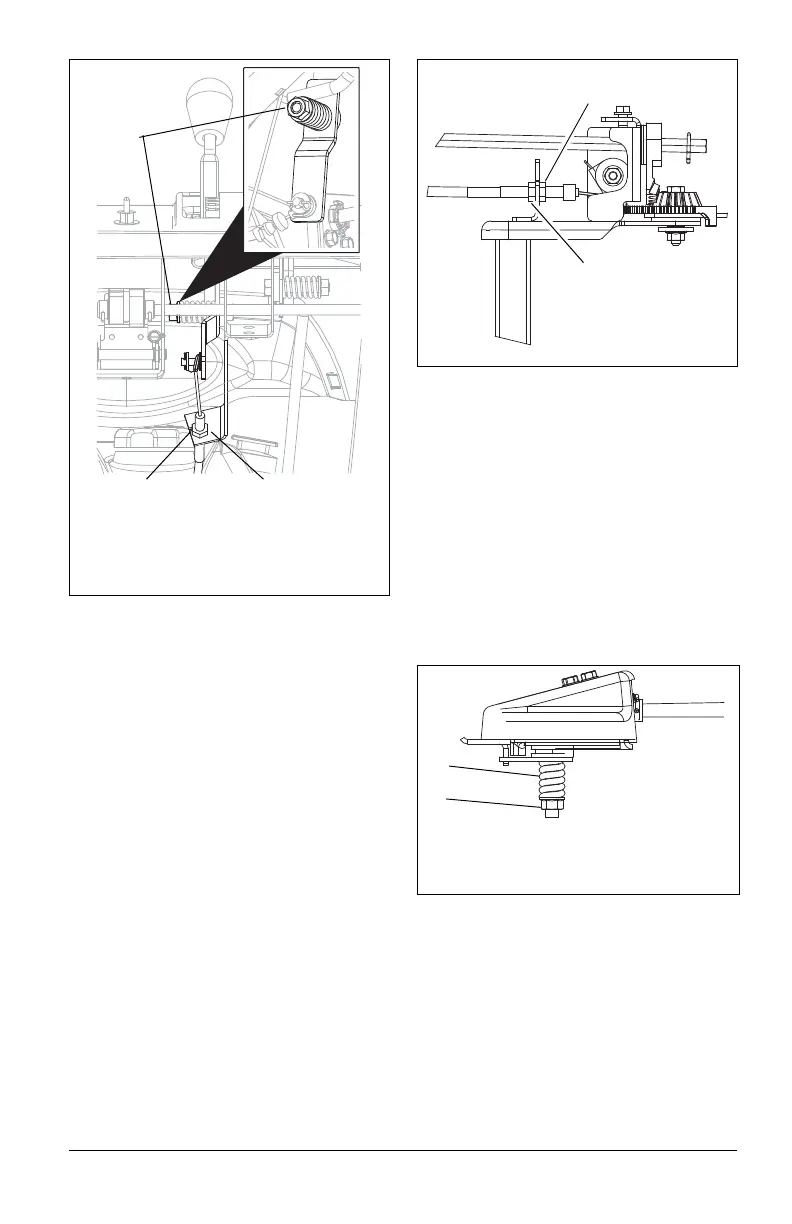
If deflector does not follow full range of travel:
1. Push deflector remote all the way
forward.
2. Loosen adjusting nuts on cable support
bracket underneath the control p
anel
(F
igure 29).
3. To adjust the deflector lower:
Slide cable down. Tighten bottom nut.
4. To adjust deflector higher:
Slide cable up. Tighten top nut.
5. Check travel and repeat adjustment
as
ne
cessary.
DISCHARGE CHUTE
(Models 921028, 029)
(Figure 30)
If chute does not stay in position while
throwing snow or if chute does not rotate
freely, adjust the cable under the gear cover
so the chute lock fingers engage or
disengage the locking gear.
If chute does not stay in position:
Loosen the cable by loosening the rear
adjustment nut, and then tightening the
forward adjustment nut against the bracket
until the lock arm engages the gear teeth.
If chute does not rotate freely:
Tighten the cable by loosening the forward
adjustment nut, and then tightening the rear
adjustment nut against the bracket until all
cable slack is removed and lock arm engages
teeth (Figure 30).
DISCHARGE CHUTE CONTROL
(Models 921023, 024, 030, 032, 035,
036, 037)
(Figure 31)
If discharge chute does not stay in position
while operating, tighten nut on carriage bolt at
pivot point to increase tension on spring.
SPEED SELECTOR ADJUSTMENT
(Figure 32)
To adjust:
1. Disconnect adjustment pivot pin fr
om
speed
selector lever by removi
ng
hairpin.
2.
Place the speed selector on the cont
rol
p
anel in the fastest forw
ard speed
posit
ion.
Figure 29
2
1
1. Cable Adjusting Nuts
2. Cable Support Bracket
3. Control Lever Nut
3
Figure 30
1. Forward
A
djustment Nut
2.
Rear Adjust
ment
Nut
Figure 31
1. Spring
2. Nut
1
2



 To Next Page