EN - 27
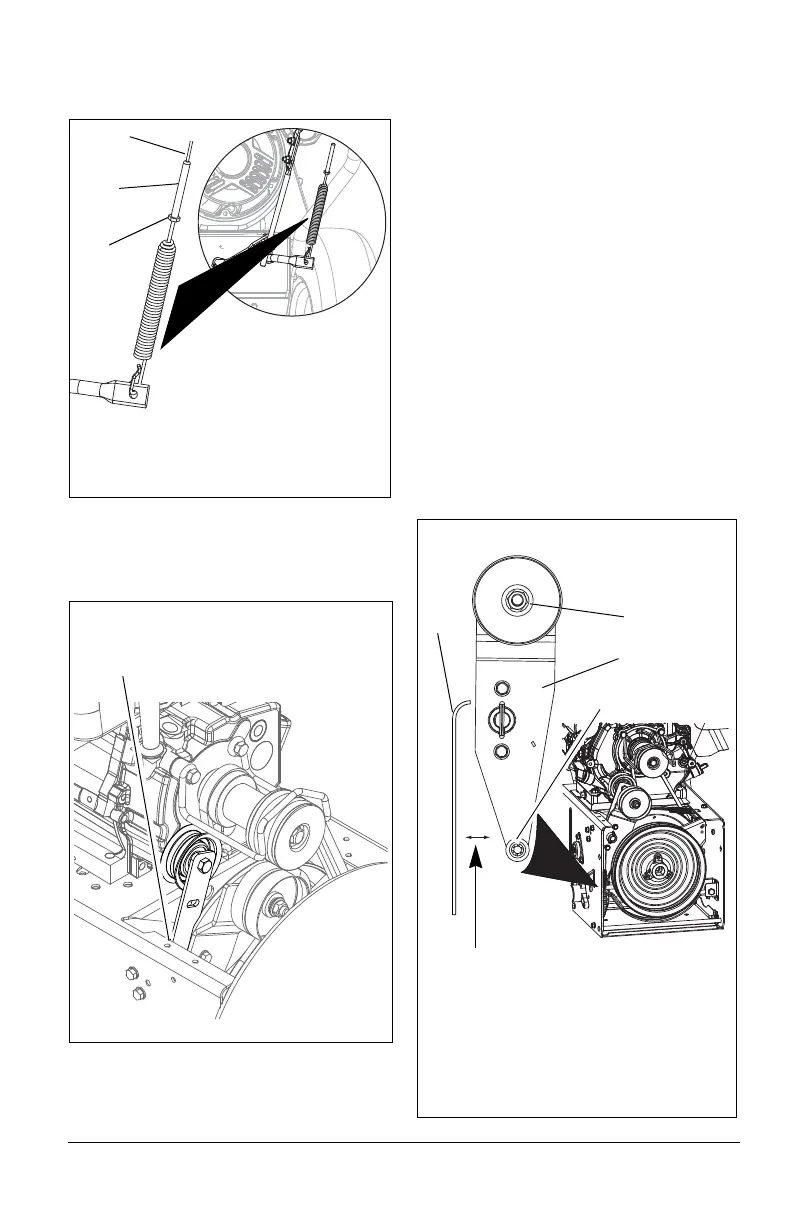
4. Loosen jam nut on cable adjustment
barrel, and then turn the adjustment
barrel down to shorten cable and
remove all cable slack (Figure 26).
5. With the attachment clutch disengaged,
check that the attachment idler arm
lightly touches the frame. (Figure 27).
6. Tighten jam nut on the adjustment
barrel.
\
Check Attachment Idler Arm Roller
Clearance
(Figure 28)
NOTICE: It will be difficult to check the
measurement inside the frame. Use a 1/2"
(12.7 mm) minimum spacer as a gauge to
check the clearance between the roller and
the frame.
1. Place the unit into the service position.
Remove the bottom cover.
2. With the clutch lever engaged, check the
clearance between the frame and plastic
roller on the lower end of the attachment
idler arm (Figure 28).
• If roller is 1/2 – 7/8" (12.7 – 22.2 mm)
from frame, no further adjustments are
required.
• If roller is less than 1/2" (12.7 mm)
from frame, loosen idler adjustment
nut and move idler closer to the belt.
Tighten adjustment nut and recheck
the roller clearance.
• If roller is more than 7/8" (22.2 mm)
from frame, loosen idler adjustment
nut and move idler away from the belt.
Tighten adjustment nut and recheck
roller clearance.
Figure 26
1. Attachment Clutch Cable
2. Adjustment Barrel
3. Jam Nut
2
3
1
Figure 27
With the attachment clutch disengaged,
check the attachment idler arm position
here. The attachment idler arm should
lightly touch the frame.
Figure 28
Some components removed for
clarity of illustration.
Roller should be 1/2 – 7/8" (12.7 – 22.2
mm) from the frame when the attachment
clutch is engaged.
1. Idler Adjustment Nut
2. Attachment Idler Arm
3. Roller
4. Frame
1
2
3
4




 To Next Page