/ 41
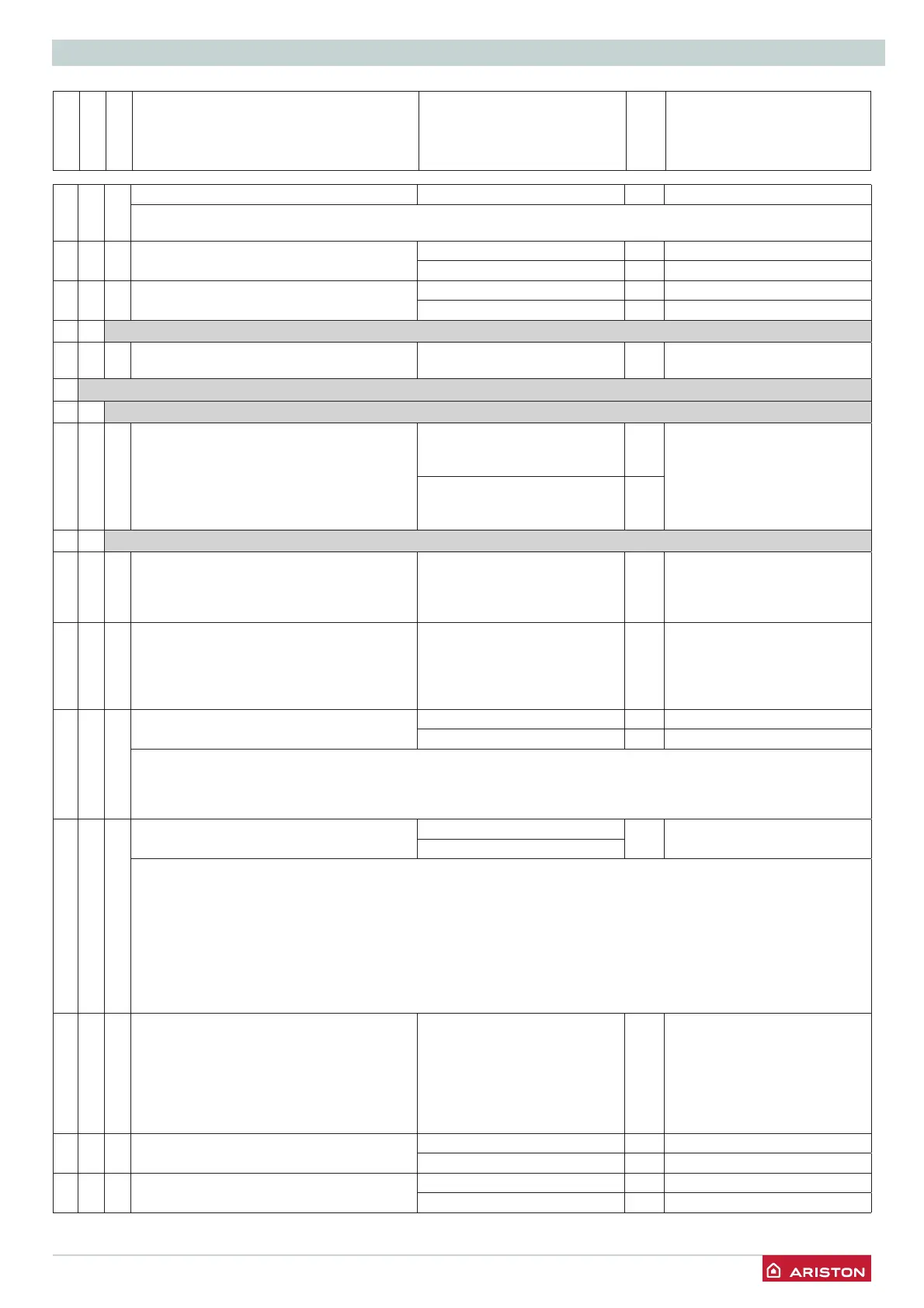
SETTINGS - ADJUSTMENT - PROBLEM IDENTIFICATION MENUS
menu
sub-menu
Parameter
Description value
default setting
424 Compensation from 0 to 20 20
if setting = 0, the temperature taken from the ambient sensor does not affect the calculation of the setting. If setting = 20,
the temperature taken has maximum infl uence on the setting.
425Zone 1 heating MAXIMUM temperature
setting
from 35 to 85 °C 82 if parameter 420 = 1
from 20 to 45 °C 45 if parameter 420 = 0
426Zone 1 heating MINIMUM temperature
setting
from 35 to 85 °C 35 if parameter 420 = 1
from 20 to 45 °C 25 if parameter 420 = 0
4 3 DIAGNOSTICS
434Zone 1 heat request 0 = OFF
1 = ON
5 ZONE 2 PARAMETER
5 0 ZONE 2 TEMPERATURE SETTING
502 Heating fi xed temperature setting
“Heating fi xed temp”
from 35 to 82 °C
(high temperature - para. 420
=1)
70 Activated only with temperature
control and fi xed temperature
(see 521)
from 20 to 45 °C
(high temperature - para. 420
=0)
20
5 2 ZONE 2 SETTING
520Heating appliance temperature value setting 0 = from 20 to 45°C
(low temper ature)
1 = from 35 to 85°C
(high temperature)
1 select in the appliance type
base
521 Basic heating control type selection type
depending on the peripheral devices
connected
0 = fi xed fl ow temperature
1 = device On/Off
2 = NOT PRESENT
3 = external sensor only
4 = NOT PRESENT
1 To activate heating control,
press the AUTO button. The
display lights up the AUTO
symbol
522Slope from 0_2 to 0_8 (low temperature)
from 1_0 to 3_5 1_5 (high temperature)
- see graph on the previous page
If the external sensor is used, the boiler calculates the most suitable heating fl ow temperature taking the external
temperature and the type of appliance into account.
The type of curve must be chosen according to the type of appliance radiator and the heat losses present in the building.
523Parallel curve shift Zone 2 Offset from - 7 to + 7 (low temperature) 0
from - 14 to + 14
(high temperature)
To adapt the thermal curve to the appliance requirements, it is possible to perform a parallel shift of the curve in order
to alter the calculated fl ow temperature and therefore the ambient temperature.
By accessing this parameter or pressing the buttons 12 the curve can be shifted in a parallel manner as indicated in the
fi gure shown below.
The value is indicated on the display:
- from -7 to +7
(low temperature)
- from -14 to +14
(high temperature)
Each step represents a fl ow temperature increase/decrease of 1°C in relation to the
set-point value.
524Compensation from 0 to 20 20 if setting = 0, the temperature
taken from the ambient sensor
does not affect the calculation
of the setting. If setting = 20,
the temperature taken has
maximum infl uence on the
setting.
525Zone 2 heating MAXIMUM temperature
setting
from 35 to 85 °C 82 if parameter 520 = 1
from 20 to 45 °C 45 if parameter 520 = 0
526Zone 2 heating MINIMUM temperature
setting
from 35 to 85 °C 35 if parameter 520 = 1
from 20 to 45 °C 25 if parameter 520 = 0




 To Next Page