68
8. SmartHub SD Card Storage
The SmartHub model VMB5000 supports SD card storage. If you use your camera with the
SmartHub VMB5000, you can use this feature.
You can insert a microSD card into the slot in your SmartHub VMB5000 and store your Arlo
recordings both in the cloud and on the SD card. If the SmartHub isn’t connected to the
internet, recordings continue to be saved on the microSD card. If you have an active live
stream connection between an Arlo Ultra camera and a SmartHub, you can record to a
microSD card. Your Arlo app noties you when the SD card is low on storage space or is full.
MicroSD card format
Your SmartHub accepts SDHC or SDXC microSD cards. We recommend using microSD cards
with a minimum of 16 GB capacity, Speed Class 10, UHS-1, V10. Your Arlo SmartHub supports
up to Class 10 UHS-3 V90.
If your microSD card isn’t formatted, or is formatted with an incompatible le system, you can
use your Arlo app to format the microSD card. See Format a microSD card on page 70.
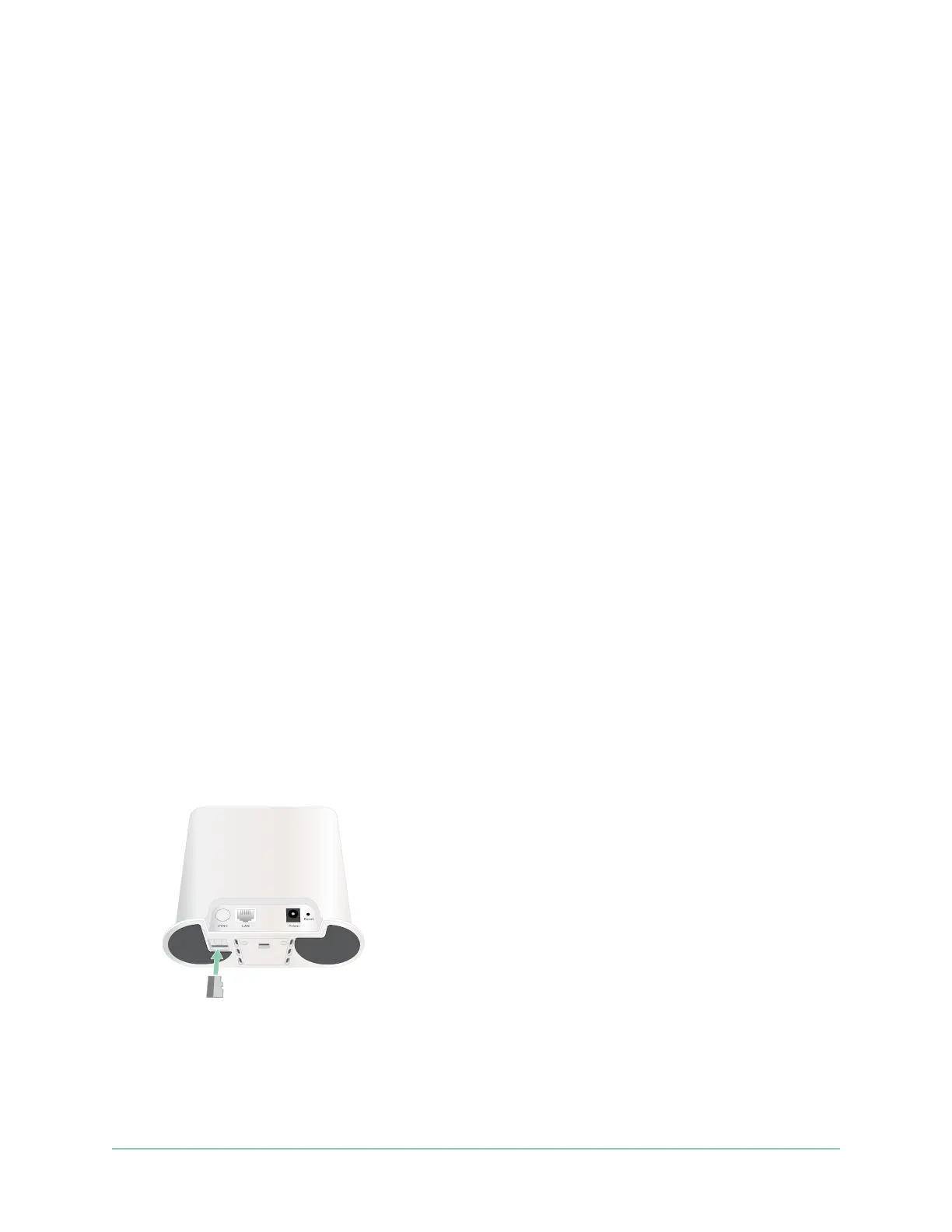
Insert a microSD card
1. Insert the microSD card into the slot on the bottom of the SmartHub.
2. Press the edge of the microSD card until it’s completely seated in the slot.



 To Next Page