18Get Started
Ultra Series 4K UHD Wire-Free Security Camera System
User Manual
Install an Anti-The Mount
Some Arlo Ultra kits include an Anti-The Mount. Anti-The Mounts are also sold separately.
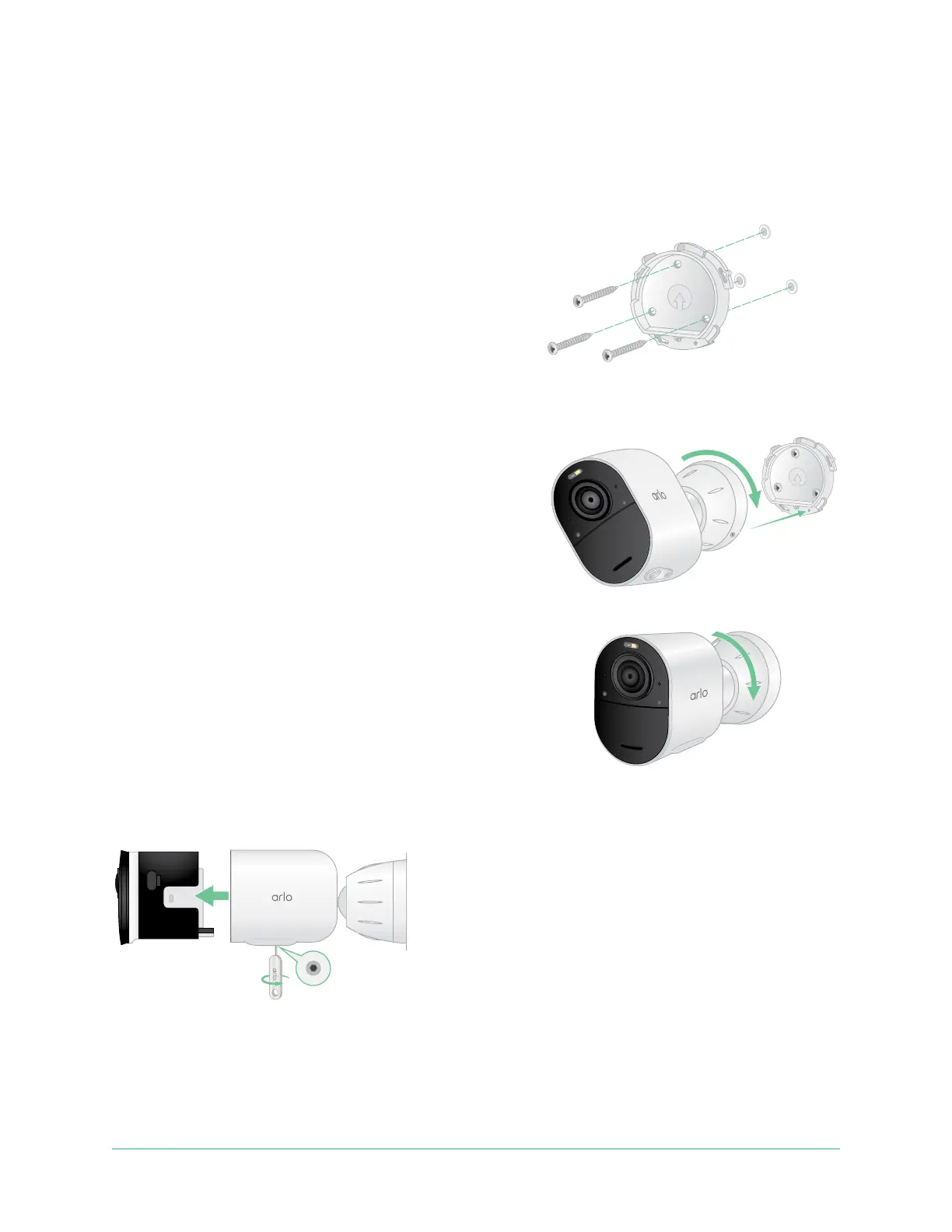
To install your Anti-The Mount:
1. Place the wall plate against the wall, with the
arrow pointing up, and secure it with screws.
Note: If you are mounting your Anti-The Mount
on drywall, we recommend using the included
wall anchors.
2. Insert your camera with its battery into the Anti-
The Mount housing.
3. To attach the housing to the wall plate:
• Align the small screw on the mount and the
dot on the wall plate.
• Turn the housing clockwise, until it clicks in
place.
• Use the security key to tighten the small screw.
Note: The security key came in the package with
your Anti-The Mount.
4. Adjust your camera position, then nger-tighten
the mount lock (clockwise) to lock the camera in
position.
Note: To release your camera from the housing, insert the security key in the security keyhole
and turn the key clockwise.



 To Next Page