
 Need help?
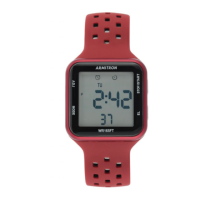
Do you have a question about the Armitron Pro Sport M1185A and is the answer not in the manual?
Displays Hours, Minutes, Seconds, and Day of the Week.
Appears and displays the Month and Date when 'C' is pressed.
Appears when 'B' is pressed once. Returns to Time Telling Mode.
Appears when 'B' is held. Sets Alarm Hours and Monday Indicator.
Appears when 'B' is held then pressed once. Sets Time.
Appears when 'A' is held. Returns to Time Telling Mode.
Appears when 'C' is held. Returns to Time Telling Mode.
Press 'B' to advance to Seconds. Press 'A' to zero out seconds.
Press 'C' to advance Minutes. Pressing 'A' advances digits rapidly.
Press 'C' to advance Hour. 'A' for a.m., 'P' for p.m. in 12-hour format.
Press 'C' to advance the Month. Press 'B' to end.
Press 'C' to advance the Date. Press 'B' to end.
Press 'C' to advance Day of the Week. Press 'B' to end.
Press 'B' once from Time Telling Mode to enter Chronograph.
Press 'C' to start timing, press 'C' again to stop timing.
Press 'A' to reset the Chronograph timing to zero.
Press 'A' to measure Laps while timing in Chronograph Mode.
Press 'B' to exit Chronograph or Lap Operation.
Enter Alarm Mode by holding 'B'. Set Alarm Hours and Minutes.
Hold 'A', then press 'C' to activate Hourly Chime.
Hold 'A', then press 'C' twice to activate the Alarm.
Press 'C' repeatedly to deactivate Hourly Chime and Alarm.
Hold 'A', then press 'B' to select 12-hour or 24-hour time.
Hold 'C', then press 'A' to select US or European Calendar.
Press 'D' in any mode to illuminate the watch face.
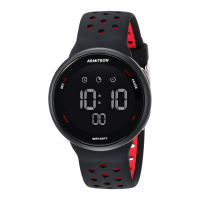
This document provides instructions for the Armitron M1185A and M1179B/M1185A watches, detailing their functions, usage, and maintenance.
The Armitron M1185A and M1179B/M1185A watches offer a range of features designed for timekeeping, scheduling, and event timing.
Time Telling Mode: This is the primary display mode, showing the current Hours, Minutes, Seconds, and Day of the Week. It serves as the default state from which other modes are accessed.
Calendar Mode: This mode displays the Month and Date. It can be accessed from the Time Telling Mode to quickly check the current date.
24 Hour Alarm: The watch includes an alarm function that can be set for a specific time. This alarm can be activated or deactivated as needed. For the M1185A, there is also a Hourly Chime feature that sounds every hour on the hour when activated.
Chronograph Mode: This feature allows for precise timing of events, displaying Hours, Minutes, Seconds, and 1/100th of a Second. It also includes a Lap Operation function, enabling users to measure intermediate times within an event.
Countdown Timer: (M1179B/M1185A only) This mode allows users to set a specific time to count down from. It includes a Timer Repeat Feature which, when activated, will automatically restart the countdown once it reaches zero.
12/24 Hour (Military Time): Users can choose between a standard 12-hour format (with AM/PM indicators) or a 24-hour (military) time format for displaying the time.
US/European Calendar: The watch allows users to select between a US or European calendar format, which affects how the date is displayed.
Water Resistance: The watches are designed to be water-resistant, as indicated on the watch itself. However, specific instructions regarding water exposure must be followed to maintain this feature.
EL Light Feature: The watch face can be illuminated for a few seconds by pressing a designated button, making it easier to read in low-light conditions.
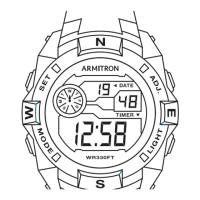
The watches are operated using a series of buttons, typically labeled A, B, C, and D (or EL/SET/ADJ/MODE/STOP/START/RESET/LIGHT depending on the specific model and button placement). The instructions provide two sets of button configurations based on the 'ADJ' button's placement on the dial (top left or bottom right).
 General
| Brand | Armitron |
|---|---|
| Model | M1185A |
| Category | Watch |
| Type | Digital |
| Display Type | LCD |
| Case Material | Resin |
| Band Material | Resin |
| Water Resistance | 100 meters |
| Features | Alarm, Backlight |
| Battery Life | 2 years |



 To Next Page