EasyManua.ls Logo

Armitron Champion M1216 - User Manual

Armitron Champion M1216
2 pages
Print Icon
To Next Page IconTo Next Page
Loading...
INSTRUCTIONS MANUAL
FEATURES
SELECTING FEATURES
SETTING THE TIME AND CALENDAR
12/24 HOUR (MILITARY) TIME
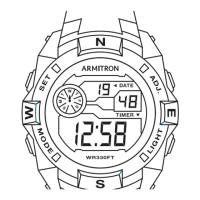
Time Telling Mode (Hours, Minutes, Seconds, Date and Day of
the Week)
Calendar Mode (Month, Date, and Day of the Week)
(3) 24 Hour Alarms
Hourly Chime, One ‘Beep’ sound every full Hour
Chronograph Mode, Hours, Minutes, Seconds and 1/100 of a
Second with Lap Operation
Countdown Timer
Second Time Zone
12/24 Hour (Military Time)
Water Resistant as indicated on the watch
INSTALITE - Electro luminescent Display
1. Time Telling Mode displays Hours, Minutes, Seconds, Date, and Day of
the Week.
2. From Time Telling Mode, press and hold ‘C’. Calendar Mode appears
and the Month, Date, and Day of the Week are displayed. Release ‘C’ to
return to Time Telling Mode.
3. From Time Telling Mode, press ‘B’ once. Chronograph appears. Press
‘B’ four times to return to Time Telling Mode.
4. From Time Telling Mode, press ‘B’ twice. Alarm Mode appears. Press ‘B’
three times to return to Time Telling Mode.
5. From Time Telling Mode, press ‘B’ three times. Countdown Timer Mode
appears. Press ‘B’ twice to return to Time Telling Mode.
6. From Time Telling Mode, press ‘B’ four times. Second Time Zone Mode
appears. Press ‘B’ once to return to
Time Telling Mode.
1.From Time Telling Mode, press and hold A’. Seconds ash. Press ‘C’ to
zero out the Seconds.
2. Press ‘B’. Hours ash. Press ‘C’ to advance the Hour. NOTE: Pressing
and holding ‘C’ will advance digits rapidly. When 12 Hour Format is select-
ed, ‘PM’ indicates ‘p.m.’ times; there is no indicator tor ‘a.m.’ times.
3. Press ‘B’. Minutes ash. Press ‘C’ to advance the Minutes.
4. Press ‘B’. Months ash. Press ‘C’ to advance the Months.
5. Press ‘B’. The Date ashes. Press ‘C’ to advance the Date.
6. Press ‘B’. The Day of the Week ashes. Press ‘C’ to advance the Day.
7. Press ‘B’. 12/24 Hour Time Format ashes. Press ‘C’ to select either
12 Hour Time or 24 Hour (Military) Time. NOTE: ‘12HR’ indicates 12 Hour
format; ‘24HR’ indicates
24 Hour (Military Time}.
8. Press ‘A’ to end sequence and return to Time Telling Mode.
1. From Time Telling Mode, press and hold ‘D’. Press ‘B’ to select either 12
Hour or 24 Hour (Military) Time. ‘12’ indicates 12 Hour Time; ‘0’ indicates 24
Hour (Military) Time.
2. Release ‘D’ to return to Time Telling Mode.
M1216
ACTIVATING ALARM + HOURLY CHIME
STOPWATCH
SPLIT TIME
I. While in Alarm Mode, press A’ to select the Alarm
2. Press ‘C’ to activate or deactivate the selected Alarm, Hourly Chime, or
“Beep” sound.
NOTE, The Alarm or Chime Symbols appear when the Alarm and Hourly
Chime are activated. “ON” indicates that the
“Beep” will sound. When the Alann is activated, the selected Alarm will
sound at the preset Alarm Time for 20 seconds or until any button is
pressed. When the Hourly Chime is activated, the Hourly Chime will sound
with one “Beep” every hour on the hour.
3. Press ‘B’ to return to Time Telling Mode.
I. From Time Telling Mode, press ‘B’ once to enter the Stopwatch Mode.
2. Press ‘C’ to start timing.
3. Press ‘C’ again to stop timing.
4. Press A’ to reset to zero.
5. Press ‘B’ to return to Time Telling Mode.
I. While in the Stopwatch Mode, press ‘C’ to start timing.
2. Press A’ to measure and display Split Times.
3. Press ‘C’ to stop timing at the end of the event.
4. Press A’ to reveal the nal Split Time.
5. Press A’ again to reset to zero.
6. Press ‘B’ to return to Time Telling Mode.
SECOND TIME ZONE
EL LIGHT FEATURE
1. From Time Telling Mode, press and hold ‘C’. Press ‘D’ to select either
US Calendar or European Calendar.
2. Release ‘C’ to return to Time Telling Mode.
Press ‘D’ in any mode to illuminate the watch face. The backlight will
remain Iii for 3 seconds.
NOTE: Excessive use of the light will shorten battery life.
I. From Time Telling Mode, press ‘B’ twice to enter the Alarm Mode.
2. Press and hold A’. The Alarm Number ashes. Press ‘C’ to select the
Alarm Number (A1-A3).
3. Press ‘B’. Alarm Hours ash. Press ‘C’ to adjust the Hours.
4. Press ‘B’. Alarm Minutes ash. Press ‘C’ to adjust the Minutes.
5. Press ‘B’. Normal Time/Dual Time Alarms ash. Press ‘C’ to select either
Normal Time (Tl) or Dual Time (T2) Alarm.
6. Press ‘B’. Daily or Weekly Alarms ash. Press ‘C’ to select either the Dai-
ly (DAV) or the Weekly (WE) Alarm. If the Weekly Alarm is selected, press
‘B’ then press ‘C’ to select the Day of the Week.
7. Press ‘B’. then press ‘C’ to activate or deactivate the selected Alarm.
8. Press A’ to end set sequence.
9. Press ‘B’ to return to Time Telling Mode.
SETTING THE 24 HOUR ALARM
COUNTDOWN TIMER
I. From Time Telling Mode, press ‘B’ three times to enter the Timer Mode.
2. Press and hold A’. Hours ash. Press ‘C’ to adjust the Hour.
3. Press ‘B’. Minutes ash. Press ‘C’ to adjust the Minutes.
4. Press ‘B’. Seconds ash. Press ‘C’ to adjust the Seconds.
5. When the Countdown Timer is set, press A’ to end set sequence and
return to Timer Mode.
6. Press ‘C’ to start the Countdown Timer.
7. If desired, press ‘C’ again to stop the Countdown Timer. Press ‘C’ again
to resume the Countdown Timer.
NOTE: The Countdown timing will continue in any mode until ‘C’ is pressed.
When the Timer has expired, the alarm will sound tor about 10 seconds or
until any button is pressed.
8. Press ‘C’ to stop the Timer.
9. Press ‘B’ to return to Time Telling Mode.

Question and Answer IconNeed help?

Do you have a question about the Armitron Champion M1216 and is the answer not in the manual?

Overview

The Armitron M1216 is a digital watch with a range of features designed for everyday use and time management.

Function Description

The watch offers multiple timekeeping modes, including:

  • Time Telling Mode: Displays Hours, Minutes, Seconds, Date, and Day of the Week. It can be set for either 12-hour or 24-hour format.
  • Calendar Mode: Displays Month, Date, and Day of the Week.
  • Alarm Mode: Features a daily alarm with an hourly chime option.
  • Stopwatch Mode: A 1/100 second stopwatch with Lap Operation, capable of measuring elapsed time, split times, and two finishes.
  • Second Time Zone: Allows tracking of a second time zone (GMT).
  • Countdown Timer: A programmable timer that counts down from a set time.

Important Technical Specifications

  • Display: Digital LCD with an electroluminescent backlight for visibility in low light conditions.
  • Water Resistance: The watch is water resistant, but not suitable for submersion or operating push buttons below the surface of water.
  • Battery: The device uses a battery, which will eventually need replacement.

Usage Features

Setting the Time and Calendar:

  1. From Time Telling Mode, press and hold 'A'. "Seconds" will flash, indicating the watch is in setting mode.
  2. Press 'C' to zero out the seconds.
  3. Press 'B' to advance the Hour. Note: Pressing and holding 'C' will advance digits rapidly. When 12 Hour Format is selected, 'PM' indicates p.m. times; there is no indicator for a.m. times.
  4. Press 'B' to advance the Minutes.
  5. Press 'B' to advance the Month.
  6. Press 'B' to advance the Date.
  7. Press 'B' to advance the Day.
  8. Press 'B' to toggle between 12 Hour Time and 24 Hour Time (Military Time). Note: '12HR' indicates 12 Hour Time, '24HR' indicates 24 Hour (Military) Time.
  9. Press 'A' to end setting and return to Time Telling Mode.

12/24 Hour (Military) Time:

  1. From Time Telling Mode, press and hold 'D'. "12 Hour" or "24 Hour (Military) Time" will flash.
  2. Press 'C' to select either 12 Hour Time or 24 Hour (Military) Time.
  3. Press 'A' to return to Time Telling Mode.

Setting the Daily Alarm:

  1. From Time Telling Mode, press 'B' twice to enter the Alarm Mode.
  2. Press and hold 'A'. The Alarm Number flashes. Press 'C' to select the Alarm Number (1-4).
  3. Press 'B'. Alarm Hours flash. Press 'C' to adjust the Hour.
  4. Press 'B'. Alarm Minutes flash. Press 'C' to adjust the Minutes.
  5. Press 'B'. Normal Time/Dual Time Alarms flash. Press 'C' to select either Normal Time or Dual Time (12/24 Hour).
  6. Press 'B'. Daily or Weekly Alarms flash. Press 'C' to select either the Daily (DAY) or the Weekly (WEEK) Alarm. If the Weekly Alarm is selected, press 'C' to select the Day of the Week (1-7, Sunday-Saturday).
  7. Press 'B', then press 'C' to activate or deactivate the selected Alarm.
  8. Press 'A' to end the Alarm set.
  9. Press 'B' to return to Time Telling Mode.

Second Time Zone:

  1. From Time Telling Mode, press and hold 'C'. Press 'D' to select either US Calendar or European Calendar.
  2. Press 'A' to return to Time Telling Mode.

Backlight Feature:

Press 'D' in any mode to illuminate the watch face. The backlight will remain lit for 3 seconds. Frequent use of the light will shorten battery life.

Activating Alarm + Hourly Chime:

  1. While in Alarm Mode, press 'A' to select the alarm.
  2. Press 'B' to activate or deactivate the selected Alarm, Hourly Chime, or "Beep" sound.
    • NOTE: The Alarm and Chime Symbols display when the Alarm and Hourly Chime are activated. "ON" indicates that the "Beep" will sound. When the Alarm is activated, the selected Alarm will sound at the preset time for 20 seconds. Press any button to stop the sound. When the Hourly Chime is activated, the Hourly Chime will sound with one "Beep" sound on the hour, every hour.
  3. Press 'B' to return to Time Telling Mode.

Stopwatch:

  1. From Time Telling Mode, press 'B' once to enter the Stopwatch Mode.
  2. Press 'D' to start timing.
  3. Press 'D' again to stop timing.
  4. Press 'A' to reset to zero.
  5. Press 'B' to return to Time Telling Mode.

Split Time:

  1. While in the Stopwatch Mode, press 'C' to start timing.
  2. Press 'A' to measure and display Split Times.
  3. Press 'D' to stop timing at the end of the event.
  4. Press 'A' to recall the total time.
  5. Press 'A' again to reset to zero.
  6. Press 'B' to return to Time Telling Mode.

Countdown Timer:

  1. From Time Telling Mode, press 'B' three times to enter the Timer Mode.
  2. Press and hold 'A'. Hours flash. Press 'C' to adjust the Hour.
  3. Press 'B'. Minutes flash. Press 'C' to adjust the Minutes.
  4. Press 'B'. Seconds flash. Press 'C' to adjust the Seconds.
  5. When the Countdown Timer is set, press 'A' to end set sequence and return to Timer Mode.
  6. Press 'C' to start the Countdown Timer.
  7. To restart, press 'D'. When in the Countdown Timer, Press 'C' again to resume the Countdown Timer.
    • NOTE: The Countdown Timer will continue in any mode until 'C' is pressed. When the Timer has expired, the alarm will sound for about 10 seconds or until any button is pressed.
  8. Press 'D' to stop the Timer.
  9. Press 'B' to return to Time Telling Mode.

Maintenance Features

Changing the Battery:

When the battery weakens, the readout may dim or disappear, or the backlight may fail. Before replacing the battery, ensure the watch is dry. Replace the battery with the same kind or equivalent. This task should be performed by a qualified watch technician. Armitron recommends returning your timepiece to a local jeweler for battery replacement.

Water Resistance:

This is a WATER RESISTANT watch. Do not operate push buttons below the surface of the water. Should water or condensation appear in the watch, immediately have the watch checked. Water can corrode electronic parts inside the case.

Use Our Nationwide Service Centers:

Armitron provides approved Service Centers nationwide. If your watch requires cleaning, lubrication, battery changing, or needs a crystal replaced, these centers can assist. They use Armitron parts and components to ensure quality and future performance. If repairs are not covered under warranty, proof of purchase may be required.

Return Your Watch for Servicing:

For service inquiries, call (718) 482-4196 or visit www.armitron.com.

Important Note: Do not return your watch to the place of purchase. Carefully pack your watch in a sturdy box (do not send in a gift box as it will not be returned) and mail it to the nearest approved Armitron authorized service station. Enclose a check or money order for the specified amount for return postage and handling. Include your name, address, daytime phone number, and a brief description of the problem. If the watch is under warranty, include a copy of your sales receipt. Do not send any other article of personal value in your shipment.

Armitron Champion M1216 Specifications

General IconGeneral
BrandArmitron
ModelChampion M1216
CategoryWatch
LanguageEnglish

Related product manuals