
 Need help?
Do you have a question about the Armitron Reaction MD11239 and is the answer not in the manual?
Access Chronograph mode by pressing 'A' once from Time Telling Mode.
Access Countdown Timer mode by pressing 'B' twice from Time Telling Mode.
Access Alarm mode by pressing 'B' three or four times from Time Telling Mode.
Access Pacer mode by pressing 'B' five times from Time Telling Mode.
Press and hold 'A' to flash seconds, then press 'C' to zero them.
Press 'B' to flash hours, then press 'C' to advance the Hour.
Press 'B' to flash minutes, then press 'C' to advance the Minute.
Press 'B' to flash the Year, then press 'C' to advance the Year.
Press 'B' to flash the Month, then press 'C' to advance the Month.
Press 'B' to flash the Date, then press 'C' to advance the Date.
Press 'C' to select 12/24 Hour or 24 Hour format.
Press 'B' three times from Time Telling Mode to enter Alarm Mode.
Press 'D' to select the Alarm Number (1 to 5).
Press 'A', Alarm Hours flash, press 'C' to advance the Alarm Hour.
Press 'B', Alarm Minutes flash, press 'C' to advance the Alarm Minute.
In Alarm Mode, press 'C' to activate the Hourly Chime.
Select an alarm, then press 'C' to activate it.
Press 'B' five times from Time Telling Mode to enter Pacer Mode.
Press 'A' to select the tempo from a sequence of numbers.
Press 'C' to start or stop the tempo.
Press 'C' in Time Telling Mode to start timing.
Press 'A' to measure and display split times.
Press 'C' to stop timing and reveal the final split time.
Press 'A' to reset to zero.
Press 'B' twice from Time Telling Mode to enter Timer Mode.
Press 'A', Hours flash, press 'C' to advance the Hour.
Press 'B', Minutes flash, press 'C' to adjust the Minutes.
Press 'B', Seconds flash, press 'C' to adjust the Seconds.
Press 'C' to start the Countdown Timer.
Press 'C' to stop or resume the Countdown Timer.
Press 'B' four times from Time Telling Mode.
Press 'A', Hours flash, press 'C' to advance the Hour.
Press 'B', Minutes flash, press 'C' to adjust the Minutes.
Press 'D' in any mode to illuminate the watch face.
Do not return watch for service where purchased; use approved service centers.
Pack watch securely, insure it, and mail to nearest authorized service station.
Covers defects in material/workmanship for lifetime, excluding normal wear and abuse.
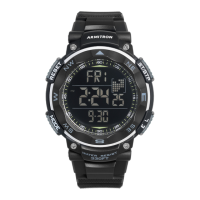
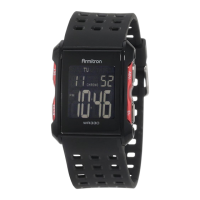
This document outlines the features, usage, and maintenance of the Armitron ProSport MD11239 digital watch, providing a comprehensive guide for its operation and care.
The Armitron ProSport MD11239 is a multi-functional digital watch designed for active lifestyles, offering a range of timekeeping, alarm, and utility features. Its primary function is the Time Telling Mode, which displays the current hour, minute, second, date, and day of the week. This mode serves as the default display and the starting point for accessing other functions.
Beyond basic timekeeping, the watch includes a Calendar Mode that specifically shows the month, date, and day of the week, allowing for quick reference. For scheduling and reminders, the watch features 24 Hour Alarms, enabling users to set up to five distinct alarms. Additionally, a Hourly Chime function provides an audible 'beep' sound at the top of every hour, which can be activated or deactivated as needed.
For sports and activity tracking, the watch incorporates a Chronograph Mode. This stopwatch function measures time in hours, minutes, seconds, and even 1/100 of a second, complete with a Lap Operation feature to record intermediate times during an event. A Countdown Timer is also available, allowing users to set a specific duration and receive an alert when the time expires.
The watch supports Dual Time Zone functionality, which enables users to keep track of a second time zone simultaneously, useful for travelers or those communicating across different regions. It also offers both 12/24 Hour (Military Time) formats, allowing users to choose their preferred display. A unique Pacer function provides a rhythmic tempo, which can be set to various beats per minute, assisting with training or maintaining a consistent pace.
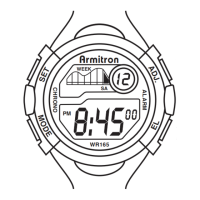
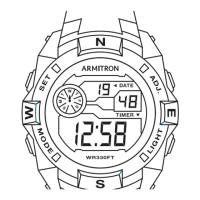
Operating the Armitron ProSport MD11239 involves a series of button presses to navigate through its various modes and set specific parameters. The watch typically features four buttons: 'A', 'B', 'C', and 'D', each with distinct roles in mode selection, setting adjustments, and feature activation.
To set the time and calendar, users typically press and hold 'A' from Time Telling Mode. This initiates a flashing sequence for seconds, hours, minutes, year, month, and date. The 'C' button is used to advance the flashing digits, with a press and hold action for rapid advancement. The 'B' button moves the flashing indicator to the next parameter. Once all settings are adjusted, pressing 'A' concludes the setting sequence. The 12/24 Hour format can be toggled using 'C' in Time Telling Mode, with 'P' indicating p.m. for the 12-hour format.
From Time Telling Mode, pressing 'B' three times enters Alarm Mode. Users can select one of the five alarms using 'D'. Pressing 'A' makes the alarm hours flash, which can be adjusted with 'C'. Pressing 'B' moves to minutes, adjustable with 'C'. Pressing 'A' again saves the alarm setting.
In Alarm Mode, 'C' activates or deactivates the Hourly Chime, indicated by a symbol. To activate a specific alarm, users select the alarm number with 'D' and then press 'C'. An alarm symbol appears, and the alarm will sound for approximately 60 seconds or until any button is pressed. Pressing 'C' again deactivates the alarm.
From Time Telling Mode, pressing 'B' five times enters Pacer Mode. 'A' selects the desired tempo from a predefined sequence (e.g., 10, 20, 30 BPM). 'C' starts and stops the tempo.
From Time Telling Mode, 'C' starts the chronograph. 'A' measures and displays split times. 'C' stops the timing at the end of an event, revealing the final split time. 'A' resets the timer to zero.
From Time Telling Mode, pressing 'B' twice enters Timer Mode. 'A' makes the hours flash, adjustable with 'C'. 'B' moves to minutes and seconds, also adjustable with 'C'. Pressing 'A' saves the settings. 'C' starts, stops, and resumes the countdown. An alarm sounds when the timer expires.
From Time Telling Mode, pressing 'B' four times enters Second Time Zone Mode. 'A' makes the hours flash, adjustable with 'C'. 'B' moves to minutes, adjustable with 'C'. Pressing 'A' saves the settings.
The watch features an INSTALITE backlight. Pressing 'D' in any mode illuminates the watch face for 2 to 3 seconds, enhancing visibility in low-light conditions.
The watch is Water Resistant, meaning it can withstand splashes and brief immersion. However, it is crucial not to operate any push buttons while the watch is submerged, as this can compromise its water resistance and lead to internal damage.
Proper maintenance ensures the longevity and optimal performance of the Armitron ProSport MD11239 watch.
The battery should be replaced when the watch display becomes dim, the readout darkens, or the backlight fails. When replacing the battery, it is essential to note the polarity of the old battery to ensure the new one is installed correctly. Only the same type or an equivalent battery should be used. While users can replace the battery themselves, it is recommended to have a qualified watch technician or a local jeweler perform the replacement due to the watch's precise electronic components. The manufacturer does not require the watch to be returned for battery replacement.
As a water-resistant watch, it is important to avoid operating the push buttons when the watch is underwater. If water or condensation appears inside the watch, it should be immediately checked by a professional to prevent corrosion of the internal electronic parts.
The Armitron ProSport MD11239 comes with a Limited Lifetime Warranty covering defects in material or workmanship. This warranty does not cover normal wear and tear, abuse, or damage to batteries, case, strap, crystal, or bracelet. If a defect in the movement occurs, it will be repaired or replaced at the manufacturer's discretion, provided it is returned prepaid with a check or money order for a handling and return postage fee (currently $9.95, though this fee does not apply to California residents). This fee is not a repair charge; additional charges may apply only for reasons beyond the manufacturer's control, such as accidents, misuse, neglect, or replacement of non-warranted parts (e.g., case, crystal, strap, bracelet, or batteries).
The watch movement requires periodic cleaning and timing, which is not considered a defect under warranty. However, after one year from the purchase date, any necessary cleaning/timing will be performed without an additional fee beyond the specified handling charge.
For repairs or servicing, users are advised to utilize Armitron Adventure approved Service Centers. These centers use genuine Armitron Adventure parts and components to ensure quality. Free estimates are available for services not covered under warranty. Proof of purchase is required for warranty-covered repairs. Watches should not be returned to the place of purchase.
To return a watch for servicing, users should contact the provided phone number or visit the website for a list of approved service centers. The watch should be carefully packed in a sturdy box (not a gift box) and mailed to the nearest authorized service station. It is recommended to insure the watch and request a return receipt when mailing, due to the possibility of loss. Users should not include special watch bands or other personal items with the shipment.
Excessive use of the INSTALITE backlight feature will shorten the battery life.
 General
| Brand | Armitron |
|---|---|
| Model | MD11239 |
| Category | Watch |
| Band Material | Resin |
| Water Resistance | 100 meters |
| Display Type | Digital |
| Style | Sport |
| Dial Color | Black |
| Display | LCD |
| Battery Life | 2 years |
| Band Width | 20 mm |
| Features | Alarm, Chronograph, Backlight |


 To Next Page