INSTRUCTIONS MANUAL
FEATURES
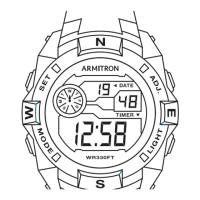
SELECTING FEATURES
SETTING THE TIME & CALENDAR
1. Time Telling Mode displays Hours, Minutes, Seconds, Date, and Day of
the Week.
2. From Time Telling Mode, press and hold ‘C’. Calendar Mode appears
and the Month, Date, and Day of the Week are Displayed. Release ‘C’
to return to Time Telling Mode.
3. From Time Telling Mode, press ‘A’ once. Chronograph appears.
Press ‘A’ three times to turn to Time Telling Mode.
4. From Time Telling Mode, press ‘A’ twice. Alarm Mode appears.
Press ‘A’ twice to return to Time Telling Mode.
Analog
1. Pull the Crown out. The second hand stops. Rotate the Crown
in either direction until the desired time is obtained.
2. Push the Crown back in to re-engage time keeping.
Digital
1. From Time Telling Mode, ‘A’ three times. Second ash. Press ‘C’
to zero out the seconds
NOTES: Zeroing out 30 or more seconds automatically adds
one minute to time.
2. Press ‘B.’ Minutes ash. Press ‘C’ to advance the Minutes.
3. Press ‘B.’ hours ash. Press ‘C’ to advance the hours.
NOTE: Pressing and holding ‘C’ will advance digits rapidly.
When 12 Hour Format is selected, ‘A’ indicates ‘a.m.’ times;
‘P’ indicates ‘p.m.’ times; ‘H’ indicates 24 Hour (Military Time).
4. Press ‘B’. The Date ashes. Press ‘C’ to advance the Date
5. Press ‘B’. The Months ash. Press ‘C’ to advance the Month.
6. Press ‘B.’ The Day of the ashes. Press ‘C’ to advance the Day.
7. Press ‘A’ to end sequence and return to Time Telling Mode
MD07120
• Time Telling Mode (Hours, Minutes, Seconds, Month, Date, and Day of
the Week)
• Calender Mode (Month, Date, and Day of the Week)
• 24 Hour Alarm with Snooze for 5 minutes
• Hourly Chime: One ‘Beep’ sound every Full Hour
• Chronograph Mode: Hours, Minutes, Seconds and 1/100 of a Second
with Lap Operation
• 12/24 Hour (Military Time)
• Water Resistant as indicated on the watch
• INSTALITE - Electro Luminescent Display
ACTIVATING THE ALARM, HOURLY CHIME, & SNOOZE
STOPWATCH
SPLIT TIME
1. While in Time Telling Mode, press and hold ‘B’ to display the Alarm Time.
At the same time, press ‘A’ to activate or deactivate the Hourly Chime.
NOTE: All of the Days of the Week appear when the Hourly Chime is
activated. When the Hourly Chime is activated, one “Beep” will sound
every hour on the hour.
2. While in Time Telling Mode, press and hold ‘B’ to display the Alarm Time.
At the same time, press ‘C’ to activate or deactivate the Alarm.
NOTE: The Alarm Symbol appears when the Alarm is activated. When the
Alarm is activated, the Alarm will sound at the preset Alarm Time for 60
seconds or until ‘B’ or ‘C’ is pressed.
Snooze
1. When the Alarm sounds, press ‘C’ to stop the Alarm for 5 minutes.
The Alarm will sound again after 5 minutes.
2. Press ‘B’ to stop the Alarm.
1. From Time Telling Mode, press ‘A’ once to enter the Stopwatch Mode.
2. Press ‘C’ to start timing.
3. Press ‘C’ again to stop timing.
4. Press ‘B’ to reset to zero.
5. Press ‘A’ to return to Time Telling Mode.
1. While in the Stopwatch Mode, press ‘C’ to start timing.
2. Press ‘B’ to measure and display SplitTimes.
3. Press ‘C’ to stop timing at the end of the event.
4. Press ‘B’ to reveal the nal Split Time.
5. Press ‘B’ again to reset to zero.
6. Press ‘A’ to return to Time Telling Mode.
1. From Time Telling Mode, press ‘B’ twice to enter the Alarm Mode.
The Alarm Hour ashes
2. Press ‘C’ to adjust the Hours.
NOTE: Pressing and holding ‘C’ will ad vance digits rapidly. When 12 Hour
Format is selected, ‘A’ indicates ‘a.m.’ times;
‘P’ indicates ‘p.m.’ times; ‘H’ indicates 24 Hour (Military Time}.
3. Press ‘B’. Alarm Minutes ash. Press ‘C’ to adjust the Minutes.
4. Press ‘B’. Alarm Minutes ash. Press ‘C’ to adjust the Minutes
SETTING THE ALARM
USE OUR NATIONWIDE SERVICE CENTERS. YOU
CANNOT RETURN WATCH FOR SERVICE WHERE IT
WAS PURCHASED.
If your watch requires cleaning, lubrication, battery changing, or needs a
crystal replaced, Armitron approved Service Centers are available in your
area. These repair facilities use Armitron parts and components to assure
quality and future performance. Free estimates are available in advance,
should you need servicing or repairs not covered under the warranty.
Repairs covered under the warranty may require proof of purchase, so
retain the purchase receipt.
This is a WATER RESISTANT watch. Do not operate push buttons below
the surface of the water. Should water or condensation appear in the
watch, immediately have the watch checked. Water can corrode
electronic parts inside the case.
WATER RESISTANCE
CHANGING THE BATTERY
Change the battery when the watch becomes slow, the readout darkens or
does not appear, or the backlight fails. Before removing the old battery, be
sure to denote its polarity so that the new battery is installed in exactly the
same way. Replace with the same kind or equivalent only. This watch
contains precise electronic components and should only be opened by
a qualied watch technician. However, it is not necessary to return your
watch to the manufacturer for battery replacement. It is recommended that
you bring your timepiece to a local jeweler.
EL LIGHT FEATURE
Press ‘C’ in any mode to illuminate the watch face. The backlight will
remain lit for 3 seconds.
NOTE: Excessive use of the light will shorten battery life.


 To Next Page
 Need help?



 General