EasyManua.ls Logo

Armitron Dual YP13614 - User Manual

Armitron Dual YP13614
2 pages
Print Icon
To Next Page IconTo Next Page
Loading...
YP13614
INSTRUCTIONS MANUAL
FEATURES
SELECTING FEATURES
SETTING THE TIME AND CALENDAR
EL LIGHT FEATURE
12/24 HOUR (MILITARY) TIME
STOPWATCH
Time Telling Mode (Hours, Minutes, Seconds, Month, Date, and Day
of the Week)
100 Year Calendar
(5) 24 Hour Alarms
Hourly Chime: One ‘Beep’ sound every full Hour
Chronograph Mode: Hours, Minutes, Seconds, and 1/100 of a sec-
ond with Lap Operation
Countdown Timer
Second Time Zone
Pacer
12/24 Hour (Military Time)
Water Resistant as indicated on the watch
INSTALITE - Electro Luminescent Display
1. Time Telling Mode displays Hours, Mlnutes, Seconds, Month, Date, and
Day of the Week.
2. From Time Telling Mode, press ‘B’ once. Chronograph appears. Press
‘B’ five times to return to Time Telling Mode.
3. From Time Telling Mode, press ‘B’ twice. Countdown Timer Mode ap-
pears. Press ‘B’ four times to return to Time Telling Mode.
4. From Time Telling Mode, press ‘B’ three times. Alarm Mode appears.
Press ‘B’ three times to return to Time Telling Mode.
5. From Time Telling Mode, press ‘B’ four times. Second Time Zone Mode
appears. Press ‘B’ once to return to Time Telling Mode.
ANALOG
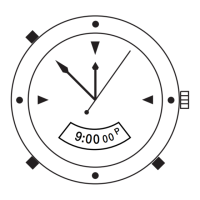
1. Carefully pull the Crown (‘E’) out all the way and tum in either direction
until the desired time Is displayed.
2. Carefully push the Crown back in all the way to resume time keeping.
DIGITAL
1. From Time Telling Mode, press and hold ‘A’. Seconds flash. Press ‘C’ to
zero out the seconds.
NOTE: Zeroing out 30 or more seconds automatically adds one minute to
time.
2. Press ‘B’. Hours flash. Press ‘C’ to advance the Hours.
NOTE: Pressing and holding ‘C’ will advance digits rapidly. When 12 Hour
Format is selected, ‘PM’ indicates ‘p.m.’ times; there is no indicator for
‘a.m.’ times.
3. Press ‘B’. Minutes flash. Press ‘C’ to advance the Minutes.
4. Press ‘B’. The Year flashes. Press ‘C’ to advance the Year.
5. Press ‘B’. Months Flash. Press ‘C’ to advance the Month.
6. Press ‘B’. The Day flashes. Press ‘C’ to advance the Day.
7. Press ‘A’ to end set sequence and return to Time Telling Mode.
1. Press ‘D’ in any mode to illuminate the watch face. The backlight will
remain lit for 3 seconds.
NOTE: Excessive use of the light will shorten battery life.
From Time Telling Mode, press ‘C’ to set either 12 Hour Time or 24 Hour
(Military) time.
1. From Time Telling Mode, press ‘B’ once to enter the Stopwatch Mode.
2. Press ‘C’ to start timing.
3. Press ‘C’ again to stop timing.
4. Press ‘A’ to reset to zero.
5. Press ‘B’ to return to Time Telling Mode.
SPLIT TIME
PACER
COUNTDOWN TIMER
SETTING THE 24 HOUR ALARMS
1. While in the Stopwatch Mode, press ‘C’ to start timing
2. Press ‘A’ to measure and display the Split Times.
3. Press ‘C’ to stop timing at the end of the event.
4. Press ‘A’ to reveal the final Split Time.
5. Press ‘A’ again to reset to zero.
6. Press ‘B’ to return to Time Telling Mode.
1. From Time Telling Mode, press ‘B’ four times. Pacer Mode appears.
2. Press ‘A’ to select the tempo in tile following sequence: 10-20-30-40-60
-80-120-160 -240-320.
3. Press ‘C’ to start the Pacer.
4. Press ‘C’ again to stop the Pacer.
5. Press ‘B’ to return to Time Telling Mode.
1. From Time Telling Mode, press ‘B’ twice to enter the Timer Mode.
2. Press and hold ‘A’. Hours flash. Press ‘C’ to adjust the Hour.
3. Press ‘B’. Minutes flash. Press ‘C’ to adjust the Minutes.
4. Press ‘B’. Seconds flash. Press ‘C’ to adjust the Seconds.
5. When the Countdown Timer is set, press ‘A’ to end set sequence and
return to Timer Mode.
6. Press ‘C’ to start the Countdown Timer.
7. If desired, press ‘C’ to stop the Countdown Timer. Press ‘C’ again to
resume the Countdown Timer.
NOTE: The Countdown timing will continue in any mode until ‘C’ is
pressed. When the Timer has expired, the alarm will sound for about 60
seconds or until any button is pressed.
8. Press ‘C’ to stop the Timer.
9. Press ‘B’ to return to Time Telling Mode.
1. From Time Telling Mode, press ‘B’ three times to enter the Alarm Mode
2. Press ‘C’ to select the Alarm number: Alarm 1 through Alarm 5.
NOTE: The process to set Alarms 1 through 5 is the same.
3. Press ‘A’. Alarm Hours flash. Press ‘C’1o advance the Alarm Hour.
4. Press ‘B’. Alarm Minutes flash. Press ‘C’ to advance the Alarm Minute.
5. Press ‘A’ to end set sequence.
6. Press ‘B’ to return to Time Telling Mode.
ACTIVATING ALARM + HOURLY CHIME
1. While in Alarm Mode, press ‘C’ to activate the Hourly Chime. The Hourly
Chime Symbol appears to indicate that the Hourly Chime will sound every
hour on the hour.
2. Press ‘C’ again to deactivate the Hourly Chime.
3. Press ‘D’ again to deactivate the Alarm (1-5).
4. Press ‘C’ to activate the selected Alarm. The Alarm Symbol appears to
indicate the Alarm will sound at the preset Alarm Time for about 60 sec-
onds or until any button Is pressed.
5. Press ‘C’ again to deactivate the Alarm.
6. Press ‘B’ three times to return to Time Telling Mode.
Question and Answer IconNeed help?

Do you have a question about the Armitron Dual YP13614 and is the answer not in the manual?

Summary

EL Light Feature

Time and Calendar Settings

12;24 Hour Time Format

Switch between 12-hour and 24-hour (military) time display modes.

Analog Time Setting

Set the analog time by pulling and turning the watch crown.

Digital Time Setting

Set digital time, seconds, minutes, hours, year, month, and day.

Stopwatch and Split Time

Stopwatch Operation

Start, stop, and reset the stopwatch function for timing events.

Split Time Measurement

Measure and display split times within the Stopwatch Mode.

Alarm and Chime Functions

Setting 24 Hour Alarms

Set up to five distinct 24-hour alarms with hour and minute.

Activating Alarm and Hourly Chime

Activate/deactivate specific alarms and the hourly chime feature.

Countdown Timer

Setting Countdown Timer

Set the countdown timer by adjusting hours, minutes, and seconds.

Using Countdown Timer

Start, stop, resume, and stop the countdown timer.

Pacer Mode

Selecting Pacer Tempo

Choose a tempo from a sequence of beats per minute for the Pacer.

Using the Pacer

Start and stop the Pacer function to maintain a set tempo.

Second Time Zone

Setting Second Time Zone

Set the hours and minutes for a secondary time zone.

Watch Maintenance and Service

Changing the Battery

Guidance on battery replacement and professional service.

Water Resistance

Information on water resistance and precautions for use.

Nationwide Service Centers

Information on using authorized service centers for repairs and maintenance.

Overview

The Armitron Prosport YP13614 is a multi-functional digital and analog watch designed for active lifestyles, offering a comprehensive suite of timekeeping, measurement, and alert features.

Function Description:

The watch primarily functions as a time-telling device, displaying hours, minutes, seconds, month, date, and day of the week. It incorporates a 100-year calendar, ensuring long-term accuracy without manual date adjustments for leap years. Beyond basic timekeeping, it features five independent 24-hour alarms, allowing users to set multiple reminders throughout the day. An hourly chime provides an audible "beep" at the top of every hour, which can be activated or deactivated.

For precise time measurement, the YP13614 includes a chronograph (stopwatch) mode capable of measuring events down to 1/100th of a second. This mode supports lap operation, enabling users to record intermediate split times during an event. A countdown timer is also integrated, useful for various activities requiring a specific duration.

The watch offers a second time zone feature, allowing users to track time in a different geographical location simultaneously, which is particularly useful for travelers or those communicating across time zones. A unique "Pacer" mode is included, providing a rhythmic beat at selectable tempos (10, 20, 30, 40, 60, 80, 120, 160, 240, 320 beats per minute), which can assist with training or maintaining a consistent pace during activities.

The time display can be toggled between 12-hour and 24-hour (military) formats, catering to different user preferences. For low-light conditions, the watch is equipped with an "INSTALITE" electro-luminescent display, providing a backlight that illuminates the watch face for approximately 3 seconds with a single button press.

Important Technical Specifications:

While specific technical specifications like battery type or movement caliber are not detailed in the provided manual, the watch's functionality implies a digital quartz movement for its electronic features and a separate analog quartz movement for its traditional hands. It is explicitly stated as "Water Resistant," though the specific depth rating (e.g., 50M, 100M) is not provided, only that push buttons should not be operated below the water surface. The display is a combination of analog hands and a digital LCD screen.

Usage Features:

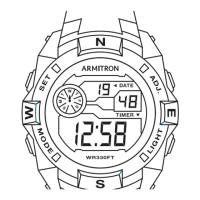
The watch's operation is managed through five distinct buttons: 'A' (RESET), 'B' (MODE/LIGHT), 'C' (ST/STP), 'D' (LIGHT), and 'E' (Crown for analog time setting).

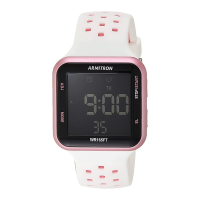
  • Time Telling Mode: This is the default display mode. Pressing 'C' toggles between 12-hour and 24-hour formats.
  • Setting Time and Calendar (Digital): To set the digital time and calendar, the user presses and holds 'A' from Time Telling Mode. 'C' is used to advance flashing digits (seconds, hours, minutes, year, month, day), and 'B' is used to move between these settings. A notable feature is that zeroing out 30 or more seconds automatically adds one minute to the time.
  • Setting Time (Analog): The analog time is set by carefully pulling out the Crown ('E') and rotating it in either direction until the desired time is displayed, then pushing it back in.
  • Stopwatch Mode: Accessed by pressing 'B' once. 'C' starts and stops timing, and 'A' resets it.
  • Split Time: While in Stopwatch Mode, 'C' starts timing. 'A' measures and displays split times. 'C' stops timing at the end of the event, and 'A' reveals the final split time before resetting to zero with another 'A' press.
  • Setting 24 Hour Alarms: Accessed by pressing 'B' three times. 'C' selects the alarm number (1-5). 'A' makes the alarm hours flash, and 'C' advances them. 'B' makes the alarm minutes flash, and 'C' advances them. 'A' ends the setting sequence.
  • Activating Alarm + Hourly Chime: In Alarm Mode, 'C' toggles the Hourly Chime on/off. The Hourly Chime Symbol indicates its activation. 'D' deactivates individual alarms (1-5). 'C' activates a selected alarm (Alarm Symbol appears), which sounds for 60 seconds or until a button is pressed.
  • Countdown Timer: Accessed by pressing 'B' twice. To set, press and hold 'A', then use 'C' to adjust hours, minutes, and seconds (navigating with 'B'). 'A' ends the setting. 'C' starts, stops, and resumes the timer. The alarm sounds for 60 seconds when the timer expires.
  • Second Time Zone: Accessed by pressing 'B' four times. To set, press and hold 'A', then use 'C' to adjust hours and minutes (navigating with 'B').
  • Pacer Mode: Accessed by pressing 'B' four times (after Second Time Zone). 'A' selects the tempo. 'C' starts and stops the pacer.
  • EL Light: Pressing 'D' (or 'B' in some modes) illuminates the watch face for 3 seconds.

Maintenance Features:

  • Battery Replacement: The manual advises changing the battery when the watch slows down, the readout darkens, or the backlight fails. Users are instructed to note the battery's polarity before replacement and to use the same kind or equivalent. It is recommended that a qualified watch technician or local jeweler perform the replacement, as the watch contains precise electronic components. The manufacturer does not require the watch to be returned for battery replacement.
  • Water Resistance: The watch is water resistant, but users are cautioned against operating push buttons below the water surface. If water or condensation appears inside the watch, it should be checked immediately, as water can corrode internal electronic parts.
  • Service and Repair: For cleaning, lubrication, battery changes, crystal replacement, or other servicing not covered under warranty, users are directed to Armitron Adventure approved Service Centers. Free estimates are available. The manual explicitly states that the watch cannot be returned for service where it was purchased. For servicing, users should call (718) 482-4195 or visit WWW.ARMITRON.COM for a list of approved service centers. When mailing the watch for service, it should be carefully packed in a sturdy box (not a gift box), insured, and sent with a return receipt requested. Users are advised not to include special watch bands or other personal valuables in the shipment.

Armitron Dual YP13614 Specifications

General IconGeneral
BrandArmitron
ModelDual YP13614
CategoryWatch
LanguageEnglish

Related product manuals