EasyManua.ls Logo

Armitron IW-YP12585-2 - User Manual

Armitron IW-YP12585-2
2 pages
Print Icon
To Next Page IconTo Next Page
Loading...
IW-YP12585-2
INSTRUCTIONS MANUAL
FEATURES
SELECTING FEATURES
SETTING THE TIME AND CALENDAR
STOPWATCH
SPLIT TIME
Time Telling Mode (Hours, Minutes, Seconds, Date and Day of the
Week)
24 Hour Alarms
Hourly Chime
Calendar Mode
Chronograph Mode: Hours, Minutes, Seconds, and 1/100 of a sec-
ond with Lap Operation
Water Resistant as indicated on the watch
INSTALITE - Electro Luminescent Display
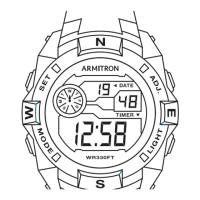
NOTE: Please note that your watch may have a different outlook on the
display than this diagram. However, the functions and operation are the
same as these instructions.
1. Time Telling Mode displays Hours, Minutes, Seconds, and Day of the
Week.
2. From Time Telling Mode, press ‘B’ once. Chronograph Mode appears.
Press ‘B’ three times to return to Time Telling Mode.
3. From Time Telling Mode, press ‘B’ twice. Alarm Mode appears. Press ‘B’
twice to return to Time Telling Mode.
4. From Time Telling Mode, press ‘B’ three times. Time Setting Mode ap-
pears. Press ‘B’ once to return to Time Telling Mode.
5. From Time Telling Mode, press and hold ‘C’ to enter Calendar Mode.
The Month, Date, and Day of the Week appear. Release ‘C’ to return to
Time Telling Mode.
1. From Time Telling Mode, press ‘B’ three times. Seconds flash. Press ‘C’
to zero out the Seconds.
2. Press ‘A’. Minutes flash. Press ‘C’ to advance the Minutes.
3. Press ‘A’. Hours flash. Press ‘C’ to advance the Hour.
NOTE: Pressing and holding ‘C’ will advance digits rapidly. When 12 Hour
Format is selected, ‘A’ indicates ‘a.m.’ times; ‘P’ indicates ‘p.m.’ times.
4. Press ‘A’. The Date flashes. Press ‘C’ to advance the Date.
5. Press ‘A’. The Month flashes. Press ‘C’ to advance the Month.
6. Press ‘A’. The Day of the Week flashes. Press ‘C’ to advance the Day of
the Week.
7. Press ‘B’ to end set sequence and return to Time Telling Mode.
1. From Time Telling Mode, press ‘B’ once to enter the Stopwatch Mode.
2. Press ‘C’ to start timing.
3. Press ‘C’ again to stop timing.
4. Press ‘A’ to reset to zero.
5. Press ‘B’ to return to Time Telling Mode.
1. While in the Stopwatch Mode, press ‘C’ to start timing.
2. Press ‘A’ to measure and display Split Times.
3. Press ‘C’ to stop timing at the end of the event.
4. Press ‘A’ to reveal the final Split Time.
5. Press ‘A’ to reset to zero.
5. Press ‘B’ to return to Time Telling Mode.
SETTING THE 24 HOUR ALARMS
1. From Time Telling Mode, press ‘B’ twice to enter the Alarm Mode. Alarm
Hours flash.
2. Press ‘C’ to advance the Alarm Hour.
NOTE: Pressing and holding ‘C’ will advance digits rapidly.
3. Press ‘A’. Alarm Minutes flash. Press ‘C’ to advance the Alarm Minute.
4. Press ‘B’ to end set sequence and return to Time Telling Mode.
ACTIVATING ALARM + HOURLY CHIME
EL LIGHT FEATURE
1. From Time Telling Mode, press and hold ‘A’ and press ‘C’ once. The
Alarm Symbol appears to indicate that the Alarm is activated and will
sound at the preset Alarm Time for about 60 seconds or until ‘A’ is pressed.
2. Press and hold ‘A’ and press ‘C’ once again to deactivate the Alarm.
3. From Time Telling Mode, press and hold ‘A’ and press ‘B’ once. All of the
Days of the Week appear to indicate that the Hourly Chime is activated and
will sound every hour on the hour.
4. Press and hold ‘A’ and press ‘B’ once again to deactivate the Hourly
Chime.
SNOOZE: Press ‘D’ to stop the Alarm for 5 minutes. The Alarm sound will
resume after 5 minutes. Press ‘D’ again to stop the Alarm for another 5
minutes.
5. Press ‘A’ and ‘C’ again to deactivate the Alarm.
1. Press ‘D’ in any mode to illuminate the watch face. The backlight will
remain lit for 3 seconds.
NOTE: EXCESSIVE USE OF LIGHT WILL SHORTEN BATTERY LIFE.
Question and Answer IconNeed help?

Do you have a question about the Armitron IW-YP12585-2 and is the answer not in the manual?

Summary

Watch Features Overview

Time Telling Mode

Displays Hours, Minutes, Seconds, and Day of the Week.

24 Hour Alarms

Includes functionality for setting and using 24-hour alarms.

Hourly Chime

Features an hourly chime that sounds on the hour.

Calendar Mode

Allows access to the Calendar Mode to view date information.

Chronograph Mode

Offers Chronograph functionality with hours, minutes, seconds, and lap operation.

Water Resistance

Indicates the watch's water-resistant capabilities.

INSTALITE Display

Features INSTALITE Electro Luminescent Display for illumination.

Navigating Watch Modes

Entering Chronograph Mode

Select Chronograph Mode from Time Telling Mode by pressing 'B' once.

Entering Alarm Mode

Select Alarm Mode from Time Telling Mode by pressing 'B' twice.

Entering Time Setting Mode

Select Time Setting Mode from Time Telling Mode by pressing 'B' three times.

Entering Calendar Mode

Select Calendar Mode from Time Telling Mode by pressing and holding 'C'.

Setting Time and Calendar

Setting Seconds

Zero out seconds by pressing 'C' after entering Time Setting Mode.

Setting Minutes

Advance minutes by pressing 'C' after pressing 'A'.

Setting Hours

Advance hours by pressing 'C' after pressing 'A', noting a.m./p.m.

Setting Date

Advance the date by pressing 'C' after pressing 'A'.

Setting Month

Advance the month by pressing 'C' after pressing 'A'.

Setting Day of the Week

Advance the day of the week by pressing 'C' after pressing 'A'.

Stopwatch Operation

Entering Stopwatch Mode

Enter Stopwatch Mode from Time Telling Mode by pressing 'B'.

Starting and Stopping Stopwatch

Use 'C' to start and stop stopwatch timing.

Resetting Stopwatch

Reset the stopwatch to zero using the 'A' button.

Exiting Stopwatch Mode

Return to Time Telling Mode from Stopwatch Mode by pressing 'B'.

Using Split Time Function

Measuring Split Times

Press 'A' in Stopwatch Mode to measure and display Split Times.

Stopping and Final Split

Use 'C' to stop timing and 'A' to reveal the final Split Time.

Resetting Split Times

Reset split times to zero using the 'A' button.

Setting 24 Hour Alarms

Setting Alarm Hour

Advance the Alarm Hour by pressing 'C' after entering Alarm Mode.

Setting Alarm Minute

Advance the Alarm Minute by pressing 'C' after pressing 'A'.

Alarm and Hourly Chime Activation

Activating Alarm

Activate Alarm by pressing and holding 'A' and pressing 'C' once.

Deactivating Alarm

Deactivate Alarm by pressing and holding 'A' and pressing 'C' again.

Activating Hourly Chime

Activate Hourly Chime by pressing and holding 'A' and pressing 'B' once.

Deactivating Hourly Chime

Deactivate Hourly Chime by pressing and holding 'A' and pressing 'B' again.

Snooze Function

Press 'D' to stop the Alarm for 5 minutes; it will resume later.

EL Light Feature

Illuminating Watch Face

Press 'D' in any mode to illuminate the watch face for 3 seconds.

Battery Life Consideration

Note that excessive use of the light will shorten battery life.

Battery Replacement and Care

When to Change Battery

Change battery when watch is slow, readout darkens, or backlight fails.

Battery Installation Note

Denote polarity of old battery and replace with the same kind.

Professional Servicing Recommendation

It is recommended to take the watch to a local jeweler for battery replacement.

Water Resistance and Maintenance

Operating Buttons

Do not operate push buttons below the surface of the water.

Water or Condensation

If water or condensation appears, have the watch checked immediately.

Service and Repair Information

Nationwide Service Centers

Utilize Armitron Adventure approved Service Centers for repairs.

Service Not Available at Purchase Location

Watch cannot be returned for service to the place of purchase.

Estimates and Warranty

Free estimates available; warranty repairs may require proof of purchase.

Returning Watch for Servicing

Call for authorized service center listings or visit the website.

Packaging for Shipment

Pack watch securely in a sturdy box; do not include personal items.

Armitron IW-YP12585-2 Specifications

General IconGeneral
BrandArmitron
ModelIW-YP12585-2
CategoryWatch
TypeWristwatch
StyleCasual
Display TypeDigital
Case MaterialResin
Band MaterialResin
Dial ColorBlack
MovementQuartz
Band ColorBlack
Battery LifeUp to 2 years
Water Resistance100 m (330 feet)
FeaturesChronograph, Alarm, Backlight

Related product manuals