ARP Control v5.x Troubleshooting Guide 0 © 2013-2020 ARPC L.L.C. All rights reserved. 8 04/20/202
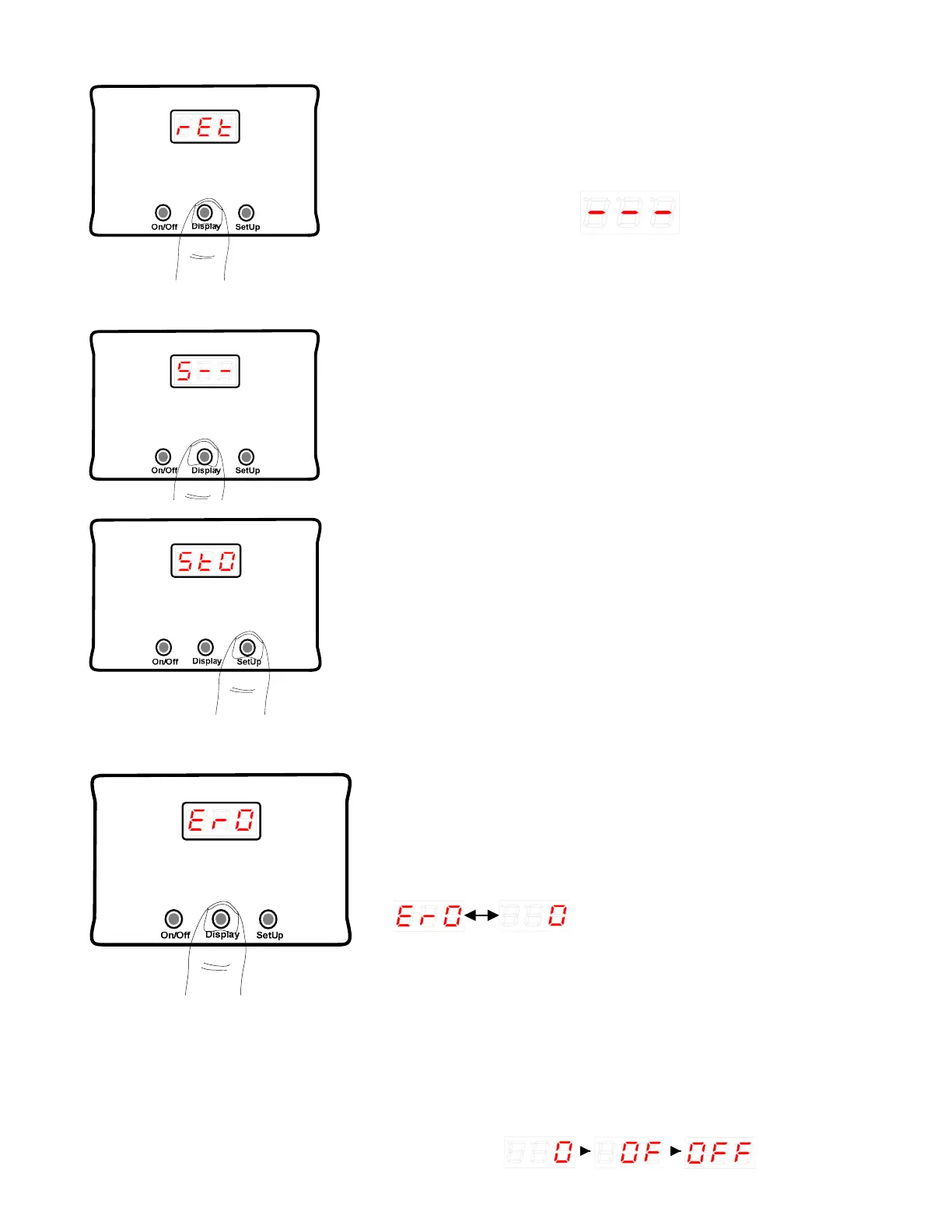
This setting restores the default settings that came with
the ARP when new. If Auto Tune is run by mistake, the
original settings can be restored by pressing the SetUp
button.
The display will flash:
and then return to the original screen. Proceed to the
next step to save your new settings.
2.22 Store Settings
The variable to save changes to SetUp is S--; any
settings that have been changed can be stored by
momentarily pressing the SetUp button as seen in the
next figure.
Release the SetUp button as soon as StO is displayed.
StO has to be displayed for the control to save the new
settings. If you do not want to save settings, proceed to
Exit SetUp Mode section.
2.23 Display Error Messages
The Er0 variable holds any IEC error messages stored
for the life of the control. Thus, always write down the
date any errors are viewed for future reference. It is not
unusual to see some errors recorded due to the nature of
RV electrical systems.
The SetUp button will toggle through all errors recorded.
will be display if no errors are
recorded.
If there are errors recoded, the first error message will
immediately appear, followed by the number of times this
particular error has been recorded. Use the SetUp button
to toggle through all of the error messages. Once the
error messages roll back to the first error recorded, use
the Display button to exit the Er0 and return to AtO.
2.24 Exit SetUp Mode



 To Next Page